
Digital Strategy Review | 2026
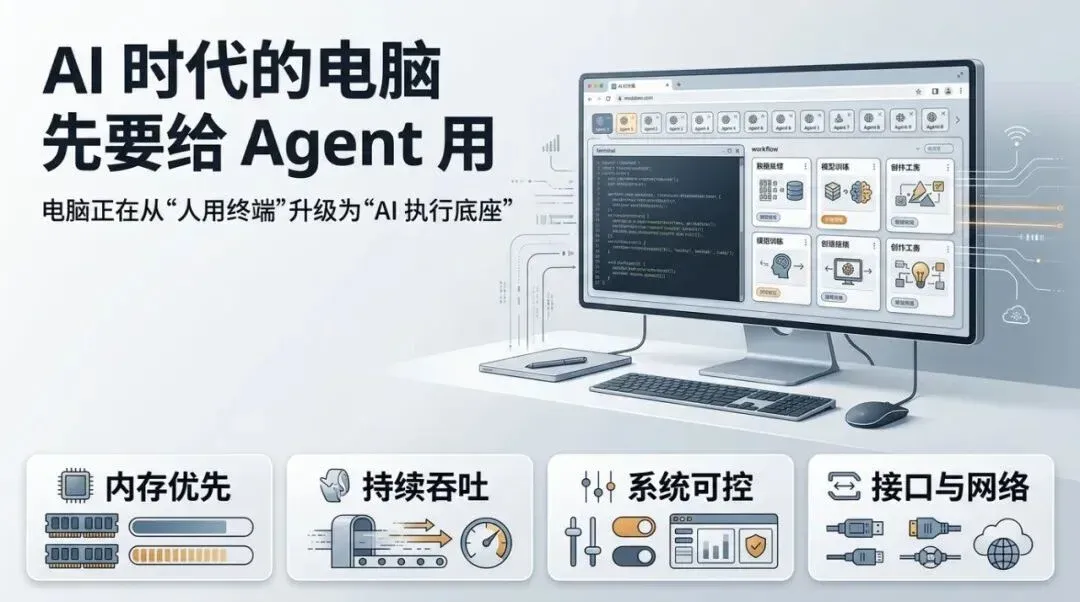
Computers in the AI Era Must First Serve Agents
By Uncle Fruit · Reading Time / 8 Min
Foreword
I learned a lesson from my own computer these past few days.
It wasn’t the abstract kind of “not enough performance,” nor the minor annoyance of a slow video export or a stuttering design app. I’m talking about a very concrete, overwhelming sense of loss of control: dozens, maybe a hundred tabs open in a browser, seven or eight sub-agents running simultaneously—some doing outreach to find clients, some building backlinks, some refactoring code, others managing background tools. One was even editing a video. My MacBook Air was bearing a burden it wasn’t designed for; window switching began to drop frames, and the machine sounded like it was gasping for air while working. In reality, it wasn’t that my computer lacked performance for me; it was that it lacked the capacity to serve my Agents.
I stared at the screen for a while, and a thought struck me:
Many personal computers today are still designed around the concept of “making the human user comfortable.” But now that Agents have entered the workforce, computers have taken on a new role: they must also serve AI.
I’ll leave the scene of the crime right here. It’s a bit raw, but it’s the truth.

The image above is the masterpiece created by my damn Codex Agent legion. Fortunately, it knew to proactively close some tabs when the memory was about to overflow.
01
Many AI PCs are still answering the previous generation’s questions
A growing realization I’ve had lately is that many so-called “AI PCs” on the market today are still addressing the problems of the previous generation.
For the past two years, the Windows camp has been obsessed with “Copilot+ PCs,” 40+ TOPS NPUs, local subtitles, image generation, search enhancement, and “on-device AI.” This direction is certainly not wrong; Microsoft has at least brought the idea that “a computer is more than just a CPU and GPU” to the masses.
However, if you actually start using AI as a colleague rather than a feature demo, you’ll quickly realize that the NPU is the least sexy part of the story.
Apple has moved a bit further ahead. Instead of fixating solely on the NPU, they have consistently pushed forward on unified memory, memory bandwidth, battery life, noise levels, and external connectivity. The new generation of MacBook Pro has pushed unified memory to 128GB, and the Mac Studio has even reached 512GB. I don’t think these moves are coincidental. It makes me wonder: have Apple’s product managers already foreseen a future where humans and AI share the same hardware platform for work? While Apple Intelligence might not seem flashy in the AI era, their hardware is actually closer to the pressure points of real-world AI workflows.
The problem is that many manufacturers still operate under the assumption that the task of an AI computer is to let you trigger AI features more smoothly on your local machine.
My own experience is completely different.
What I care about now is whether my computer can support a swarm of Agents, keeping them steadily pushing through tasks. It’s not about how fast a chat box responds or how many tokens per second a local model generates; it’s about whether the entire execution environment can handle the load. Can it run five “crayfish” virtual machines on one device? Can it handle 30 parallel tasks simultaneously without stuttering?
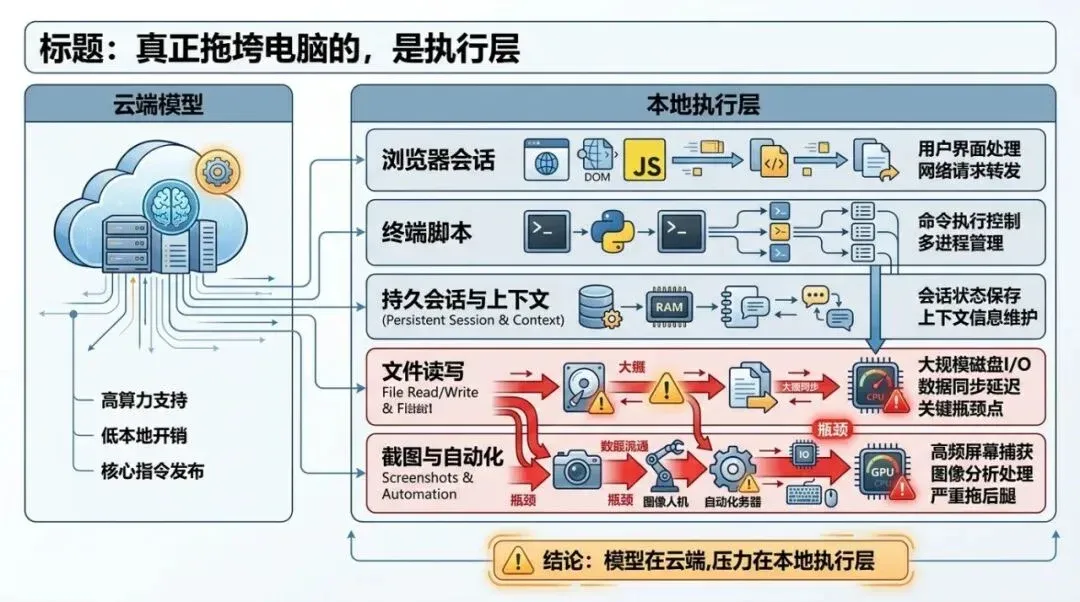
This diagram structures the key judgment in the article: the first thing to crash is rarely the model itself, but the execution layer composed of browsers, terminals, files, and automation.
02
The execution layer is what actually drags the computer down
I no longer prioritize “how large a model I can run locally.”
The reason is simple. Most of the time, a stronger model is actually more cost-effective. The work produced by a local model that you spent massive effort deploying might still require manual cleanup or a complete redo. Even with models as powerful as GPT-5.4 and Claude Opus 4.6, we still crave something stronger, faster, and more accurate. These models, at least in the short term, won’t be running on-device—not even at the Sonnet or GPT-mini level.
So, the models are fine in the cloud. What stays local—and is most likely to drag the computer down—is the execution layer.
Web pages must stay open, terminals must run, automation scripts must be active, files must be read and written repeatedly, screenshots must be generated constantly, browsers must maintain a stack of sessions, and Agents must switch contexts back and forth. If any link in this chain slows down, the entire workflow becomes sluggish.
In their official documentation for “computer use,” Anthropic has already made this clear. Agents don’t need the romantic narrative of “a model living inside a computer”; they need solid execution capabilities: screenshots, mouse, keyboard, bash, persistent sessions, and task loops. The documentation also warns that multi-app interaction still has reliability boundaries and is better suited for background tasks.
Translated into plain English: when AI starts doing real work, the computer acts as a construction site, not a showroom.
And what does a construction site fear most?
It’s never that “the machine isn’t smart enough.” It’s that “the machine is smart, but the site can’t keep moving.”
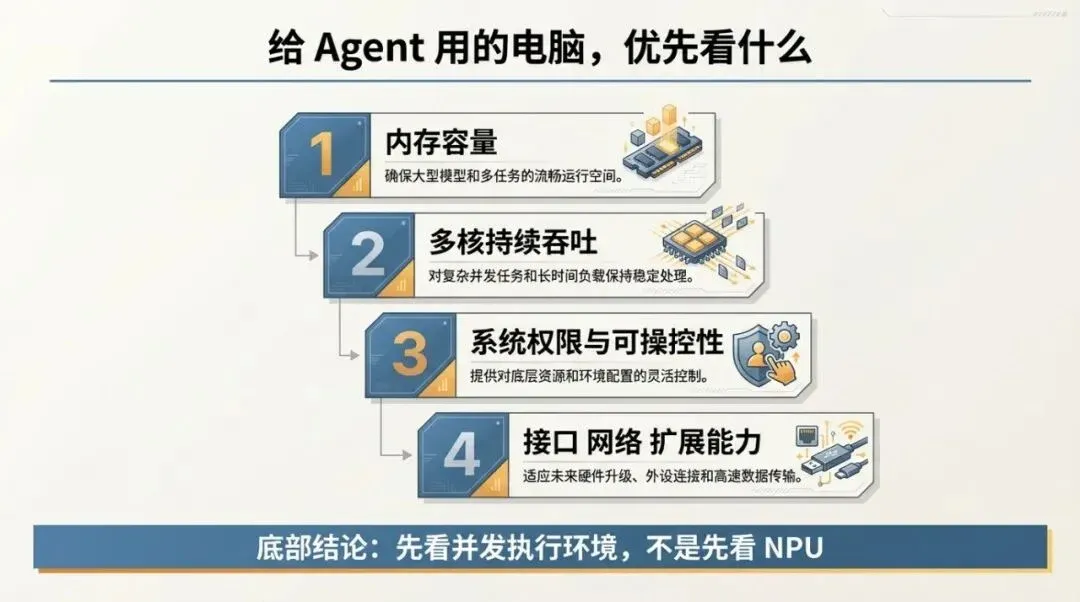
If this article were condensed into a procurement list, the order would be: memory first, then throughput, then system controllability, and finally ports and expansion.
03
My priorities for choosing a computer have completely changed
If you ask me what to look for in a computer for Agents in the AI era, my answer is direct.
1. Look at memory first, then everything else
When I look at computers now, the first thing I check is memory.
In an Agent workflow, memory is usually the first thing to hit a wall. Dozens of tabs, multiple profiles, terminals, editors, databases, sync tools, containers, screenshot caches—once these pile up, the machine starts swapping. Once the system enters that state, every task slows down, and your patience is dragged down with it.
I’m not as excited about “unified memory for running larger local models.” I care more about whether it allows me to support more Agents, more local toolchains, and more active sessions simultaneously.
If I were to give a subjective recommendation, I’d treat 64GB as the starting point for serious Agent workflows and 128GB as a comfortable workspace. This isn’t an industry standard; it’s just my own increasingly strong intuition.
2. Multi-core and sustained throughput are more valuable than peak benchmarks
In the era of single-application usage, people were easily attracted by peak performance: how fast it opens, how powerful the export is, how high the benchmark score is.
In the Agent era, I care more about sustained throughput.
When seven or eight Agents are running in parallel, you aren’t waiting for a program to sprint 100 meters; you’re watching to see if a construction site can keep moving forward all day long. At this point, higher multi-core performance, more stable scheduling, better thermal management, and the ability to maintain performance over long periods become direct productivity.
No matter how strong the cloud model is, if the local browser, scripts, terminal, and automation services can’t hold up, you’ll still be stuck at the execution layer.
3. System permissions and controllability will become increasingly important
I think many people haven’t fully realized this yet.
A computer for Agents naturally requires deeper system control. It needs to reliably take screenshots, control browsers, manage terminals, access the file system, handle automation permissions, run containers, deal with pop-ups, recover failed tasks, and allow you to combine these actions into reusable workflows.
As soon as you get into this, the design philosophy of the system starts to show its worth.
Consumer-facing systems strive for simplicity, smoothness, and consistency. Systems for Agent-intensive workflows prioritize granular permissions, scripting capabilities, containerization, observability, and recovery.
That’s why I’m increasingly valuing Linux, terminals, containers, and automation interfaces. They aren’t as “sexy” and don’t look good on advertising posters, but they determine whether a computer can evolve from “running AI features” to “continuously assigning tasks to AI.”
4. Interfaces, networking, and expansion capabilities will return to the center stage
As AI workflows deepen, you will increasingly despise a machine only suitable for light office work.
You need more external monitors, faster local storage, more stable networking, docking stations, more ports, and the ability to easily attach devices, services, and workflows. Many consumer electronics brands like to say “the cleaner, the more premium,” but I increasingly feel that this aesthetic isn’t friendly to the Agent era.
People who do high-frequency work will eventually need a machine that functions like a control console.
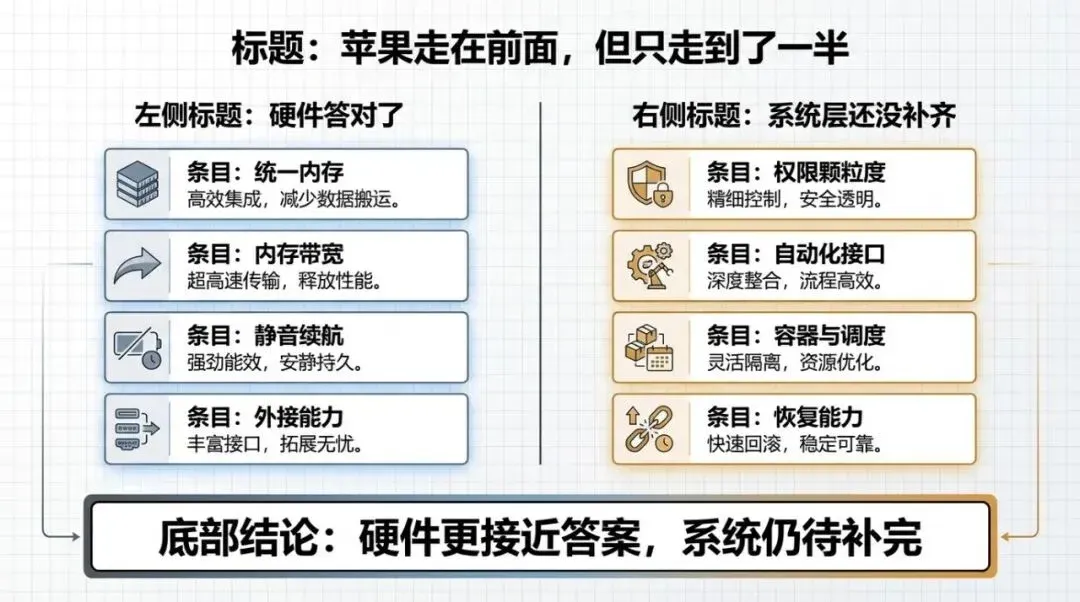
Apple is closer to the Agent workflow in hardware, but the other half of the answer emphasized in this article is still stuck at the system level.
04
Apple is ahead, but only halfway
If we only look at hardware, I do think Apple is closer to the answer than many other manufacturers.
High-bandwidth unified memory, solid multi-core performance, long battery life, quiet operation, and strong external connectivity—these things are valuable in real-world workflows. You’ll quickly understand the significance of these metrics once you run multi-Agent tasks for a while.
But I also increasingly feel that what Apple offers today is only half the answer.
The other half is at the system level.
Because no matter how strong the hardware is, if the system-level permissions, automation, containers, scheduling, scripting, and recovery capabilities aren’t smooth, the machine remains an excellent “human-use computer” rather than a mature “Agent-use computer.”
My current assessment is that Apple has bet correctly on a large part of the hardware, but the system and tool layers have yet to fully unfold. Whoever can truly integrate these two parts will have the opportunity to define the next generation of AI computers.
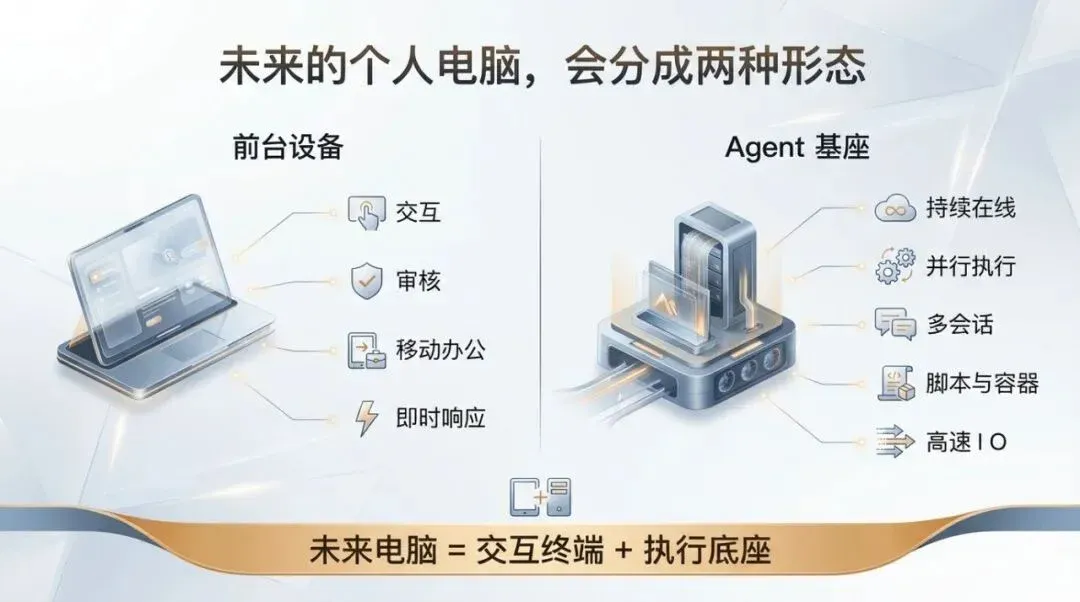
The final judgment of the article is organized into two columns: one type of machine is responsible for interacting with humans, and the other is responsible for working long-term on behalf of Agents.
05
I suspect future personal computers will split into two forms
I increasingly doubt that in the future, everyone will just pursue a thinner, lighter, “all-in-one” laptop that can run models locally.
I believe future personal computers will split into two forms.
One is the front-end device. You carry it with you; it handles interaction, review, confirmation, mobile work, lightweight inference, and instant response. It emphasizes battery life, silence, input experience, and stability.
The other is the Agent base. It sits on your desk, in your study, or in a fixed location, responsible for being online 24/7, parallel execution, multi-browser sessions, scripts, containers, data synchronization, task queues, and high-speed I/O. It doesn’t necessarily look like a traditional desktop; it could be a mini-PC, a workstation node, or even an “AI backend” that stays online in your home.
I even think that when people buy computers in the future, the most important question won’t be “Is this an office laptop or a creative laptop?” but “Is this an interaction terminal or an execution base?”
06
My Conclusion
If I had to condense this article into one sentence, it would be:
Computers in the AI era must first serve Agents.
The value of a computer is shifting from “making one person more comfortable” to “making a swarm of AI workers more efficient.” Whether you can fit a larger model locally is certainly meaningful; but what determines the ceiling of productivity is whether the machine can steadily support concurrent tasks, long-term execution, and system-level calls.
That’s why my focus when looking at computers is completely different from the past. I’ll ask first: Is the memory large enough? Can the multi-core performance hold up for long periods? Is the bandwidth sufficient? Are the system permissions open enough? Can the interfaces and networking connect a bunch of tasks smoothly?
These questions are the new test for personal computers in the AI era.
