
Digital Strategy Review | 2026
Deep Dive into Claude Code src: Why Turning a Terminal Assistant into a Multi-Agent Runtime is a Game Changer
By Uncle Fruit · 8 Min Read
Preface
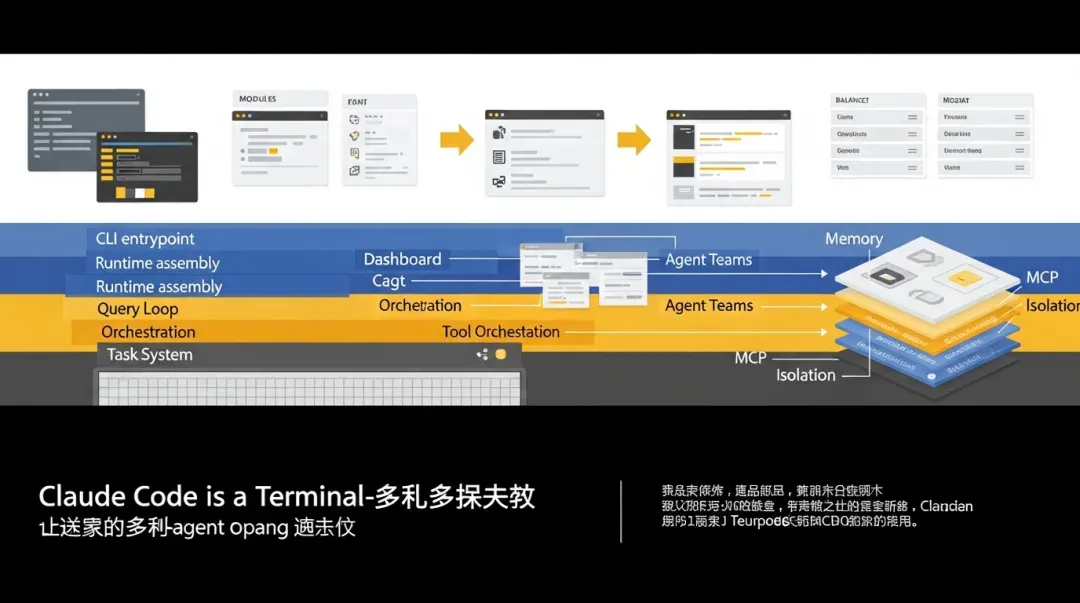
If you only look at the product surface, Claude Code is easily mistaken for a simple chat assistant in the terminal. However, after thoroughly exploring the src directory, my takeaway is clear: its core isn’t “chat”—it’s the transformation of Agents into schedulable, isolated, recoverable, and observable system objects.
Subtitle: How building a “CLI assistant” into a multi-agent operating system works, and why the implementation is so impressive.
01
Opening: The Verdict
If you only look at the product surface, Claude Code is easily mistaken for a “model caller wrapped in a terminal UI.” But after reading through the src, my conclusion is definitive: its core isn’t “chat,” but rather the transformation of Agents into a schedulable, isolated, recoverable, observable, and collaborative runtime object.
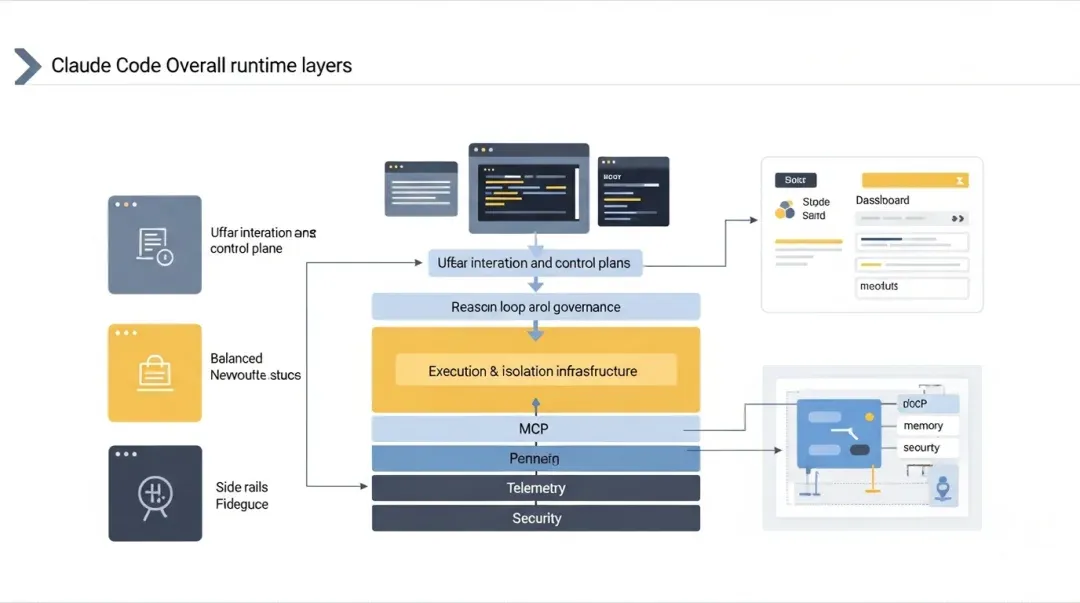
In other words, it doesn’t just “embed a few AI features” into a CLI; it builds a comprehensive agent runtime within the CLI:
01 Top Layer: User interaction, handling the REPL, commands, permission prompts, task views, and status bars.
02 Middle Layer: Inference loop, managing prompt organization, model calls, context compression, tool execution, stop hooks, and budget control.
03 Bottom Layer: Execution system, handling tools, tasks, sub-agents, teammate agents, remote agents, worktree isolation, permission synchronization, and state persistence.
04 Cross-cutting Capabilities: MCP, plugins, skills, memory, LSP, telemetry, remote control, sandboxing, and security policies.
This is why its src doesn’t look like a traditional CLI project; it looks more like a “distributed agent control plane in the terminal.”
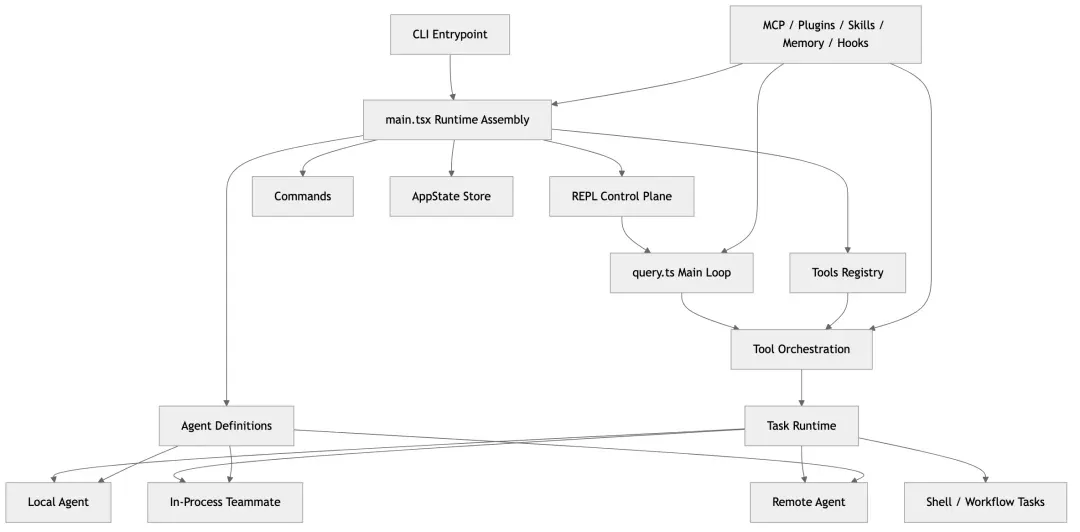
If I had to summarize this system in engineering terms, I would say:
The true innovation of Claude Code is not just “supporting sub-agents,” but unifying sub-agents, background tasks, remote tasks, team collaboration, permission approvals, context reuse, and result notifications into a shared task and tool semantic framework.
This article is divided into two parts:
01 First, I will explain the overall architecture of src to answer “how this system actually runs.”
02 Then, I will present the 10 most useful and innovative agent implementation highlights, ranked by importance.
Key anchors mentioned in this article come from these files:
• src/entrypoints/cli.tsx
• src/main.tsx
• src/query.ts
• src/tools.ts
• src/services/tools/toolOrchestration.ts
• src/tools/AgentTool/AgentTool.tsx
• src/tools/AgentTool/runAgent.ts
• src/tasks/LocalAgentTask/LocalAgentTask.tsx
• src/tasks/InProcessTeammateTask/InProcessTeammateTask.tsx
• src/utils/swarm/spawnInProcess.ts
• src/utils/swarm/inProcessRunner.ts
• src/state/AppStateStore.ts
• src/tools/AgentTool/built-in/*.ts
• src/tools/AgentTool/agentMemory.ts
• src/tools/AgentTool/forkSubagent.ts
02
I. Before Looking at Agents: How It Starts
Many architectural issues are apparent from the entry point. This is especially true for Claude Code.
src/entrypoints/cli.tsx is not a simple “forward to main” file. It is a performance-sensitive scheduler. It does three critical things:
01 Handles environment variables and feature gates at the earliest stage.
02 Uses fast-paths to intercept requests that don’t require a full CLI startup.
03 Dynamically imports heavy modules only when a full interactive runtime is required.
This means the author clearly separates startup paths into two categories:
• Light Path: Performs single actions, such as --version, daemon workers, bridges, background session management, template commands, or environment runners.
• Heavy Path: Enters the full interactive runtime.
This is more than just startup optimization; it reveals a fundamental design choice: Claude Code is not a monolithic entry point, but a set of core infrastructure shared by multiple running modes. The CLI is just one shell; background workers, remote runners, bridges, and headless runners are all different entry points into the same system.
This is crucial because, as you will see, its agents don’t just live in the “current command-line session.” They can live in:
• The current foreground REPL • Local background tasks • In-process teammates • Tmux pane teammates • Independent worktrees • Remote CCR sessions
If the entry layer hadn’t clearly separated the running modes from the start, the agent system would inevitably conflict.
03
II. main.tsx Isn’t a “Page Entry,” It’s the Assembly Line
Many people see main.tsx and assume it’s a UI entry point. In reality, it’s a runtime assembler.
This file is quite large, but that’s not a bad thing. Its size indicates it is responsible for “system assembly” rather than business logic. Reading through it, it performs six main tasks:
1. Warming up the environment
main.tsx starts by doing several deliberate things:
• Starting profiler checkpoints
• Pre-fetching MDM
• Pre-fetching keychain data
This isn’t just “optimizing startup speed.” It reflects a mature understanding of interactive systems: slow I/O that blocks the initial experience should be triggered as early as possible, ideally in parallel with other imports.
2. Initializing configuration, policies, auth, telemetry, and GrowthBook
main.tsx pulls up global capabilities that affect behavior:
• Config, managed settings, policy limits, auth/OAuth, GrowthBook, analytics, plugins, MCP, skills, commands, model selection, and permission modes.
The order is critical. For example, without auth, remote features and policy judgments are incomplete. Without tool permission context, the generated tool pool might be over-privileged.
3. Assembling commands, tools, MCP, plugins, and Agent definitions
main.tsx calls getTools(...), loads agent definitions, connects MCPs, and initializes plugins. This determines the “capability surface” visible to the current session.
4. Establishing the global state repository
AppState in src/state/AppStateStore.ts doesn’t just manage the UI; it unifies settings, model state, permission context, task collections, agent registries, and MCP clients.
5. Launching the REPL
Multiple launchRepl(...) calls indicate that main.tsx isn’t just a single path, but enters different versions of the REPL based on recovery, remote, or initialization results.
6. Serving as a bridge for various modes
main.tsx understands local interactive modes, background sessions, remote viewers, bridge modes, and teammate/swarm modes. It acts as a control room, assembling the system into the specific version required for the current session.
04
III. The Real Heart: query.ts
If main.tsx is the assembly line, src/query.ts is the heart.
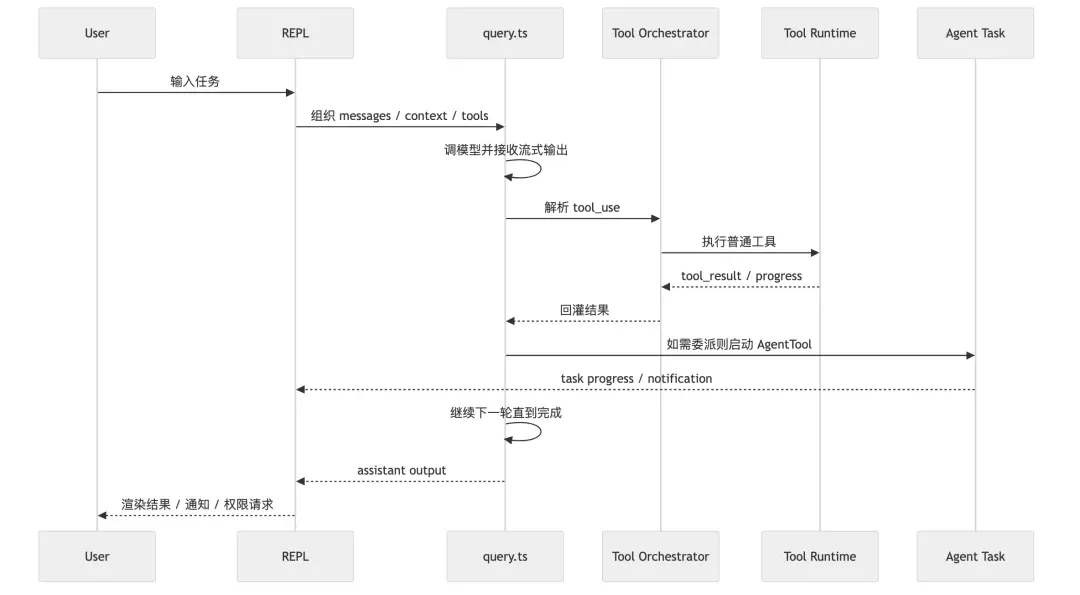
Its value lies in being a complete agentic turn loop: 01 Collect messages 02 Organize system/user/tool context 03 Call the model 04 Handle streaming output 05 Extract tool use 06 Execute tools 07 Feed tool results back into the message stream 08 Continue the loop if necessary 09 Handle interruptions, compression, budgets, hooks, and recovery
1. Explicit distinction between immutable params and mutable loop state
This makes state management manageable when a turn involves multiple tool uses, compression, and exception recovery.
2. Native support for “long turns”
The design focus is on “is the current task complete?” rather than “chat history.” It includes auto-compaction, token budgets, and stop hooks to ensure complex tasks progress across multiple model samplings.
3. Tool execution is inside the loop
Tools are not external add-ons; they are an intrinsic part of the query loop, allowing for budget control, content replacement, and streaming tool executors.
05
IV. The Tool System: A Governed Execution Surface
src/tools.ts treats tools as a unified capability protocol.
1. Tools are dynamically cropped
Claude Code doesn’t have a fixed tool list. It constructs the final toolset based on feature flags, user type, LSP status, worktree status, and permission modes.
2. Tools are part of prompt engineering
Because system prompts expose tool definitions to the model, the tool list constitutes the model’s “operational worldview.”
3. Tool execution is observable and traceable
Tool execution paths handle telemetry, permission decisions, hooks, tracing, and progress, turning “calling a tool” into an event with governance metadata.
06
V. Concurrency Safety: Built into the Orchestrator
src/services/tools/toolOrchestration.ts automatically batches tool calls based on concurrency safety: read-only tools run in parallel, while write-type tools run serially. This moves complexity from the model to the runtime, ensuring speed and stability.
07
VI. The Task System: Agents as “Task Entities”
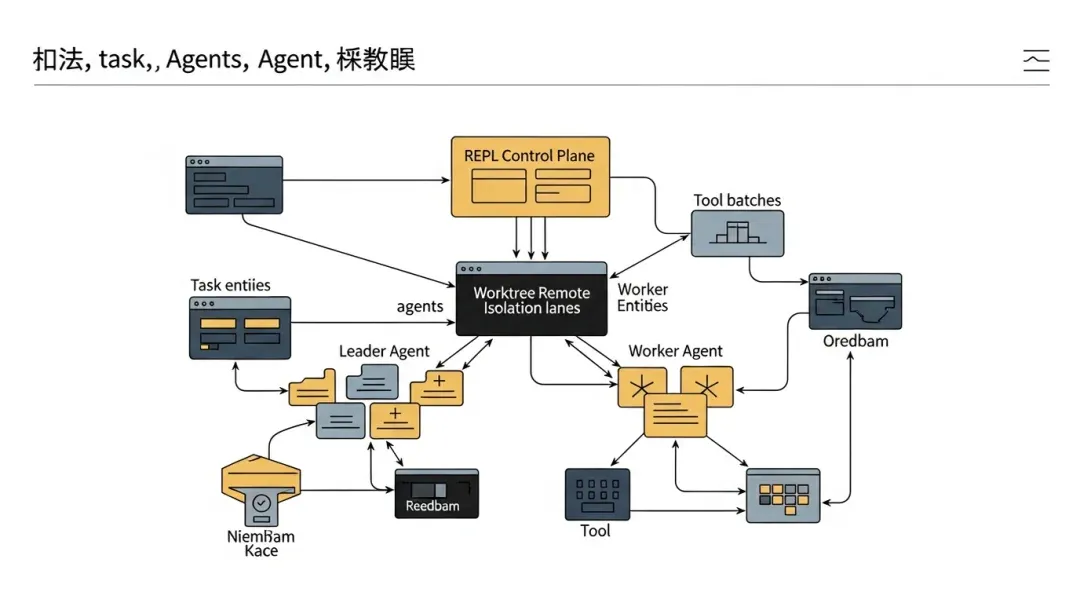
In Claude Code, an agent is not just a function result; it is a Task.
1. Unified identity and lifecycle
Every task has an id, type, status, startTime, and outputFile.
2. Output files are first-class citizens
Allowing task output to be written to disk enables recovery, notification, and side-chain transcripts, allowing agents to persist beyond the foreground UI.
3. Notification system is coupled with task state
Background tasks translate their results into system messages that the main conversation can consume, allowing the foreground agent to remain responsive.
08
VII. AgentTool: The Gateway to Multi-Agent Systems
src/tools/AgentTool/AgentTool.tsx is the facade for the multi-agent design. It exposes a unified tool interface to the model while routing tasks to different backends (local, teammate, remote, etc.) based on the context.
09
VIII. runAgent.ts: How an Agent “Runs”
runAgent.ts handles the execution of an agent, ensuring it isn’t just “nakedly running” but is launched with:
• Dedicated context (prompt, tools, model, MCP clients)
• Incremental MCP server mounting
• Transcript management (making agents traceable and recoverable)
• Precise tool cropping (inheriting or restricting tools)
10
IX. Built-in Agent Definitions: Data-Driven Roles
src/tools/AgentTool/loadAgentsDir.ts treats agent definitions as loadable, composable, and pluggable configuration objects. An agent is a combination of behavior boundaries, tool permissions, and isolation strategies—similar to a Kubernetes workload spec.
11
X. The REPL: The Unified Control Plane
src/screens/REPL.tsx is the “unified interaction control plane.” Whether it’s a main agent, background agent, teammate, or permission request, the user interacts with them through a single terminal interface.
12
XI. Three Layers of Agent Collaboration
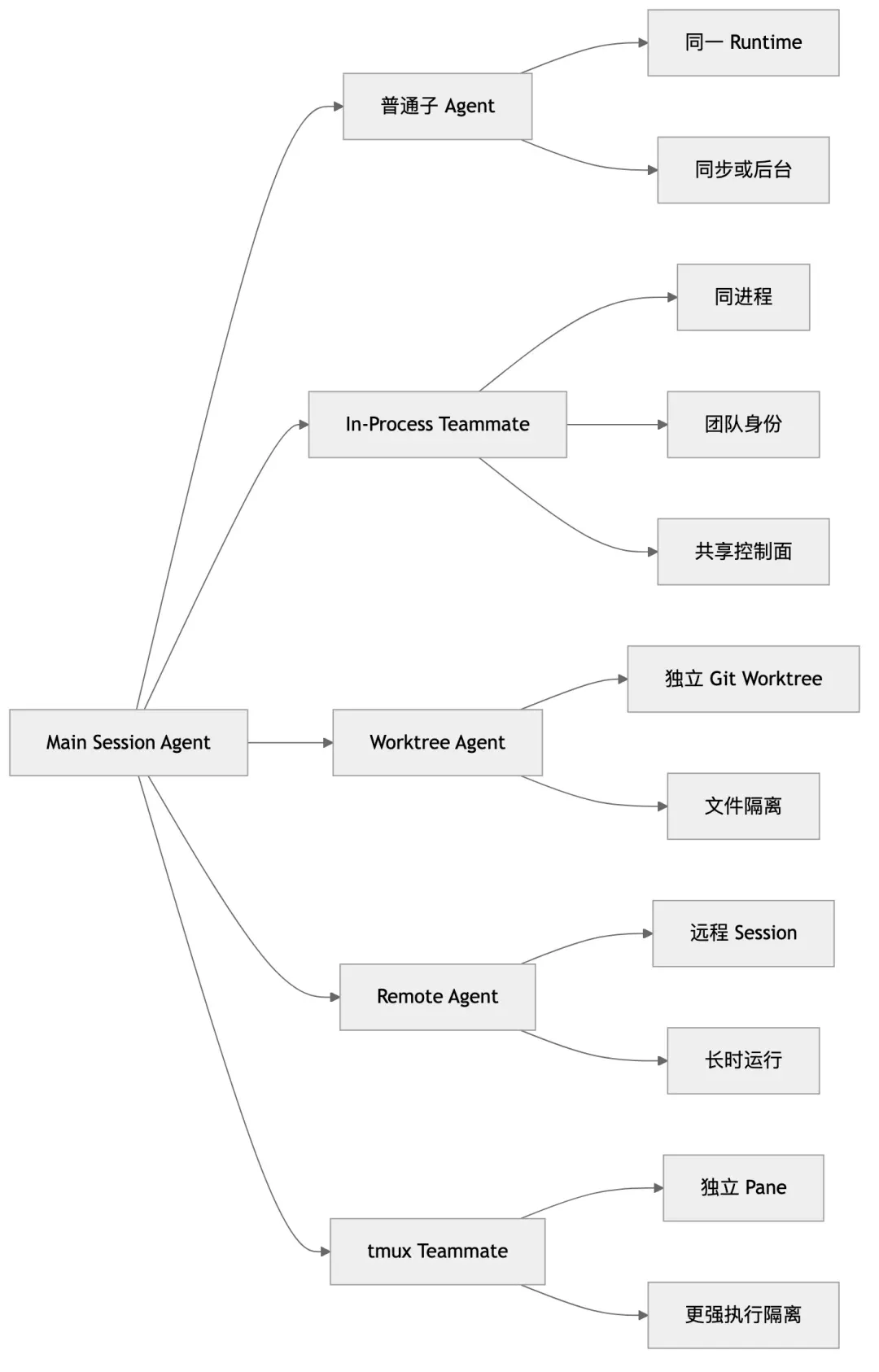
- Ordinary Sub-agents: Launched via
AgentTool, running in the local query loop. - In-Process Teammates: Running in the same Node.js process, isolated via
AsyncLocalStorage. - Isolated Agents: Worktree/Remote agents for stronger isolation and longer runtimes.
13
XII. Why the System is Controllable: Permission as a Main Path
The permission system is not a patch; it is the main path. ToolUseContext and the ask/allow/deny flow are integrated into every execution surface, ensuring that even with multiple agents, the user remains the ultimate authority.
14
XIII. Memory, Hooks, MCP, and Plugins as Extensions
These are not external add-ons but extensions of the agent runtime: • Memory: Three-tier scope (user/project/local). • Hooks: Insertable rules at key execution nodes. • MCP/Plugins: First-class capability sources.
15
XIV. Architecture Overview
CLI Entrypoint
-> fast-path dispatch
-> main runtime assembly

Main Runtime
-> config / auth / policy / analytics / feature gates
-> commands / tools / MCP / plugins / agents / state
-> launch REPL

REPL Control Plane
-> user input, message queue, permission UI, task panels, stream rendering

Query Loop
-> build prompt, sample model, parse tool calls, run tools, compact/budget/recover

Execution Substrate
-> Tool execution, Task framework, LocalAgentTask, InProcessTeammateTask, RemoteAgentTask

Agent Runtime
-> Agent definitions, AgentTool, runAgent, fork/worktree/remote/swarm, memory/MCP/hooks
16
XV. 10 Most Innovative Agent Implementation Highlights
- Agent as Task: Unified lifecycle management.
- Semantic Tool Concurrency: Batched execution for speed and safety.
- Fork Subagent Prompt Cache: Optimized for cost.
- In-Process Teammate Isolation: Balance of performance and complexity.
- Leader Approval Permission Bridge: Centralized decision-making.
- Declarative Agent Definitions: Engineering-grade roles.
- Incremental MCP Mounting: Role-specific capability binding.
- Three-Tier Agent Memory: Practical and effective.
- First-Class Worktree/Remote Isolation: Built-in architectural capability.
- Verification Agent: Anti-laziness design.
27
XVI. Summary: The Architectural Philosophy
- Models decide, Runtime constrains.
- Agents are system objects, not prompt tricks.
- Asynchrony is the default.
- Collaboration is built on a unified control plane.
- Extensions are part of the main path.
- Performance serves scalability.
- Recoverability and traceability are first-class citizens.
30
XVII. The Cost of This Design
This design is not “cheap.” It requires high mental complexity, a heavy main.tsx/REPL.tsx, extensive use of feature gates, and a high barrier to testing. However, the result is a rare, truly “systematized” coding agent runtime.
31
XVIII. Final Conclusion
Claude Code’s src tells a story: when you treat Agents as runtime entities that require scheduling, governance, isolation, recovery, and collaboration, the entire code structure changes. It is not just “putting Claude in the terminal”; it is building a system.
32
Appendix: Quick Reference List of Highlights
01 Agent as Task 02 Semantic Tool Concurrency 03 Fork Subagent Prompt Cache 04 In-Process Teammate Isolation 05 Leader Approval Permission Bridge 06 Declarative Agent Definition 07 Agent-specific MCP Mounting 08 Three-Tier Agent Memory 09 Worktree/Remote Isolation 10 Verification Agent Anti-laziness
