
Digital Strategy Review | 2026
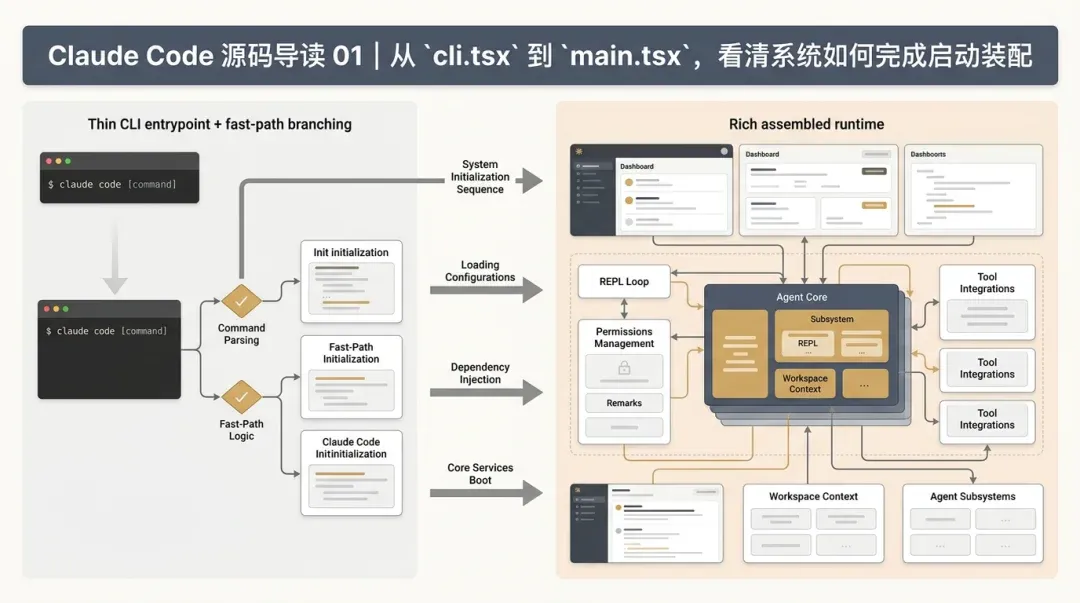
Claude Code Source Code Walkthrough 01 | From cli.tsx to main.tsx: Understanding System Assembly
By Uncle Fruit · Reading Time / 8 Min
Preface
In this article, I want to thoroughly explain the startup chain. By clearly understanding the entry point and the assembly process first, we can avoid getting lost in local details when we later dive into query.ts, AgentTool, and REPL.tsx. The difficulty in reading Claude Code isn’t the number of files, but the fact that it is a runtime assembly process from the very first line of code.
01
From cli.tsx to main.tsx: How the System Starts
This article answers only one question: How does the Claude Code system evolve from a single command into a fully assembled runtime?
Without establishing this panoramic view, it is easy to get bogged down in local details when reading query.ts, AgentTool, or REPL.tsx. This is not a typical CLI that simply “parses commands and executes business logic”; it is an agent runtime with multiple operating modes, various execution backends, and complex capability-pruning logic.
02
I. A Look at src/entrypoints/cli.tsx
The role of src/entrypoints/cli.tsx is not just a “thin wrapper.” It acts as the first layer of the scheduler.
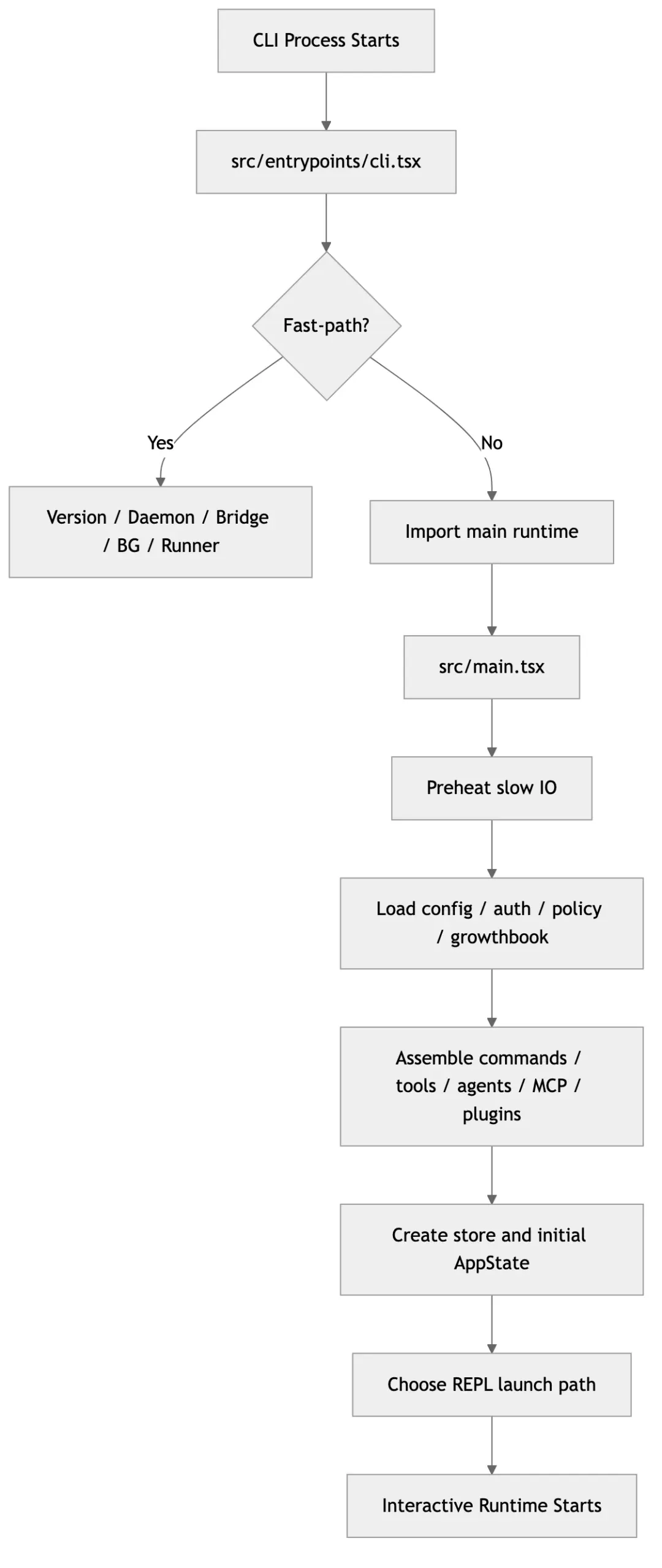
The most important fact here is that it does not import the entire system immediately. Instead, it performs a round of lightweight, performance-sensitive “fast-path” routing.
You can see from the source code that it clearly pursues two goals:
01 Do not load the full runtime for paths that do not require it.
02 Fork the entry points for different modes as early as possible.
1. Why use a fast-path here?
cli.tsx handles many paths that can return early, such as:
• --version
• --dump-system-prompt
• --daemon-worker
• remote-control / remote / sync / bridge
• daemon
• ps / logs / attach / kill / --bg
• Template-based commands
• environment-runner
• self-hosted-runner
• --worktree --tmux related paths
This means that, architecturally, Claude Code acknowledges one thing:
“Claude Code” is not a single execution form, but a multi-entry system sharing a core set of capabilities.
In other words, the command-line foreground REPL is just one type of entry point; the background worker, bridge, daemon, and remote execution environments are essentially part of the same ecosystem.
2. Why use dynamic imports?
The heavy use of await import(...) here isn’t just a coding style; it is a deliberate startup control mechanism:
• Dependencies are only loaded when a specific branch is entered.
• It reduces module evaluation costs for common paths.
• It leaves clear boundaries for subsequent feature gates.
This is fundamentally different from many CLI projects that “import all modules first, then decide logic later.” Claude Code is more like a multi-mode runtime launcher.
3. What this means for the Agent system
We will see later that the agent has many execution forms:
• Local foreground
• Local background
• In-process teammate
• Tmux teammate
• Worktree agent
• Remote agent
If the entry layer didn’t separate these operating modes at the start, the system complexity would explode. Therefore, the core value of cli.tsx isn’t just “starting faster,” but clearly defining the system boundaries.
03
II. src/main.tsx is a Runtime Assembler, Not a Page Entry
main.tsx is large, but it shouldn’t be read as “one big component.” More accurately, it is the Claude Code runtime assembler.
It is responsible for assembling the following:
• config / settings / managed settings
• auth / OAuth / subscription / org policy
• analytics / GrowthBook / feature gates
• model selection and capability assessment
• MCP / plugin / skills
• tools / commands / agents
• store / AppState
• Final entry into a specific REPL mode
Its size is not due to confused responsibilities, but because it shoulders the master control duty of “assembling a runnable session.”
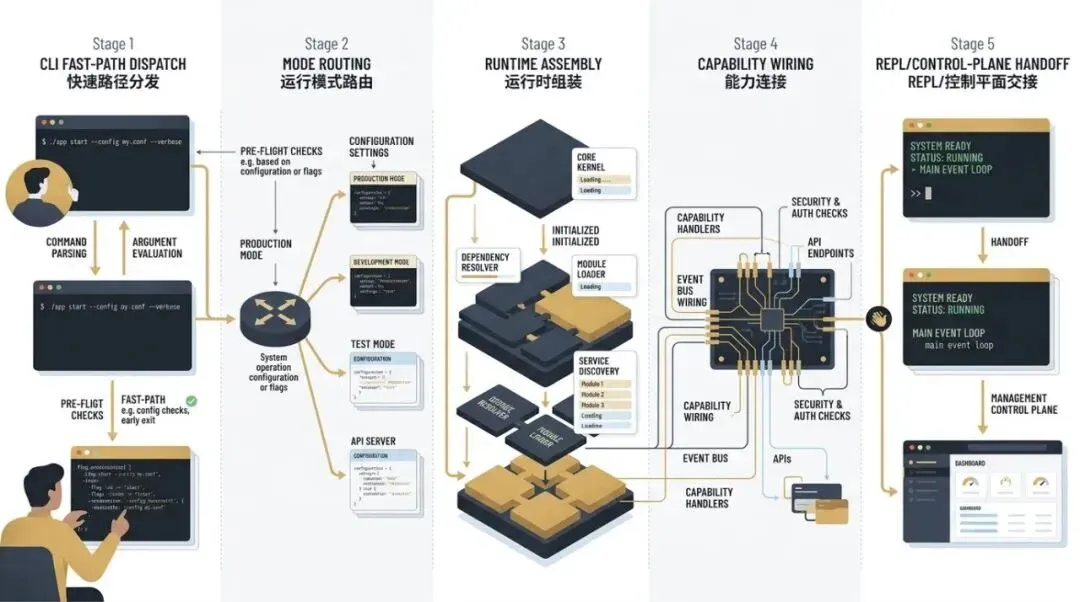
Startup is not a single-point execution, but a process of routing, assembly, and capability wiring.
04
III. The Five Stages of the Startup Process
I suggest understanding the startup path of main.tsx in five stages.
Stage 1: Warming up the slow path
At the very beginning of the file, several experienced steps are taken:
• profileCheckpoint(...)
• Early initiation of MDM reading
• Early initiation of keychain prefetch
The intent here is clear: the author knows exactly which operations slow down the initial screen, so they move them forward and parallelize them.
This “warm-up” is not just a nice-to-have; it is a critical optimization for interactive systems. Because Claude Code must enter a high-interaction state immediately upon startup, it cannot afford to initialize slowly like a background script.
Stage 2: Initializing environment and policies
Before entering the main logic, the system gradually pulls up:
• Configuration and environment variable mapping
• Managed settings
• Remote managed settings
• Policy limits
• Auth / bootstrap information
• GrowthBook
• Analytics gate
This step determines what capabilities the current user, organization, and environment are allowed to see.
This is crucial because, in Claude Code, tools, agents, remote capabilities, bridges, and auto-mode are not exposed by default. They must pass through this layer of policy and configuration assessment.
Stage 3: Assembling the capability surface
Next, it assembles:
• commands
• tools
• agent definitions
• MCP clients / resources / commands
• plugins
• skills
The essence of this step is not “registering functions,” but forming a capability snapshot of the current session.
The getTools(...) layer is particularly critical. Claude Code does not treat tools as static SDK functions, but as a dynamic execution surface pruned by environment, permissions, modes, and feature gates.
Stage 4: Establishing the state store
main.tsx creates the store and prepares the initial state required for the REPL. This is the prerequisite for AppState to carry tasks, notifications, MCP, plugins, viewing-agents, and the permission queue.
In other words, this is not just “initializing React state,” but creating a session-level runtime state container.
Stage 5: Entering the REPL
Finally, the system enters the launchRepl(...) path based on various prerequisites.
This shows that the REPL is not a single page, but a unified interactive stage that accepts various startup results, such as:
• Normal local session
• Resumed session
• Remote viewer
• Foreground control surface for different modes
05
IV. main.tsx solves “Assembly,” not just “Startup”
If we summarize the responsibility of main.tsx in one sentence:
Before entering the first round of user interaction, it assembles the complete world model for the current session.
This world model includes:
• Who is the current user?
• What is the current model?
• What is the current permission mode?
• Which tools are visible?
• Which agents can be loaded?
• Are there any MCP / plugin / remote bridges?
• In what posture should the REPL start?
Why is this important? Because the subsequent query loop, tool orchestration, and AgentTool all assume these basic conditions have already been set.
In other words, main.tsx is the “pre-evaluator” for the entire system.
06
V. Architecturally, cli.tsx + main.tsx establish three boundaries
Together, these two files establish three important boundaries for the entire system.
Boundary 1: Operating mode boundary
cli.tsx decides which entry path you take:
• Lightweight command
• Daemon/bridge/background
• Full interactive runtime
Boundary 2: Capability boundary
main.tsx decides what this session can see:
• Which tools
• Which commands
• Which agents
• Which plugin / MCP capabilities
Boundary 3: Interaction boundary
launchRepl(...) decides how the user finally enters the system:
• Local foreground
• Resumed session
• Remote observation/control
From the source code structure, these two layers are not “startup scripts,” but the first line of defense that constrains the complex system that follows.
07
VI. Key points to focus on
If you intend to delve deeper into these two files, I suggest focusing on these questions:
01 Which paths are truncated early in cli.tsx, and why?
02 Which configurations must be completed early in main.tsx to prevent capability exposure errors later?
03 At which stage are getTools(...), agent definitions, MCP, and plugins assembled?
04 Why are there so many launchRepl(...) calls in main.tsx?
05 Why does it perform so many policy and capability assessments before the REPL starts?
Once you have thought through these five questions, you won’t mistake query.ts for a simple “chat loop” when you read it later.
08
VII. The Startup Flow at a Glance
09
VIII. Conclusion
cli.tsx and main.tsx work together not just to “run the program,” but to:
• Split operating modes at the entry layer.
• Evaluate current session capabilities at the main assembly layer.
• Hand over the fully assembled runtime to the REPL.
This is the prerequisite for the entire agent runtime that follows. Because everything you read about the complexity later is built on the assumption that “the current world has already been assembled.”
The next article will enter the true heart of this world: query.ts, tools.ts, and toolOrchestration.ts.
