
0. Test Background and Environment
I’m Mr. Guo. For Vibe Coders and indie developers with zero design skills, forget about Gemini’s backend and large project Agentic capabilities for a second — just a design mockup usually blocks many people. Many indie dev projects online are obviously AI-generated at first glance, looking very similar and mechanical. Gemini 3.0 Pro this time, subjectively speaking, has made a qualitative leap in frontend design capabilities. Looks like Google’s Stitch accumulation wasn’t for nothing.
To verify Google’s latest Gemini 3.0 Pro’s actual coding level in frontend, I abandoned conventional algorithm tests and adopted “Stylized UI Reproduction” as the exam.
Test Rules:
- Single-file delivery: HTML/CSS/JS must be in one file, no
npm install. - Zero asset dependency: No external JPG/PNG — all graphics must be CSS-drawn.
- Abstract instructions: Prompt only describes “style” and “function,” no specific CSS parameters.
- One-Shot: Only evaluate first-pass code quality, no multi-round debug.
Test Case 1: Cyberpunk Trading Interface (Cyberpunk UI)
🔍 Test Objective
Evaluate AI’s mastery of high-contrast color schemes, CSS blend modes, and complex CSS animations (Glitch effect).
Prompt Keywords
“High-tech, dark, neon lighting, glitch art, monospace font, scanline background”
🛠 Code Breakdown and Performance
1. Visual Fidelity:
Gemini 3.0 Pro accurately used clip-path: polygon(...) to achieve UI chamfered edges effect, rather than traditional border-radius. This fits cyberpunk’s hard industrial aesthetic.
2. Animation Logic:
Most impressive was its “glitch effect” implementation. It defined a @keyframes card-glitch, combining clip-path inset variations with transform: skew, very realistically simulating screen tearing.
// Gemini’s generated glitch logic snippet transform: translate(-2px, 2px) skew(2deg); clip-path: inset(10% 0 80% 0);
3. Interaction Script: It proactively wrote JavaScript to randomly trigger glitch classes on different cards (class toggle), simulating unstable power environment characteristics. This shows it understood the “chaos within order” from the prompt wasn’t just a visual requirement, but a logic requirement.
Test Case 2: Art Nouveau Gallery
🔍 Test Objective
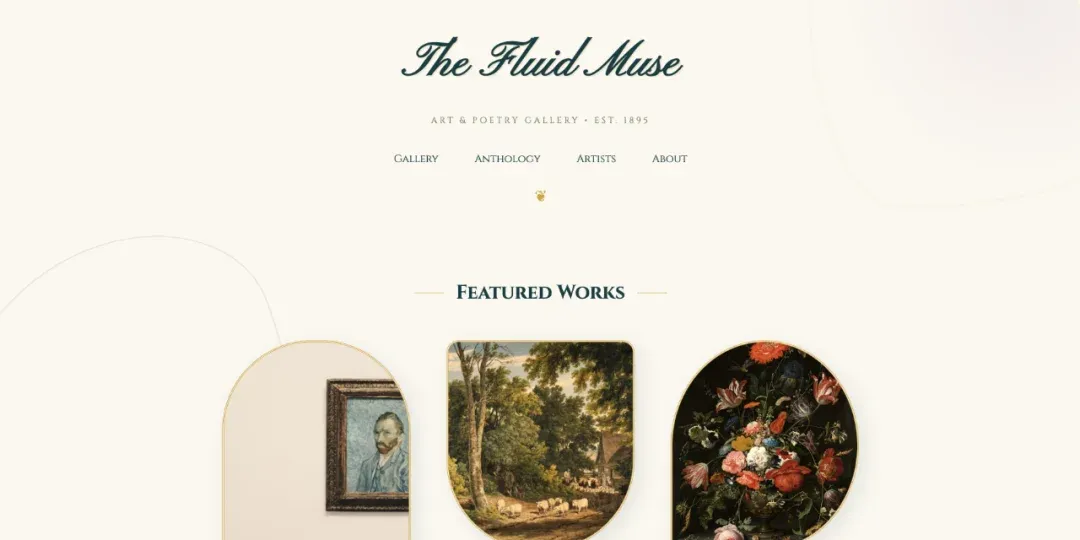
Evaluate AI’s ability to break away from rectangular layouts. Art Nouveau emphasizes organic curves and asymmetry — very counter-intuitive for Box Model-based web development.
🛠 Code Breakdown and Performance
1. Irregular Shape Construction:
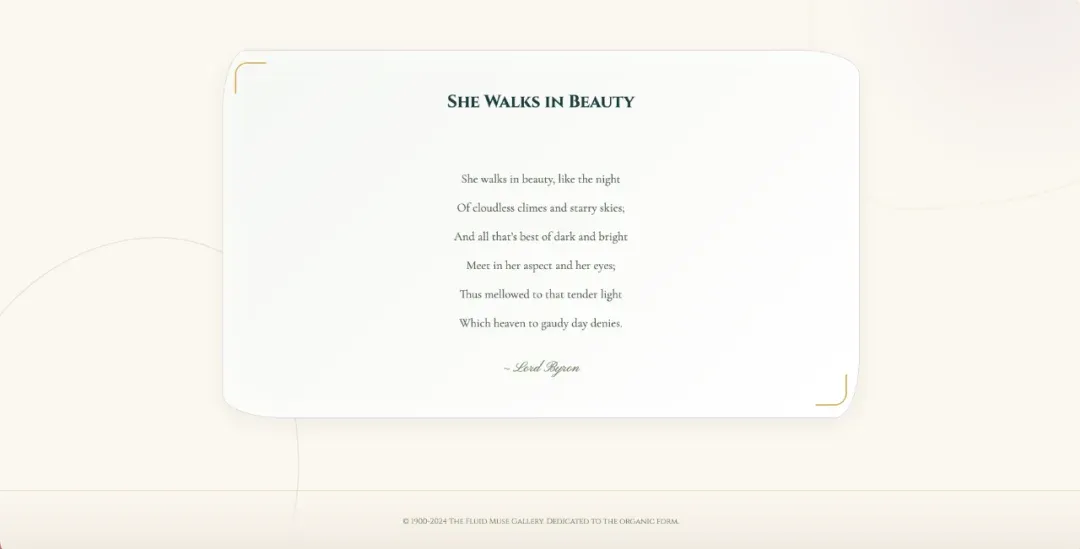
This was the highest technical difficulty part of the test. Gemini 3.0 Pro used extreme border-radius syntax (like 60% 40% 30% 70% / 60% 30% 70% 40%) to simulate irregular organic circles. This syntax is typically only used by senior CSS developers.
2. Decorative Pseudo-Elements:
It extensively used ::before and ::after pseudo-elements, combined with position: fixed and large sizes, drawing blurry vine lines and color blocks on the page background.
3. Fonts and Typography:
It correctly called Google Fonts API, selecting Pinyon Script (script) and Cinzel (classical serif). This shows it not only understands code, but has some font pairing knowledge base.
The effect is quite stunning, very artistic, aesthetics on point — see the images:
Test Case 3: Steampunk Studio
🔍 Test Objective
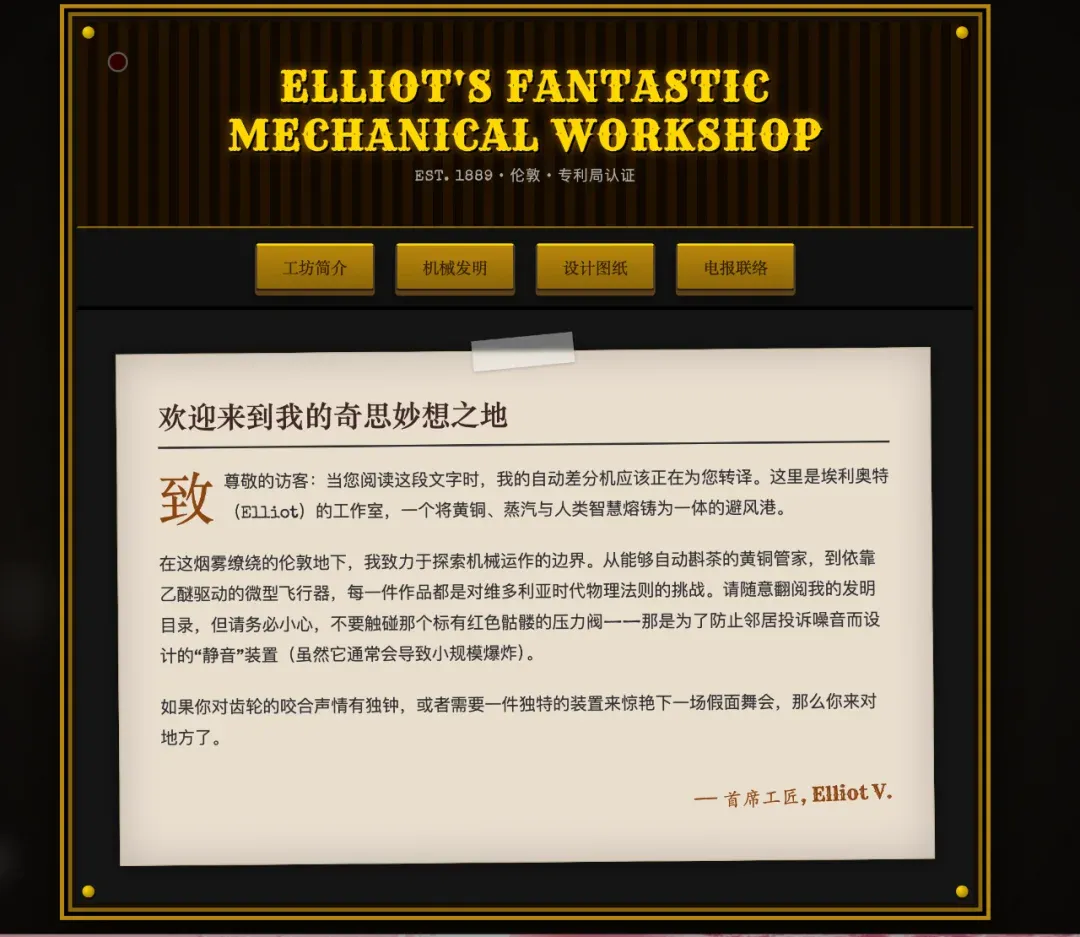
Evaluate AI’s CSS simulation of complex textures and mechanical structures. Steampunk involves lots of metallic textures, gears, and steam effects.
🛠 Code Breakdown and Performance
1. Zero-Asset Gear Drawing:
Under the no-images constraint, Gemini used dashed border combined with radial-gradient to successfully “draw” gear shapes, plus animation: spin for rotation animation. This is a very clever CSS hack.
2. Particle System Simulation:
For the “faint steam” requirement, it used multiple DOM nodes with filter: blur() and vertical displacement animation (TranslateY) to simulate rising and dissipating smoke.
Test Summary: Gemini 3.0 Pro’s Capability Boundaries
Based on above three extreme scenario tests, here’s my summary of Gemini 3.0 Pro’s frontend coding capabilities:
Pros
- Precise Semantic Understanding:
Can accurately translate adjectives like “glitch,” “vintage,” “organic” into specific CSS properties.
- Strong CSS Drawing:
Excels at using Gradient and Box-shadow to replace images — very meaningful for reducing HTTP requests and optimizing performance.
- Good Context Awareness:
Generated code structure is complete, responsive handling (Media Queries) usually correct on first version.
Cons
- Over-reliance on Absolute Positioning:
When handling extremely complex decorative backgrounds, it tends to use position: absolute, which may cause content obstruction on extreme screen sizes.
- Relatively Simple JS Logic:
Though visual effects are outstanding, for complex business logic interactions (like real shopping cart state management), generated code still leans toward demo-level.
Takeaway:
From a product manager perspective, I think it’s time to overturn previous product prototype — design workflows. I believe for most projects without extreme design requirements, product managers completing high-fidelity prototypes directly through Gemini and going straight to development is a clearly valuable efficiency improvement approach.
From an indie dev perspective, this directly solves the critical design need, greatly improving indie project user experience — please treat Gemini as your dedicated design consultant.
🌌 Stay objective, stay curious — tools are just means, delivering value is the goal.
