
99% of Webmasters Accepting HTML Guest Posts Will Get Hacked Sooner or Later: Guest Posting Is Becoming an SEO Trojan Horse
Digital Strategy Review | 2026
The SEO Trojan Horse: Why “HTML Guest Posts” Are a Death Trap for Independent Sites
By Mr. Guo · 8 Min Read

By Mr. Guo
It’s 3:00 AM. You receive an email in your site’s inbox. The sender is “Sarah,” her profile picture shows a professional-looking woman, and her tone is so sincere it’s almost moving:
“Dear Webmaster, I’ve been following your blog for years… I’d love to contribute a high-quality guest post for free. I’ve already formatted it in HTML for you, just copy and paste!”
You’re tempted. “Free content? SEO value? It saves me hundreds of dollars on writers!” You open the HTML file and preview it in your browser: the layout is beautiful, the images are crisp, and the content is genuinely useful. You log into your dashboard, switch to “Source Code Mode,” Ctrl+C, Ctrl+V, and hit publish.
Congratulations. You thought you passed the Turing Test, but in reality, you just failed the “Fool Test.” You’ve handed a loaded gun to a hacker.
In this era of traffic anxiety, independent site owners are like starving fish, eyeing every piece of “free content” bait. But you’ve forgotten the most basic law of the ocean: if the lunch is free, you are usually the meal.
Today, I’m going to perform an “autopsy” on your site. I’ll show you how that few-KB HTML file can destroy a site you’ve spent three years building in less than 24 hours.
01
1. It’s Not Content, It’s Code
Most webmasters still think of HTML as a “formatting tool.” Please remember: HTML is not just a document; it is an executable file for your browser.
This problem has become even more insidious and dangerous in the age of AI. In the past, if someone sent you a bunch of messy code, you would have been suspicious. But now, with the help of ChatGPT or Claude, hackers can generate perfectly formatted HTML articles with elegant CSS styles and even interactive components. When operations staff see such “plug-and-play” high-quality layouts, they often assume the sender is “professional” and “thoughtful,” causing them to drop their guard completely. When you paste this AI-generated, “perfect” code directly into your WordPress or Shopify backend to save time, you are effectively authorizing the execution of that code with Administrator privileges.
Hackers usually bury three “kill shots” inside this “Trojan Horse”:
1. Stored XSS (Cookie Theft)
This is the most lethal blow. Hidden among the <p> and <div> tags in that HTML file is a <script> tag that is hard to spot with the naked eye, or an <img src=x onerror=...> disguised as an image.
When you (as the administrator) preview or publish this article, the script executes in your browser. It instantly reads your document.cookie—your administrator login credentials—and silently sends them to the hacker’s server.
You won’t notice a thing. But the hacker now has the keys to your kingdom. They don’t need your password; they simply use your cookie to impersonate you, log into the backend, change the admin email, and lock you out.
Note: Many people ask if this is the same as a Webshell. It is not.
-
HTML (XSS) is a client-side attack: It steals your (the admin’s) identity without your knowledge.
-
Webshell is a server-side backdoor: Once the hacker has your identity, their next step is usually to upload a PHP/ASP Trojan (Webshell) to your server.
-
Simply put: HTML/XSS is the “thief” who steals your keys; the Webshell is the “robber” who moves into your house afterward. But the former is the perfect springboard for the latter.
Game Over.
2. SEO Poisoning (Keyword Hijacking)
Sometimes, hackers aren’t in a rush to kick you out. They prefer to turn your site into a “botnet.” They use CSS to inject thousands of links into the article: <div style="display:none"> <a href="gambling-site">...</a> </div>
Human users can’t see these links, but Google’s crawlers see them perfectly. Your site begins to aggressively bleed link juice to gambling, adult, or fake medicine websites. A month later, your traffic suddenly drops to zero. You open Google Search Console to find nothing but “Manual Action” notifications. Your site is flagged as “hacked” or a “spam link farm.” Domain Reputation: Ruined.
3. Phishing Pop-ups (Social Engineering)
There is an even more sinister tactic. When a user (or you, in the future) browses the article, a very realistic “Session Expired” window suddenly pops up, looking exactly like the WordPress login screen. You instinctively enter your username and password. You don’t log in; instead, you hand your plaintext password directly to the hacker. This is known as Phishing via Web.
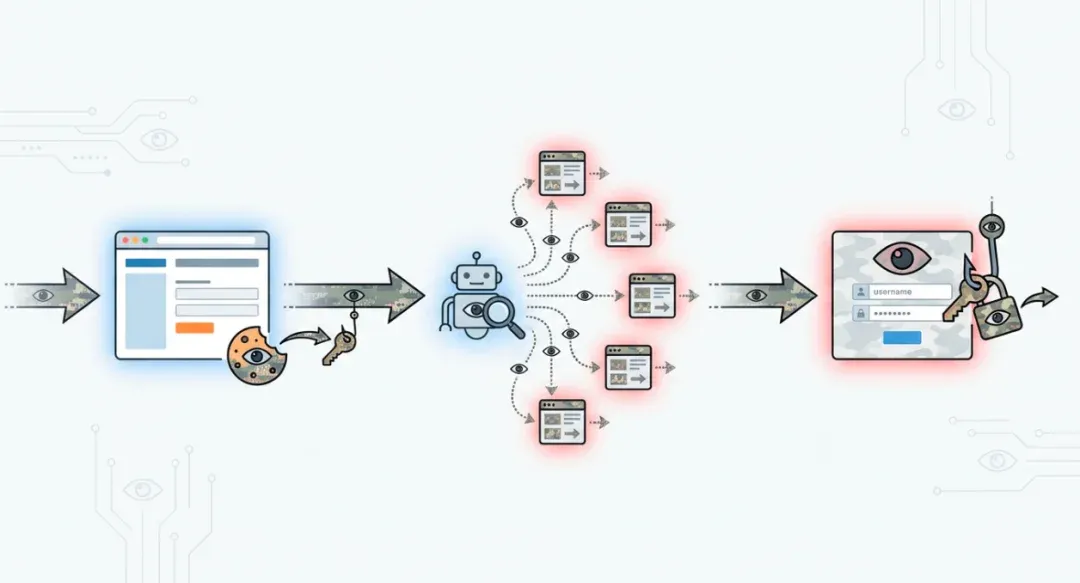
From XSS to SEO poisoning to phishing, these risks often occur in a chain reaction.
02
2. Greed Is the Biggest Vulnerability
Technical vulnerabilities (XSS) are actually easy to defend against. WordPress has filtering mechanisms, and security plugins can intercept them. So why do hackers succeed so often?
Because you are the administrator. Security systems trust the administrator by default. When you paste the code yourself, you bypass all defensive lines. The hacker didn’t break your firewall; they broke your greed.
A “free Guest Post” is a carefully designed social engineering attack.
- Exploiting Reciprocity: “I’ll give you free content, you help me post it.” You think you’re winning.
- Exploiting Laziness: “It’s already formatted in HTML, just paste it.” You think you’re saving time.
- Exploiting Professionalism: The email is written so professionally that you assume the sender is an expert.
This is what we call P-E-B-K-A-C (Problem Exists Between Keyboard And Chair).
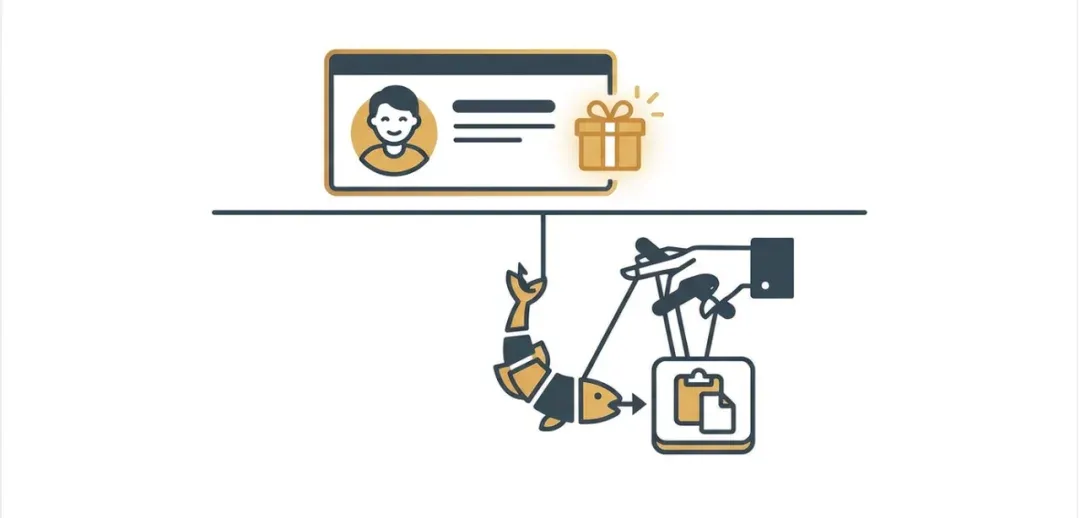
Hackers often don’t exploit system vulnerabilities; they exploit human psychological vulnerabilities.
03
3. Defense Strategies
If you want to survive in this jungle, please engrave these points onto your monitor:
-
01 AI vs. AI: Fight Fire with Fire In the AI era, refusing all HTML submissions is unrealistic because HTML’s expressive power far exceeds plain text. But you must never paste it directly. After receiving an HTML file, feed the code to a capable AI (like Claude Code or GPT-4o) and have it perform a Security Audit. Use this prompt: “Please check this HTML code for XSS scripts, malicious external links, hidden SEO links (display:none), or any non-content code.” Current AI is very accurate at sniffing out malicious code hidden within content.
-
02 Code Inspection First When you get an HTML file, never double-click it to preview it in your browser! Once opened, the browser will execute the scripts inside. The correct way: Right-click -> Open with -> VS Code / Sublime Text / Notepad. Look at the code first, then the visual result. If the code contains a bunch of messy JS scripts or base64 encoding, block the sender immediately.
-
03 Content Security Policy (CSP) Ask your technical partner to configure a strict CSP header for your site.
Content-Security-Policy: script-src 'self';This is like installing security bars on your house: even if a thief (code) gets in, they can’t carry anything (data) out.

Audit the code first, then publish the content; let AI and policy be your first line of defense.
04
Conclusion: Embrace Convenience, But Don’t Become the Cost
The arrival of the AI era has made content production and exchange easier than ever. This should be the golden age for SEO professionals. But you must understand that technology is neutral; it can accelerate construction, but it can also accelerate destruction.
AI hasn’t made scammers disappear; it has just given them a more respectable suit. Old scams were clumsy emails and garbled text; today’s scams are perfect layouts and “altruistic” phrasing. Beneath this veneer of convenience lie countless invisible traps.
The saddest part isn’t refusing a collaboration; it’s that many SEO beginners don’t realize their servers are infested with “parasites” until the day Google completely de-indexes their site. They think they are doing content marketing, but in reality, they have unknowingly become free labor in a black-market supply chain.
We don’t advocate “technophobia,” nor do we suggest you stop all collaborations. But in this era of frequent “dimensional strikes,” blind trust is arrogance. Please protect your cookies; they are the only “underwear” you have in this digital world. Use advanced tools to audit code, and use a professional lens to scrutinize “free” offers.
Don’t let your convenience become someone else’s profit.
