
Stop “Decorating” Your Notes: Obsidian CLI is Transforming “Note-Taking Software” into a “Knowledge Operating System”
Digital Strategy Review | 2026
Stop “Decorating” Your Notes: Obsidian CLI is Transforming “Note-Taking Software” into a “Knowledge Operating System”
By Mr. Guo · Reading Time / 8 Min
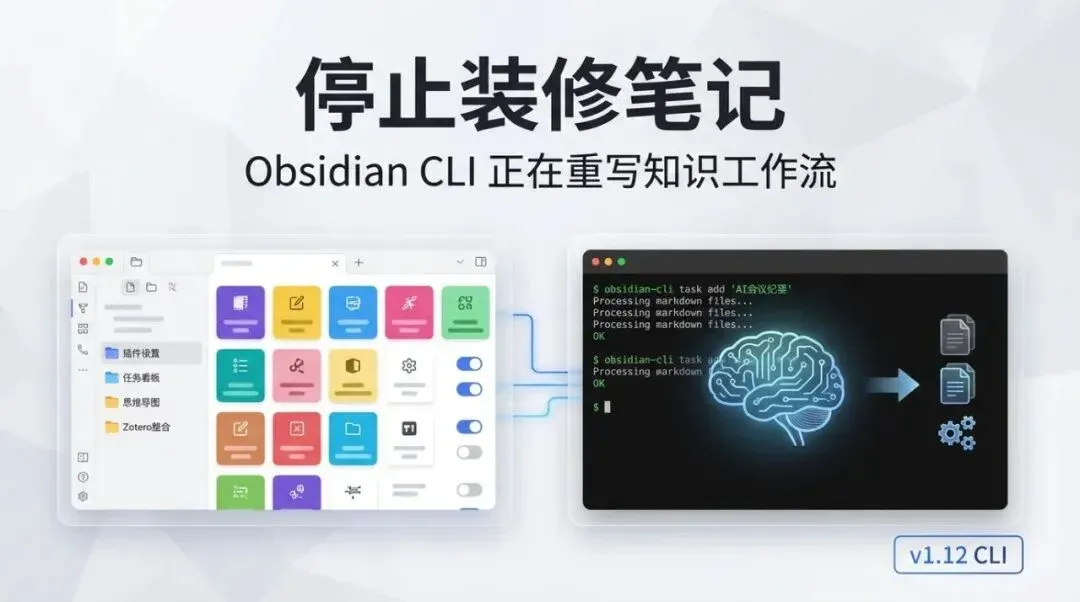
A note before we begin: You think you’re doing knowledge management, but you’re actually just doing plugin maintenance.
On February 10, 2026, Obsidian officially launched its CLI in Desktop v1.12.0 (Catalyst). While many see this as “just another geeky entry point,” I prefer to view it as a fundamental refactoring of the interface layer.
I have been a loyal Obsidian user for years, but unlike many online “gurus” who teach how to use Obsidian, I never obsess over note aesthetics. I only keep the most essential functional plugins (like automatic local image saving). I’ve always felt that focusing on “beautification” is putting the cart before the horse.
Furthermore, ever since the birth of Claude Code (CC), I have managed most of my note files through it, including my articles for this newsletter. Now that the official CLI is here, using CC to interact with Obsidian will be a qualitative leap in experience. Tasks I previously considered a waste of time—such as beautifying notes or creating complex, “impressive-looking” knowledge graphs—will become incredibly easy. It will just require a few more tokens, and everything will be solved.
01
Chapter 1: Morphological Mutation — From GUI Tool to Agent Interface
1.1 This is not a rumor; it is a version-controlled fact
The official changelog is very clear:
-
•
2026-02-10,v1.12.0 Desktop (Catalyst)added the CLI, providing a set of native commands (such asdaily,search,tasks,bookmarks,backlinks, etc.). -
• On the same day,
v1.12.1was released to immediately fix CLI-related issues (including command parsing and path parameter problems).
Releasing a patch immediately after a feature launch isn’t embarrassing; it shows the team treats this as a “production interface” rather than a marketing gimmick. The truly dangerous features are the ones that are “released and then abandoned.”
1.2 The Business Implications of CLI: Obsidian begins supporting machine labor
The official Help page is blunt: You can execute actions within Obsidian from the command line, including commands exposed by plugins. It also introduces “Developer Commands” to allow agentic coding tools to automatically test and debug plugins.
In plain English:
-
• Your Vault now has “composability.”
-
• Your operations now have “replayability.”
-
• Your knowledge work now has “delegation to AI.”
The convergence of these three things is the true PMF (Product-Market Fit) signal of this update.
02
Chapter 2: The Hard Truth — It’s not fully headless yet
2.1 “No clicking” does not mean “no interface process”
The CLI is powerful, but keep your expectations in check.
The official documentation explicitly states two points:
-
• The Obsidian app must be running locally.
-
• The first command will automatically launch the Obsidian process.
Therefore, the current architecture is closer to a “remote control desktop app” rather than a resident headless service.
2.2 Counter-evidence: The community is already asking for a “fully headless mode”
On the official forum, there are already feature requests for “fully headless mode” and discussions regarding the stability of command IDs. These two signals are highly significant:
-
• People are already using the CLI as a production capability.
-
• The boundaries of its capabilities are still rapidly converging.
This isn’t bad news. It just tells you: this is a period for leverage, not for sitting back.
| Dimension | What you imagine the CLI is | The reality of 1.12 | Actual Conclusion |
|---|---|---|---|
| Execution Form | Fully headless daemon | Depends on desktop process | Automatable, but not server-like |
| Stability | Perfect out of the box | Continuous patch fixes | Suitable for progressive adoption |
| Target Objects | Built-in commands only | Includes plugin/dev commands | High ceiling, but requires governance |
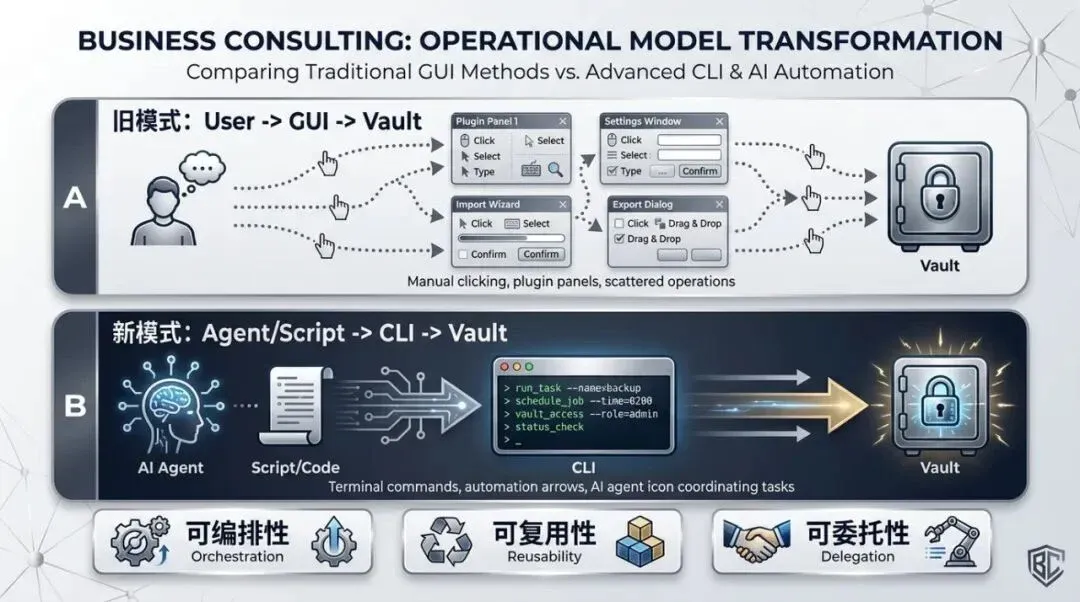
From “clicking buttons” to “composable interfaces”: Obsidian is becoming a knowledge foundation that can be invoked by AI.
03
Chapter 3: It’s not the plugins being eliminated, but low-value manual labor
3.1 The more prosperous the plugin ecosystem, the higher your maintenance debt
I analyzed the community-plugins.json file in the official obsidian-releases repository. As of 2026-02-16, there are 2,736 community plugins.
2,736 isn’t “a rich selection”; it’s an “explosion of decision-making overhead.”
More realistically, the official plugin security notice is honest: auditing resources are limited, and no full audit is performed. Installing community plugins remains, at its core, a trust-based decision. When you add high-frequency update checks to the mix, your time is easily consumed by “plugin maintenance.”
3.2 The Economic Ledger: Plugin-centric workflow vs. CLI+AI workflow
You shouldn’t be calculating “which one is cooler,” but rather which one has a lower long-term marginal cost.
| Dimension | Plugin-centric Workflow | CLI + AI Workflow | Result |
|---|---|---|---|
| Initial Setup | Fast (Click to install) | Medium (Must learn commands) | Plugins win |
| Scalable Reuse | Low (Manual clicking) | High (Scripts are repeatable) | CLI+AI wins |
| Migration Cost | High (Bound to UI/Plugins) | Low (Commands are portable) | CLI+AI wins |
| Maintenance Burden | High (Version conflicts) | Medium (Command governance) | CLI+AI more controllable |
| Auditability | Weak (Verbal processes) | Strong (Commands and logs) | CLI+AI wins |
The conclusion is cold: Plugins won’t disappear, but labor performed “just for the sake of plugins” will be eliminated.
04
Chapter 4: How to upgrade now — Paths, paywalls, and whether to jump on board
4.1 How to upgrade to the CLI-ready version (Official path)
According to official documentation, the current path is:
-
- Upgrade the desktop installer to the latest version (the documentation uses
1.11.7as an example), then update to the early1.12.xversions.
- Upgrade the desktop installer to the latest version (the documentation uses
-
- Log in to your account in Settings -> General, enable “Receive early access versions,” then “Check for updates” + “Relaunch.”
-
- After the update, enable “Command line interface” in Settings -> General and follow the prompts to register the CLI.
-
- Windows users may need to additionally run a
.comfile (officially noted to be available in the Catalyst Discord).
- Windows users may need to additionally run a
In short: This isn’t just “installing a plugin.” It’s about entering the Early Access channel and then toggling the CLI switch.
4.2 Is it paid?
The short answer: Currently, yes.
-
• The official CLI documentation states that
1.12is currently in Early Access and requires a Catalyst license. -
• Catalyst is a one-time payment tier: Insider
$25, Supporter$50, VIP$100(you can pay the difference to upgrade tiers). -
• If you don’t want to pay for “early access,” just wait for the stable release to hit the public update channel.
So, this isn’t “feature-gated pricing,” but “early-adopter pricing.” You are paying for the time advantage, not a permanent feature lock.
4.3 Upgrade now, or wait?
I suggest different approaches based on your situation:
-
• Heavy production users (especially those with large vaults): Wait.
-
• Experimental users who enjoy tinkering: Go ahead, but use a test vault.
The reasons are straightforward:
-
• Official warnings state that Early Access versions “may be unstable.”
-
• CLI documentation notes that commands and syntax “may change in the early stages.”
-
•
1.12.0and1.12.1were released on the same day, and1.12.1already contains multiple CLI-related fixes (e.g.,vaultparameter order,daily:prependbehavior).
So, the “rumors of many bugs” are not an emotional judgment; from the version release cadence, it is clearly still in a rapid convergence phase. My advice: If you want the benefits, use a test vault; if you want stability, wait for a few more iterations of 1.12.x.
Additionally, I’ve heard many reports in the community about bugs in the current version, so I genuinely recommend waiting.
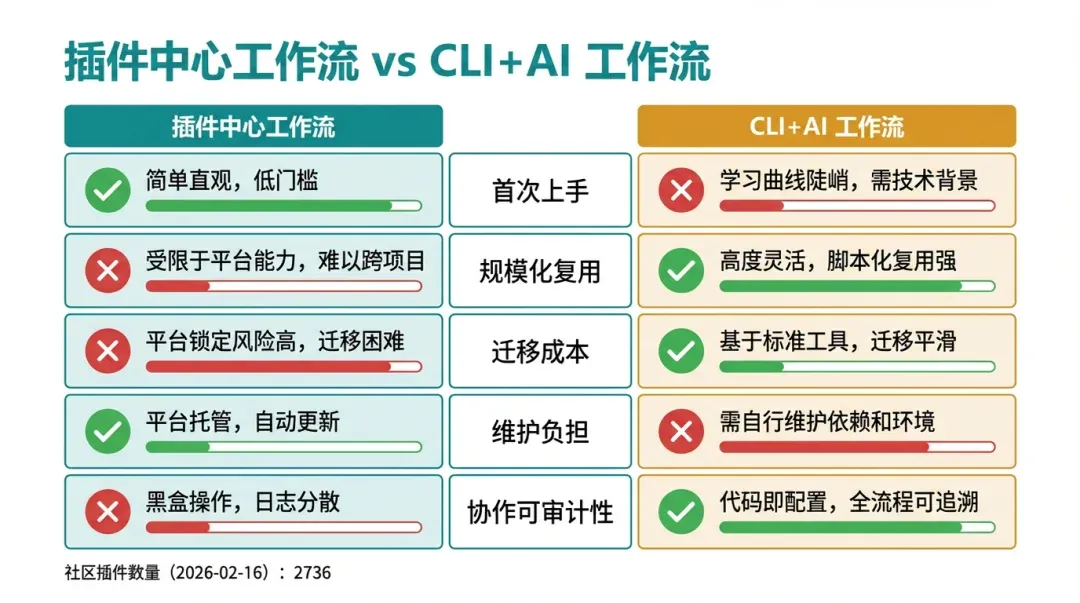
What you should really calculate is not the “cool factor,” but the long-term marginal cost.
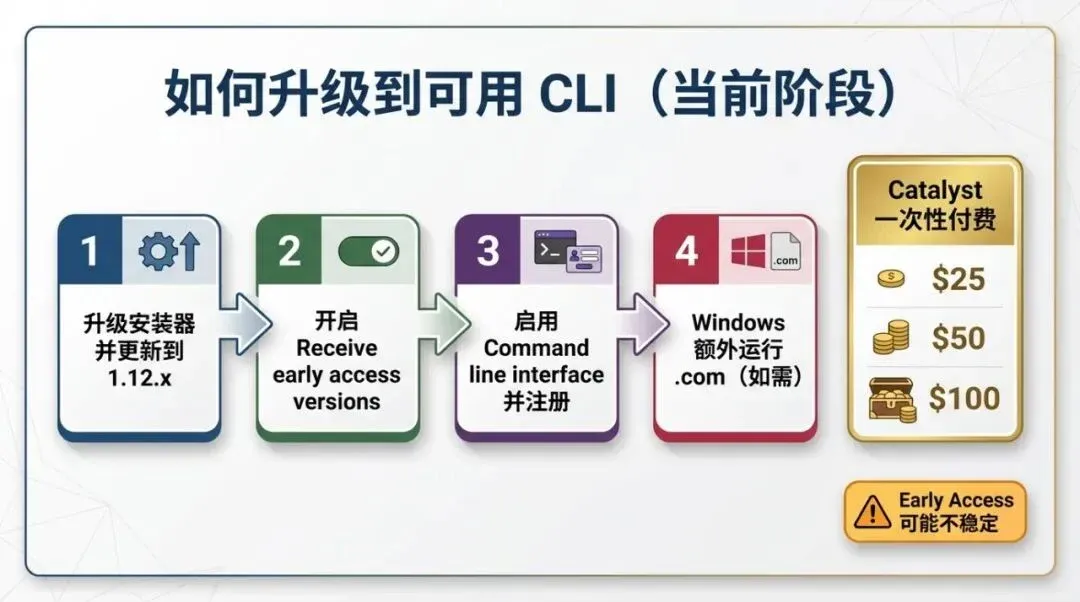
The barrier here is not a feature subscription, but the time-cost of “early access.”
05
Conclusion: Don’t rush to “all in,” take back your rhythm
This update doesn’t just give you “another playable feature”; it gives you a new workflow entry point.
What truly matters is:
-
• Is your Markdown structure stable?
-
• Are your commands reusable?
-
• Is your main vault evolving under controlled risk?
Now that tools have evolved to the CLI + Agent generation, the competition in knowledge management is no longer about “who can tinker more,” but “who can tinker less while maintaining stable output.”
The greatest value of this Obsidian update is bringing in the “AI fanatic” user base. Given the current state, if you are an agent user (like CC + Codex), you likely won’t choose Notion. Furthermore, it is a productivity liberation for those “player-type” Obsidian users who spend half an hour writing a note and two hours beautifying it—provided they also learn to use AI agents like CC.
A final, slightly blunt word: The future won’t replace writers; it will replace manual processes. Stabilize your system first, then scale your automation.
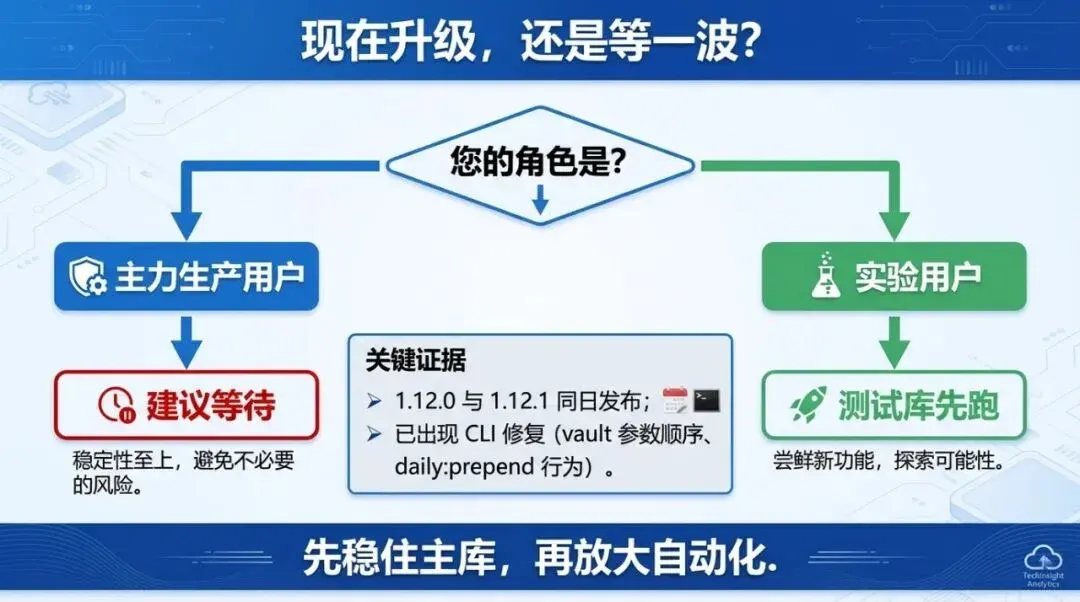
The rumors of bugs are not unfounded: judging by the version cadence, it is still in a rapid convergence phase.
06
References
-
- Obsidian Changelog: Desktop v1.12.0 (2026-02-10) https://obsidian.md/changelog/2026-02-10-desktop-v1.12.0/
-
- Obsidian Changelog: Desktop v1.12.1 (2026-02-10) https://obsidian.md/changelog/2026-02-12-desktop-v1.12.1/
-
- Obsidian Help: CLI https://help.obsidian.md/cli
-
- Obsidian Forum: Feature request for fully headless mode https://forum.obsidian.md/t/full-headless-mode/111137
-
- Obsidian Forum: Command ID / CLI stability discussion https://forum.obsidian.md/t/obsidian-cli-commands-by-id/111173
-
- Obsidian Help: Community plugin security https://help.obsidian.md/plugins/community-plugins#plugin-security
-
- Obsidian Releases repo: community-plugins list https://raw.githubusercontent.com/obsidianmd/obsidian-releases/master/community-plugins.json
-
- Obsidian Help: Update Obsidian https://help.obsidian.md/updates
-
- Obsidian Help: Early access versions https://help.obsidian.md/early-access
-
- Obsidian Help: Catalyst license https://help.obsidian.md/catalyst
