
Deep Dive into OpenCode: The Architecture of Next-Gen AI Coding Assistants
A Note from the Editor
It’s been a while since we had a technical deep-dive from Tam, so here’s one for you! If you’re into tech or learning agent development, gather around. OpenCode is essentially an “open-source Claude Code.” Those who’ve followed my work know I wrote a series called “Learning Agent Development with Gemini CLI” — this time we’re tackling OpenCode. Fair warning: this article goes deep, so you might want to read it a few times and actually dig into the OpenCode source code.
As I’ve mentioned before, the Agent tools I use most in my daily work aren’t Manus or Genspark — they’re Claude Code and Codex running in my terminal. I customize them with my own tools, turning them into my personal J.A.R.V.I.S. I firmly believe CC and Codex represent the best-designed agent products of our era. Analyzing and learning from OpenCode will give you an excellent reference and template for building any kind of agent.
The following is authored by Tam.
Introduction: When AI Learns to Code
Remember the first time you asked ChatGPT to write code for you? That “Wow, this actually works?” amazement that quickly turned into “Wait, this code doesn’t run” frustration.
AI can write code, but it can’t truly write code — it can’t read your files, run tests, or understand your project’s context. It’s like a genius programmer blindfolded with hands tied: capable, but unable to act.
OpenCode exists to remove those constraints.
┌─────────────────────────────────────────────────────────────────┐
│                                                                 │
│   Traditional LLM Chatbot       vs         OpenCode Agent       │
│                                                                 │
│   ┌─────────────────┐                ┌─────────────────────┐   │
│   │      User       │                │        User         │   │
│   └────────┬────────┘                └──────────┬──────────┘   │
│            │                                    │              │
│            ▼                                    ▼              │
│   ┌─────────────────┐                ┌─────────────────────┐   │
│   │       LLM       │                │       Agent         │   │
│   │  (Black Box)    │                │  ┌───────────────┐  │   │
│   └─────────────────┘                │  │  Think        │  │   │
│            │                         │  ├───────────────┤  │   │
│            ▼                         │  │  Tools        │  │   │
│   ┌─────────────────┐                │  │  ├─ Read      │  │   │
│   │  Plain Text     │                │  │  ├─ Write     │  │   │
│   │  (Can't Execute)│                │  │  ├─ Bash      │  │   │
│   └─────────────────┘                │  │  ├─ Grep      │  │   │
│                                      │  │  └─ ...       │  │   │
│                                      │  ├───────────────┤  │   │
│                                      │  │  Action       │  │   │
│                                      │  └───────────────┘  │   │
│                                      └─────────────────────┘   │
│                                               │              │
│                                               ▼              │
│                                      ┌─────────────────────┐   │
│                                      │   Real Code Changes  │   │
│                                      │   Runnable Results   │   │
│                                      └─────────────────────┘   │
│                                                                 │
└─────────────────────────────────────────────────────────────────┘
OpenCode is an open-source AI coding assistant, but more precisely, it’s a complete Agent framework. It enables LLMs to:
- 🔍 Read your code files
- ✏️ Edit your code
- 🖥️ Execute shell commands
- 🔎 Search your codebase
- 🤔 Think and show reasoning
- 📝 Remember long conversation context
- 🔄 Rollback any changes
This isn’t a simple API wrapper — it’s a carefully crafted piece of engineering art. Let’s dive into its internals and see how modern AI Agents are built.
Chapter 1: Bird’s Eye View - OpenCode Architecture Overview
1.1 The Monorepo Choice
OpenCode uses a Monorepo architecture with Bun as the runtime and package manager, and Turbo for build orchestration. This choice wasn’t accidental:
opencode/
├── packages/
│   ├── opencode/        # Core CLI and server (the heart)
│   ├── console/         # Web management console (brain visualization)
│   │   ├── app/         # SolidJS Web UI
│   │   ├── core/        # Backend logic
│   │   ├── function/    # Serverless functions
│   │   └── mail/        # Email templates
│   ├── desktop/         # Tauri desktop app (Native shell)
│   ├── app/             # Shared UI components (unified visuals)
│   ├── sdk/js/          # JavaScript SDK (external interface)
│   ├── ui/              # UI component library (design system)
│   ├── plugin/          # Plugin system (extensibility)
│   ├── util/            # Shared utilities (infrastructure)
│   ├── web/             # Documentation site (knowledge base)
│   └── identity/        # Authentication (security gateway)
├── infra/               # Infrastructure as Code (SST/AWS)
└── sdks/                # SDK distribution
Why Monorepo?
Imagine you’re building a modern smart building:
- CLI is the elevator system — users enter through it
- Server is the central control room — coordinating everything
- Desktop is the luxurious lobby — a polished entrance
- Web Console is the monitoring center — global visibility
- SDK is the API interface — for external system integration
These components need to share code (UI components, utilities, type definitions), synchronized versions, and unified builds. Monorepo makes all this elegant.
1.2 Technology Stack Overview

1.3 Deep Dive into Core Package Structure
Let’s focus on packages/opencode — the heart of the entire system:
packages/opencode/src/
├── cli/cmd/           # CLI command entry (17+ commands)
│   ├── run.ts         # Main run command
│   ├── auth.ts        # Auth command
│   ├── serve.ts       # Server mode
│   ├── mcp.ts         # MCP server
│   └── ...
│
├── agent/             # Agent system
│   └── agent.ts       # Agent definition & config
│
├── session/           # Session management (core!)
│   ├── index.ts       # Session CRUD
│   ├── message-v2.ts  # Message Schema
│   ├── prompt.ts      # Prompt building + main loop
│   ├── processor.ts   # Stream processing pipeline
│   ├── compaction.ts  # Context compression
│   ├── summary.ts     # Summary generation
│   ├── llm.ts         # LLM call interface
│   ├── system.ts      # System Prompt building
│   ├── revert.ts      # Rollback functionality
│   ├── status.ts      # Status tracking
│   ├── retry.ts       # Retry logic
│   └── todo.ts        # Task tracking
│
├── provider/          # LLM Provider abstraction
│   └── provider.ts    # 18+ provider support
│
├── tool/              # Tool system
│   ├── registry.ts    # Tool registry
│   ├── tool.ts        # Tool definition interface
│   ├── bash.ts        # Shell execution
│   ├── read.ts        # File reading
│   ├── write.ts       # File writing
│   ├── edit.ts        # File editing
│   ├── grep.ts        # Code search
│   ├── glob.ts        # File matching
│   ├── lsp.ts         # LSP integration
│   ├── task.ts        # Subtasks
│   └── ...
│
├── server/            # HTTP server
│   ├── server.ts      # Hono server
│   └── tui.ts         # TUI routes
│
├── mcp/               # Model Context Protocol
├── lsp/               # Language Server Protocol
├── project/           # Project management
├── permission/        # Permission system
├── storage/           # Data storage
├── bus/               # Event bus
├── config/            # Configuration management
├── worktree/          # Git Worktree
├── snapshot/          # File snapshots
└── plugin/            # Plugin system
This structure embodies the separation of concerns philosophy: each directory has clear responsibilities, and modules communicate through well-defined interfaces.
Chapter 2: Session Management - AI’s “Memory Palace”
“Memory is the mother of wisdom.” — Aeschylus
If LLM is the Agent’s brain, then Session Management is its memory system. An AI without memory is like a genius with Alzheimer’s — starting from scratch with every conversation.
2.1 Session Data Model
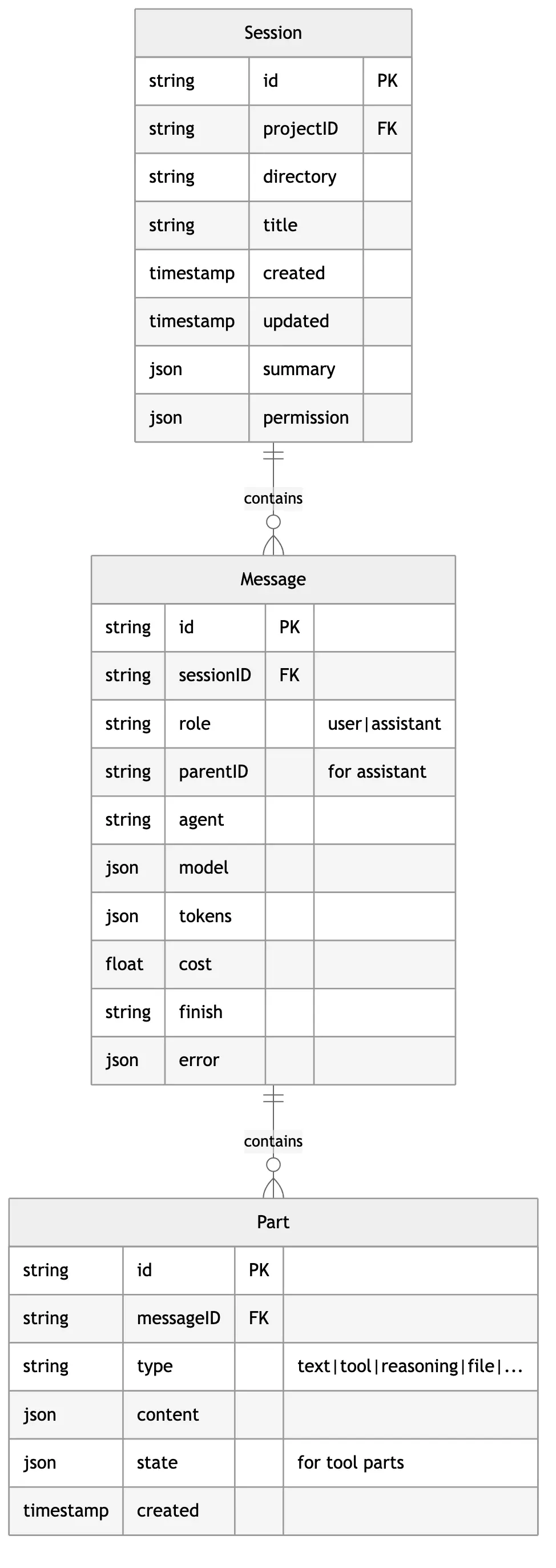
This three-layer structure is brilliantly designed:
- Session - A complete task session
- Message - A single user or AI utterance
- Part - Components within an utterance (text, tool calls, reasoning, etc.)
Why do we need the Part layer?
Traditional chatbots only have the Message layer — one message is just one piece of text. But AI Agent output is far more complex:
User: "Help me fix the bug in src/app.ts"

Assistant Response:
├─ ReasoningPart: "Let me read the file first..."
├─ ToolPart: { name: "read", input: {...}, output: "..." }
├─ ReasoningPart: "I found a type error on line 42..."
├─ ToolPart: { name: "edit", input: {...}, output: "..." }
├─ TextPart: "Fixed! The problem was..."
└─ PatchPart: { diff: "..." }
The Part layer enables:
- Streaming updates: Each Part can update independently, UI refreshes in real-time
- State tracking: Tool execution has independent state machines
- Fine-grained storage: Only update what changed
- Differentiated rendering: Reasoning, tool calls, and final responses use different styles
2.2 Message Type System
OpenCode uses Zod to define a strict type system:
// User Message Schema
const UserMessage = z.object({
  id: z.string(),
  sessionID: z.string(),
  role: z.literal("user"),
  time: z.object({ created: z.number() }),

  // AI configuration
  agent: z.string(),
  model: z.object({
    providerID: z.string(),
    modelID: z.string(),
  }),

  // Optional overrides
  system: z.string().optional(),      // Custom system prompt
  tools: z.record(z.boolean()).optional(), // Tool toggles
  variant: z.string().optional(),     // Model variant

  // Summary info
  summary: z.object({
    title: z.string().optional(),
    body: z.string().optional(),
    diffs: z.array(FileDiff),
  }).optional(),
});

// Assistant Message Schema
const AssistantMessage = z.object({
  id: z.string(),
  sessionID: z.string(),
  role: z.literal("assistant"),
  parentID: z.string(),  // Links to user message

  time: z.object({
    created: z.number(),
    completed: z.number().optional(),
  }),

  // Model info
  modelID: z.string(),
  providerID: z.string(),
  agent: z.string(),
  mode: z.string(),

  // Execution result
  finish: z.enum(["tool-calls", "stop", "length", "content-filter", "other"]),
  error: MessageError.optional(),

  // Cost tracking
  cost: z.number(),
  tokens: z.object({
    input: z.number(),
    output: z.number(),
    reasoning: z.number(),
    cache: z.object({ read: z.number(), write: z.number() }),
  }),
});
The Wisdom of the finish Field
Note the enum values for finish:
"tool-calls": AI needs to call tools, loop continues"stop": AI voluntarily ends, loop terminates"length": Output truncated due to length"content-filter": Content filtered"other": Other reasons
This field is the main loop’s control switch — only when finish !== "tool-calls" does the Agent stop working.
2.3 The Part Type Universe
Part uses the Discriminated Union pattern, a powerful feature of TypeScript’s type system:
type Part =
  | { type: "text"; content: string; }
  | { type: "reasoning"; content: string; }
  | { type: "tool"; state: ToolState; }
  | { type: "file"; source: "file" | "symbol" | "resource"; path: string; content: string; }
  | { type: "snapshot"; ref: string; }
  | { type: "patch"; diff: string; }
  | { type: "step-start"; snapshot: string; }
  | { type: "step-finish"; usage: Usage; }
  | { type: "agent"; agentID: string; }
  | { type: "compaction"; }
  | { type: "subtask"; taskID: string; }
  | { type: "retry"; attempt: number; };
Each type serves a unique purpose:
| Type | Purpose | Example |
|---|---|---|
text | AI’s text response | ”I’ve fixed this bug…” |
reasoning | Thinking process | ”Let me analyze this function…” |
tool | Tool invocation | Read, Write, Bash, Grep… |
file | File attachment | Code file contents |
snapshot | Git snapshot reference | For rollback |
patch | File changes | Modifications in diff format |
step-start/finish | Step boundaries | For token and cost calculation |
compaction | Compression marker | Marks context compression |
subtask | Subtask | Calls other Agents |
retry | Retry metadata | Records retry count |
2.4 Tool Part State Machine
Tool invocation is the Agent’s core capability, and its state management is crucial:

State Data Structure:
type ToolState =
  | {
      status: "pending";
      input: {};
      raw: string;  // Raw JSON received from stream
    }
  | {
      status: "running";
      input: Record<string, unknown>;
      title?: string;
      metadata?: Record<string, unknown>;
      time: { start: number };
    }
  | {
      status: "completed";
      input: Record<string, unknown>;
      output: string;
      title: string;
      metadata: Record<string, unknown>;
      time: { start: number; end: number; compacted?: number };
      attachments?: FilePart[];
    }
  | {
      status: "error";
      input: Record<string, unknown>;
      error: string;
      time: { start: number; end: number };
    };
Why do we need the pending state?
When an LLM decides to call a tool, it streams the tool’s parameters. Before the parameters are complete, we only have an incomplete JSON string:
Receiving: {"file_path": "src/ap
Receiving: {"file_path": "src/app.ts", "off
Receiving: {"file_path": "src/app.ts", "offset": 0, "limit": 100}
The pending state lets us show “Preparing tool call…” in the UI instead of waiting until parameters are complete.
Chapter 3: Agent System - The Art of Thinking
3.1 What is an Agent?
In OpenCode, an Agent isn’t just an LLM wrapper — it’s a personalized role definition. Each Agent has its own:
- System Prompt - Behavioral guidelines
- Permission configuration - What it can do
- Model parameters - temperature, topP, etc.
- Step limits - Maximum execution rounds
interface AgentInfo {
  name: string;           // Unique identifier
  mode: "subagent" | "primary" | "all";  // Usage mode
  permission?: PermissionRuleset;  // Permission rules
  prompt?: string;        // Custom System Prompt
  temperature?: number;   // Creativity level
  topP?: number;          // Sampling range
  steps?: number;         // Max steps
}
3.2 Built-in Agent Gallery
OpenCode comes with multiple specialized Agents:

Agent Responsibilities:
| Agent | Mode | Responsibility | Features |
|---|---|---|---|
build | primary | Main code execution Agent | Native permissions, most commonly used |
plan | primary | Planning phase Agent | For creating implementation plans |
explore | subagent | Codebase exploration | Read-only permissions, fast search |
general | subagent | General multi-step tasks | Full permissions |
compaction | hidden | Context compression | Auto-invoked, invisible to users |
title | hidden | Generate session titles | Uses small model, low cost |
summary | hidden | Generate message summaries | Auto-summarizes conversations |
3.3 The Brilliance of Explore Agent
The explore Agent is a read-only fast explorer, its design embodies the “principle of least privilege”:
{
  name: "explore",
  mode: "subagent",
  permission: {
    // Only allow read operations
    "tool.read": { allow: true },
    "tool.glob": { allow: true },
    "tool.grep": { allow: true },
    // Deny write operations
    "tool.write": { deny: true },
    "tool.edit": { deny: true },
    "tool.bash": { deny: true },
  },
  prompt: `You are a fast codebase explorer. Your job is to quickly
    find relevant files and code patterns. You cannot modify anything.`,
  steps: 10,  // Max 10 rounds, quick completion
}
Use Case:
When a user asks “How is routing implemented in this project?”, the main Agent can:
- Create an
exploresubtask - Explore Agent quickly searches the code
- Returns results to main Agent
- Main Agent synthesizes the answer
This design has several benefits:
- Safe: Exploration won’t accidentally modify files
- Efficient: explore has specially optimized prompts
- Parallel: Multiple exploration tasks can run concurrently
3.4 Agent Call Chain
User Input: "Help me refactor this function"
     │
     ▼
┌─────────────────────────────────────────────────────────────────┐
│                        Build Agent                              │
│  ┌───────────────────────────────────────────────────────────┐  │
│  │ Thinking: I need to understand this function's purpose    │  │
│  └───────────────────────────────────────────────────────────┘  │
│                              │                                  │
│                              ▼                                  │
│  ┌───────────────────────────────────────────────────────────┐  │
│  │ Tool Call: Task (create explore subtask)                  │  │
│  │ { agent: "explore", prompt: "Find all calls to this fn" } │  │
│  └───────────────────────────────────────────────────────────┘  │
│                              │                                  │
└──────────────────────────────│──────────────────────────────────┘
                               │
                               ▼
┌─────────────────────────────────────────────────────────────────┐
│                       Explore Agent                             │
│  ┌───────────────────────────────────────────────────────────┐  │
│  │ Tool: Grep (search function references)                   │  │
│  │ Tool: Read (read related files)                           │  │
│  │ Return: Found 5 calls in a.ts, b.ts, c.ts...              │  │
│  └───────────────────────────────────────────────────────────┘  │
└──────────────────────────────│──────────────────────────────────┘
                               │
                               ▼
┌─────────────────────────────────────────────────────────────────┐
│                        Build Agent (continues)                  │
│  ┌───────────────────────────────────────────────────────────┐  │
│  │ Thinking: Now I understand the context, safe to refactor  │  │
│  │ Tool: Edit (modify function)                              │  │
│  │ Tool: Edit (update call sites)                            │  │
│  │ Output: Refactoring complete, modified 6 files            │  │
│  └───────────────────────────────────────────────────────────┘  │
└─────────────────────────────────────────────────────────────────┘
Chapter 4: Tool System - AI’s “Swiss Army Knife”
4.1 Tool Design Philosophy
Tools are the bridge between Agent and the real world. OpenCode’s tool system follows several design principles:
- Declarative definition: Use Zod Schema to define parameters
- Context-aware: Each tool can access session context
- State tracking: Real-time execution status updates
- Permission control: Every tool call goes through permission checks
- Extensible: Supports custom tools and MCP protocol
4.2 Tool Definition Interface
// Tool definition interface
Tool.define = (id: string, init: () => ({
  description: string;           // Description for LLM
  parameters: ZodSchema;         // Parameter Schema
  execute: (args: T, ctx: ToolContext) => Promise<ToolResult>;
  formatValidationError?: (error: ZodError) => string;  // Custom error format
}));

// Tool context
interface ToolContext {
  sessionID: string;
  messageID: string;
  agent: string;
  abort: AbortSignal;           // For cancellation
  callID: string;               // Unique ID for this call

  // Dynamic methods
  metadata(input: object): Promise<void>;  // Update metadata
  ask(request: PermissionRequest): Promise<void>;  // Request permission
}

// Tool execution result
interface ToolResult {
  title: string;                // Title shown to user
  output: string;               // Output returned to LLM
  metadata?: Record<string, unknown>;  // Extra info
  attachments?: FilePart[];     // Attachments (like images)
}
4.3 Core Tools Explained
Read Tool - File Reading
Tool.define("read", () => ({
  description: `Reads a file from the local filesystem.
    - The file_path parameter must be an absolute path
    - By default reads up to 2000 lines
    - Can read images (PNG, JPG), PDFs, and Jupyter notebooks
    - Results use cat -n format with line numbers`,

  parameters: z.object({
    file_path: z.string().describe("Absolute path to the file"),
    offset: z.number().optional().describe("Starting line number"),
    limit: z.number().optional().describe("Number of lines to read"),
  }),

  async execute({ file_path, offset, limit }, ctx) {
    // 1. Normalize path
    const normalizedPath = normalizePath(file_path);

    // 2. Check permission
    if (isExternalPath(normalizedPath)) {
      await ctx.ask({ permission: "read.external", path: normalizedPath });
    }

    // 3. Detect file type
    const fileType = detectFileType(normalizedPath);

    // 4. Read based on type
    if (fileType === "image") {
      return { title: `Read image`, output: "[Image]", attachments: [...] };
    }
    if (fileType === "pdf") {
      return { title: `Read PDF`, output: extractPdfText(normalizedPath) };
    }

    // 5. Read text file
    const content = await readFile(normalizedPath, { offset, limit });

    return {
      title: `Read ${basename(normalizedPath)}`,
      output: formatWithLineNumbers(content, offset),
      metadata: { lines: content.split('\n').length, path: normalizedPath },
    };
  },
}));
Edit Tool - Precise Editing
Edit Tool is one of the most complex tools, implementing precise string replacement:
Tool.define("edit", () => ({
  description: `Performs exact string replacements in files.
    - You must read the file before editing
    - old_string must be unique in the file
    - Use replace_all for batch replacements`,

  parameters: z.object({
    file_path: z.string(),
    old_string: z.string().describe("Text to replace"),
    new_string: z.string().describe("Replacement text"),
    replace_all: z.boolean().default(false),
  }),

  async execute({ file_path, old_string, new_string, replace_all }, ctx) {
    // 1. Read current content
    const content = await readFile(file_path);

    // 2. Verify old_string exists and is unique (unless replace_all)
    const occurrences = countOccurrences(content, old_string);

    if (occurrences === 0) {
      throw new Error(`String not found in file`);
    }
    if (occurrences > 1 && !replace_all) {
      throw new Error(`String appears ${occurrences} times. Use replace_all or provide more context.`);
    }

    // 3. Perform replacement
    const newContent = replace_all
      ? content.replaceAll(old_string, new_string)
      : content.replace(old_string, new_string);

    // 4. Write file
    await writeFile(file_path, newContent);

    // 5. Generate diff
    const diff = createDiff(content, newContent, file_path);

    return {
      title: `Edit ${basename(file_path)}`,
      output: diff,
      metadata: {
        replacements: replace_all ? occurrences : 1,
        path: file_path,
      },
    };
  },
}));
Why string replacement instead of line numbers?
Line-based editing (“modify line 42”) seems simple but has a fatal flaw: LLMs can’t count lines accurately.
When AI says “look at line 42,” it might actually mean line 40 or 45. But string matching is precise — either found or not found.
This design has another benefit: it forces AI to provide context. If the replacement target isn’t unique, AI must provide more surrounding code for disambiguation, which actually improves editing accuracy.
Bash Tool - Shell Execution
Tool.define("bash", () => ({
  description: `Executes bash commands with timeout and security measures.
    - Avoid file operations, use dedicated tools instead
    - Commands timeout after 2 minutes by default
    - Output truncated at 30000 characters`,

  parameters: z.object({
    command: z.string(),
    timeout: z.number().max(600000).optional(),
    run_in_background: z.boolean().optional(),
    description: z.string().describe("5-10 word description of what this does"),
  }),

  async execute({ command, timeout = 120000, run_in_background }, ctx) {
    // 1. Security check
    if (containsDangerousPatterns(command)) {
      await ctx.ask({
        permission: "bash.dangerous",
        command,
        warning: "This command may be destructive",
      });
    }

    // 2. Create shell process
    const shell = await createShell({
      command,
      timeout,
      cwd: getWorkingDirectory(),
      abort: ctx.abort,
    });

    // 3. Handle background execution
    if (run_in_background) {
      return {
        title: `Background: ${description}`,
        output: `Started in background. Task ID: ${shell.id}`,
        metadata: { taskId: shell.id, background: true },
      };
    }

    // 4. Wait for completion
    const result = await shell.wait();

    // 5. Truncate long output
    const output = truncate(result.output, 30000);

    return {
      title: description || `Run: ${command.slice(0, 50)}`,
      output: `Exit code: ${result.exitCode}\n\n${output}`,
      metadata: { exitCode: result.exitCode, duration: result.duration },
    };
  },
}));
4.4 Tool Registry
All tools are managed through ToolRegistry:
namespace ToolRegistry {
  export function tools(providerID: string, agent?: string): Tool[] {
    const builtinTools = [
      InvalidTool,      // Handle invalid tool calls
      BashTool,         // Shell execution
      ReadTool,         // File reading
      GlobTool,         // File matching
      GrepTool,         // Code search
      EditTool,         // File editing
      WriteTool,        // File writing
      TaskTool,         // Subtasks
      WebFetchTool,     // Web fetching
      TodoReadTool,     // Task list reading
      TodoWriteTool,    // Task list writing
      WebSearchTool,    // Web search
      SkillTool,        // Skill invocation
    ];

    // Optional tools
    if (Config.get().experimental?.lsp) {
      builtinTools.push(LSPTool);  // Language Server Protocol
    }
    if (Config.get().experimental?.batch) {
      builtinTools.push(BatchTool);  // Batch operations
    }

    // Custom tools
    const customTools = loadCustomTools("~/.opencode/tool/");

    // MCP tools
    const mcpTools = MCP.tools();

    return [...builtinTools, ...customTools, ...mcpTools];
  }
}
4.5 MCP: Infinite Tool Extension
Model Context Protocol (MCP) is an open protocol that allows external services to provide tools and resources for AI. OpenCode fully supports MCP:
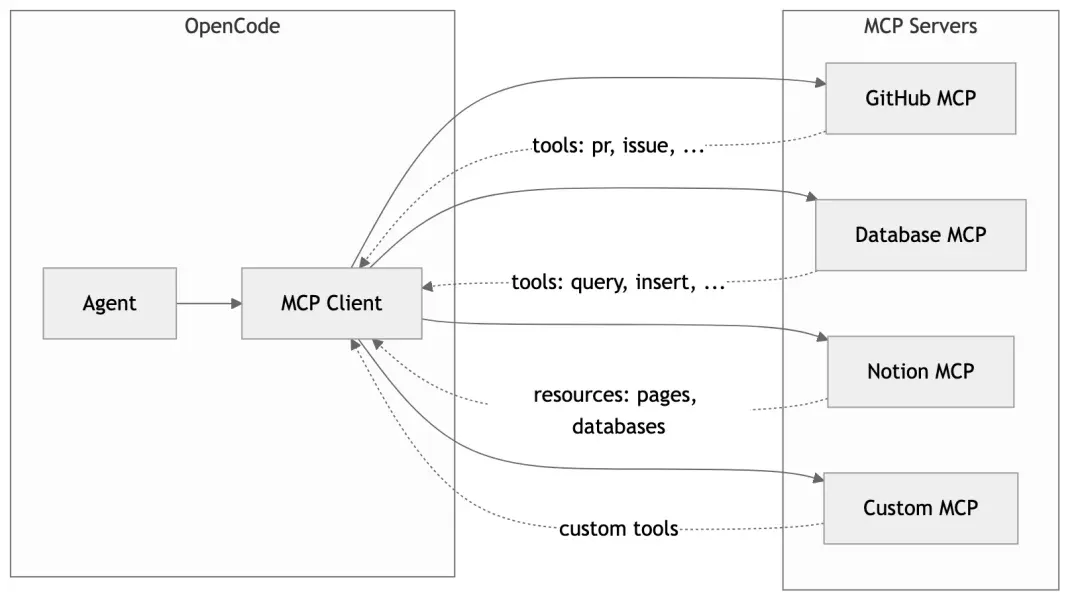
Configuring MCP servers:
// .opencode/config.json
{
  "mcp": {
    "servers": {
      "github": {
        "command": "npx",
        "args": ["-y", "@modelcontextprotocol/server-github"],
        "env": {
          "GITHUB_TOKEN": "..."
        }
      },
      "postgres": {
        "command": "npx",
        "args": ["-y", "@modelcontextprotocol/server-postgres"],
        "env": {
          "DATABASE_URL": "..."
        }
      }
    }
  }
}
This way, AI can directly manipulate GitHub PRs, query databases, or even update Notion documents — all these capabilities added through configuration, no code changes needed.
Chapter 5: Provider Abstraction Layer - Everything Can Be LLM
5.1 The Multi-Provider Challenge
There are too many LLM providers on the market:
- Anthropic (Claude)
- OpenAI (GPT-4, o1)
- Google (Gemini, Vertex AI)
- Azure OpenAI
- AWS Bedrock
- Groq, Mistral, Cohere…
Each provider’s API is slightly different: different authentication methods, request formats, streaming implementations, error handling…
OpenCode’s Provider abstraction layer solves this problem.
5.2 Unified Provider Interface
interface Provider {
  id: string;
  name: string;

  // Authentication
  getApiKey(): string | undefined;

  // Model list
  models(): Model[];

  // Get language model instance
  languageModel(modelID: string, options?: ModelOptions): LanguageModel;
}

interface Model {
  id: string;
  name: string;
  provider: string;

  // Capabilities
  context: number;          // Context window size
  maxOutput?: number;       // Max output length
  supportsImages?: boolean; // Image input support
  supportsToolUse?: boolean; // Tool use support
  supportsReasoning?: boolean; // Reasoning support (like o1)

  // Cost
  pricing?: {
    input: number;   // $ per 1M tokens
    output: number;
    cache?: { read: number; write: number };
  };

  // Configuration
  options?: ModelOptions;
}
5.3 Provider Registry
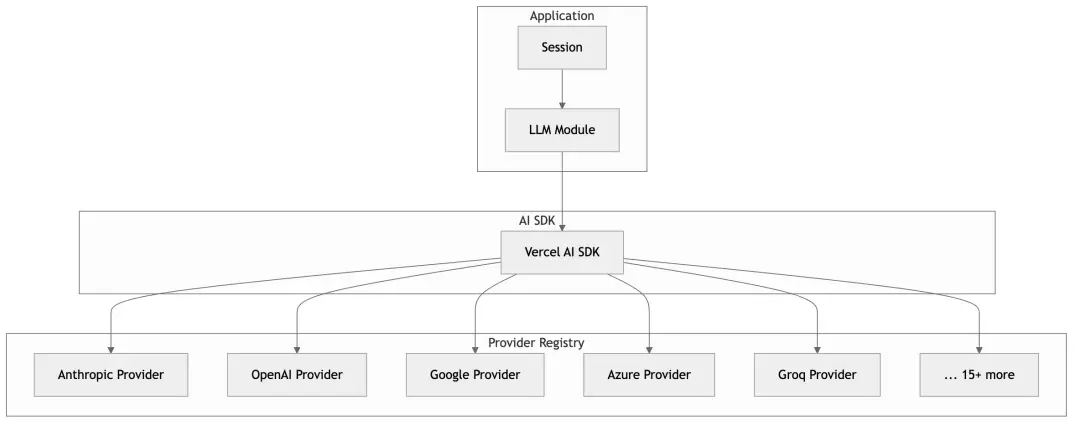
OpenCode uses Vercel AI SDK as its foundation, which provides a unified streaming interface:
import { streamText } from "ai";
import { anthropic } from "@ai-sdk/anthropic";
import { openai } from "@ai-sdk/openai";
import { google } from "@ai-sdk/google";

// Same calling pattern regardless of provider
const result = await streamText({
  model: anthropic("claude-3-5-sonnet"),  // or openai("gpt-4"), google("gemini-pro")
  messages: [...],
  tools: {...},
});

for await (const chunk of result.fullStream) {
  // Unified stream processing
}
5.4 Smart Model Selection
OpenCode automatically selects appropriate models based on tasks:
// Main tasks: Use configured main model
const mainModel = await Provider.getModel(config.model);

// Small tasks (titles, summaries): Use small model to save costs
const smallModel = await Provider.getSmallModel(mainModel);

// Different models for different tasks
async function generateTitle(sessionID: string) {
  return LLM.stream({
    model: smallModel,  // Use cheap small model
    small: true,
    agent: "title",
    // ...
  });
}

async function executeMainTask(sessionID: string) {
  return LLM.stream({
    model: mainModel,   // Use powerful main model
    agent: "build",
    // ...
  });
}
5.5 Provider-Specific Optimizations
Different providers have different best practices, and OpenCode optimizes for them:
// Anthropic-specific System Prompt
const PROMPT_ANTHROPIC = `You are Claude, made by Anthropic.
You have access to a set of tools...`;

// OpenAI-specific System Prompt
const PROMPT_OPENAI = `You are a helpful assistant with access to tools...`;

// Select appropriate prompt based on Provider
function getSystemPrompt(providerID: string, model: Model) {
  if (providerID === "anthropic") {
    return PROMPT_ANTHROPIC;
  }
  if (providerID === "openai" && model.supportsReasoning) {
    return PROMPT_OPENAI_REASONING;  // Special handling for o1 models
  }
  // ...
}
Prompt Caching Optimization
Anthropic supports Prompt Caching, which can cache System Prompts to reduce token consumption:
// System prompt split into two parts
const system = [
  header,   // [0] Static header - cacheable
  body,     // [1] Dynamic body
];

// If header unchanged, API uses cache
// Significantly reduces input token cost
Chapter 6: Context Compression - The Art of Memory
6.1 The Long Conversation Dilemma
LLMs have a fundamental limitation: context windows are finite.
Even Claude’s 200K token window can be quickly filled in complex programming tasks:
User question              → 500 tokens
Code file 1 (500 lines)    → 8,000 tokens
Code file 2 (300 lines)    → 5,000 tokens
AI thinking + response     → 3,000 tokens
Tool call result 1         → 2,000 tokens
Tool call result 2         → 10,000 tokens
...
After round 10             → 150,000 tokens 😱
When context approaches the limit, two bad things happen:
- Performance degrades: Processing time increases, quality decreases
- Failure risk: Exceeding the limit causes errors
6.2 OpenCode’s Compression Strategy
OpenCode employs a multi-layer compression strategy:
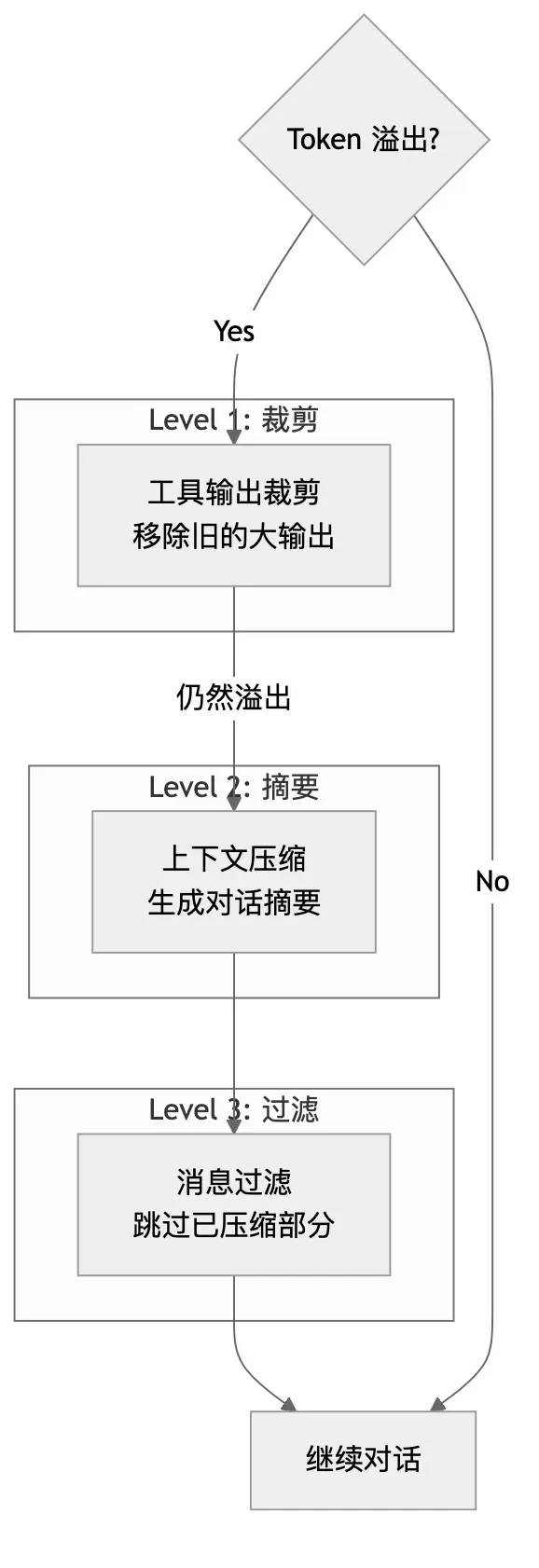
Layer 1: Tool Output Pruning
Old tool outputs often occupy lots of space but are no longer needed:
async function prune(sessionID: string) {
  const messages = await Session.messages(sessionID);
  let protectedTokens = 0;
  const PROTECT_THRESHOLD = 40_000;  // Protect recent 40K tokens
  const PRUNE_THRESHOLD = 20_000;    // Only prune outputs > 20K

  // Scan from end to start
  for (let i = messages.length - 1; i >= 0; i--) {
    const msg = messages[i];

    for (const part of msg.parts) {
      if (part.type === "tool" && part.state.status === "completed") {
        const outputSize = estimateTokens(part.state.output);

        // Protect recent tool calls
        if (protectedTokens < PROTECT_THRESHOLD) {
          protectedTokens += outputSize;
          continue;
        }

        // Prune large outputs
        if (outputSize > PRUNE_THRESHOLD) {
          part.state.output = "[TOOL OUTPUT PRUNED]";
          part.state.time.compacted = Date.now();
        }
      }
    }
  }
}
Why not prune everything?
AI needs to reference recent tool outputs when thinking. If all outputs are pruned, it loses context and starts repeating the same tool calls (“Let me read that file again…”).
The 40K token protection zone is a balance: enough for AI to work, but not taking up too much space.
Layer 2: Context Compaction
When pruning isn’t enough, more aggressive compression is needed — generating summaries:
async function compact(sessionID: string) {
  // 1. Create compaction Agent message
  const compactionMessage = await Session.createAssistant({
    sessionID,
    agent: "compaction",
    mode: "compact",
  });

  // 2. Build compaction prompt
  const compactionPrompt = `You are a conversation summarizer. Your task is to create a comprehensive
summary of the conversation so far that preserves all important context
needed to continue the task.

Include:
- What the user originally asked
- What actions have been taken
- Current state of the task
- Any important findings or decisions

The summary will replace the conversation history, so it must be complete.`;

  // 3. Call LLM to generate summary
  const summary = await LLM.stream({
    agent: "compaction",
    messages: getAllMessages(sessionID),
    system: compactionPrompt,
  });

  // 4. Mark compaction point
  await Session.updatePart(compactionMessage.id, {
    type: "compaction",
  });

  // 5. Create synthetic user message to continue conversation
  await Session.createSyntheticUser({
    sessionID,
    content: "Please continue with the task based on the summary above.",
  });
}
Conversation history after compaction:
[Before compaction - 150K tokens]
User: Help me refactor the user module
AI: Let me check the code... [20 tool calls]
User: That function has a bug
AI: I'll fix it... [15 tool calls]
User: Also need tests
AI: Sure... [10 tool calls]

[After compaction - 5K tokens]
AI (compaction):
## Task Summary
User requested refactoring of user module. Completed:
1. Analyzed all files under src/user/
2. Refactored UserService, split into three smaller classes
3. Fixed null pointer bug in getUserById
4. Added unit tests, 85% coverage

Current state: Basically complete, user may have follow-up requests.

User (synthetic): Please continue with the task based on the summary above.
Layer 3: Message Filtering
When building LLM input, compacted sections are automatically skipped:
function filterCompacted(messages: Message[]): Message[] {
  // Find last compaction marker
  const lastCompactionIndex = messages.findLastIndex(
    msg => msg.parts.some(p => p.type === "compaction")
  );

  if (lastCompactionIndex === -1) {
    return messages;  // No compaction, return all
  }

  // Only return messages after compaction marker
  return messages.slice(lastCompactionIndex);
}
6.3 Overflow Detection
function isOverflow(model: Model, messages: Message[]): boolean {
  const contextLimit = model.context;
  const outputReserve = model.maxOutput || 8192;
  const currentTokens = estimateTokens(messages);

  // Leave enough room for output
  return currentTokens > contextLimit - outputReserve;
}
This check runs before every LLM call. Once overflow risk is detected, the compression process triggers immediately.
Chapter 7: Security & Permissions - Trust But Verify
7.1 Why Do We Need a Permission System?
AI Agents have powerful capabilities, but “with great power comes great responsibility.” Imagine these scenarios:
- What if AI executes
rm -rf /? - What if AI reads
~/.ssh/id_rsa? - What if AI sends your code to external services?
Without a permission system, all of these could happen. OpenCode implements fine-grained permission control.
7.2 Permission Model
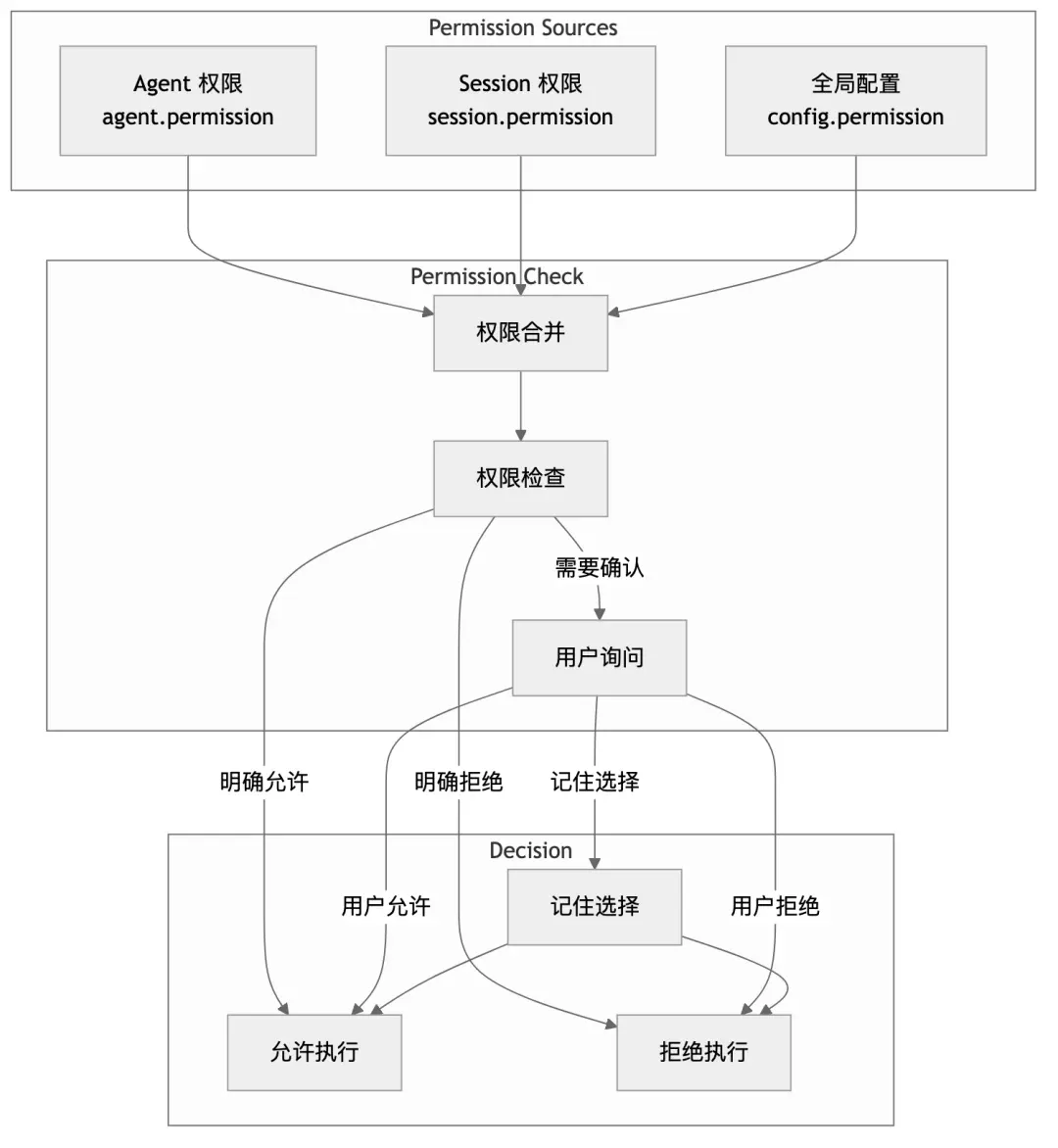
7.3 Permission Rule Definition
interface PermissionRule {
  // Match conditions
  tool?: string;           // Tool name match
  path?: string | RegExp;  // Path match
  command?: string | RegExp; // Command match

  // Decision
  allow?: boolean;         // Allow
  deny?: boolean;          // Deny
  ask?: boolean;           // Ask user

  // Memory
  always?: boolean;        // Remember this choice
}

// Example configuration
const permissionRules: PermissionRule[] = [
  // Allow reading project files
  { tool: "read", path: /^\/project\//, allow: true },

  // Deny reading private keys
  { tool: "read", path: /\.ssh|\.env|password/, deny: true },

  // Dangerous commands need confirmation
  { tool: "bash", command: /rm|sudo|chmod|curl/, ask: true },

  // External paths need confirmation
  { tool: "write", path: /^(?!\/project\/)/, ask: true },
];
7.4 Permission Check Flow
async function checkPermission(
  tool: string,
  args: Record<string, unknown>,
  ctx: ToolContext
): Promise<void> {
  // 1. Get merged permission rules
  const rules = PermissionNext.merge(
    ctx.agent.permission,
    ctx.session.permission,
    Config.get().permission
  );

  // 2. Find matching rule
  const matchedRule = rules.find(rule => matches(rule, tool, args));

  // 3. If explicitly allowed, pass through
  if (matchedRule?.allow) {
    return;
  }

  // 4. If explicitly denied, throw exception
  if (matchedRule?.deny) {
    throw new PermissionNext.RejectedError(tool, args);
  }

  // 5. If needs asking, request user confirmation
  if (!matchedRule || matchedRule.ask) {
    await ctx.ask({
      permission: `tool.${tool}`,
      metadata: args,
      patterns: extractPatterns(args),
      always: matchedRule?.always ?? false,
    });
  }
}
7.5 User Interaction Interface
When user confirmation is needed, CLI displays:
┌─────────────────────────────────────────────────────────────────┐
│  🔐 Permission Required                                         │
├─────────────────────────────────────────────────────────────────┤
│                                                                 │
│  Tool: bash                                                     │
│  Command: rm -rf ./dist                                         │
│                                                                 │
│  This command will delete the ./dist directory.                 │
│                                                                 │
│  [Y] Allow once                                                 │
│  [A] Always allow this pattern                                  │
│  [N] Deny                                                       │
│  [D] Always deny this pattern                                   │
│                                                                 │
└─────────────────────────────────────────────────────────────────┘
Selecting “Always allow” saves the rule to Session permissions, and future matching requests pass automatically.
7.6 Doom Loop Detection
The permission system also includes special protection: doom loop detection.
When AI gets stuck in an ineffective loop (repeatedly calling the same tool), the system automatically intervenes:
function detectDoomLoop(toolParts: ToolPart[]): boolean {
  if (toolParts.length < 3) return false;

  // Get last 3 tool calls
  const last3 = toolParts.slice(-3);

  // Check if completely identical
  const allSame = last3.every(part =>
    part.state.name === last3[0].state.name &&
    JSON.stringify(part.state.input) === JSON.stringify(last3[0].state.input)
  );

  return allSame;
}

// Check during tool call
async function onToolCall(tool: string, input: object, ctx: ToolContext) {
  if (detectDoomLoop(getRecentToolParts(ctx.messageID))) {
    // Ask user whether to continue
    await ctx.ask({
      permission: "doom_loop",
      message: `AI is calling the same tool (${tool}) repeatedly with identical arguments. This might indicate a stuck loop.`,
      options: ["Continue anyway", "Stop and intervene"],
    });
  }
}
Chapter 8: Deep Dive into Key Technical Highlights
8.1 Streaming Reasoning Extraction
One of OpenCode’s coolest features is showing AI’s thinking process in real-time. How is this implemented?
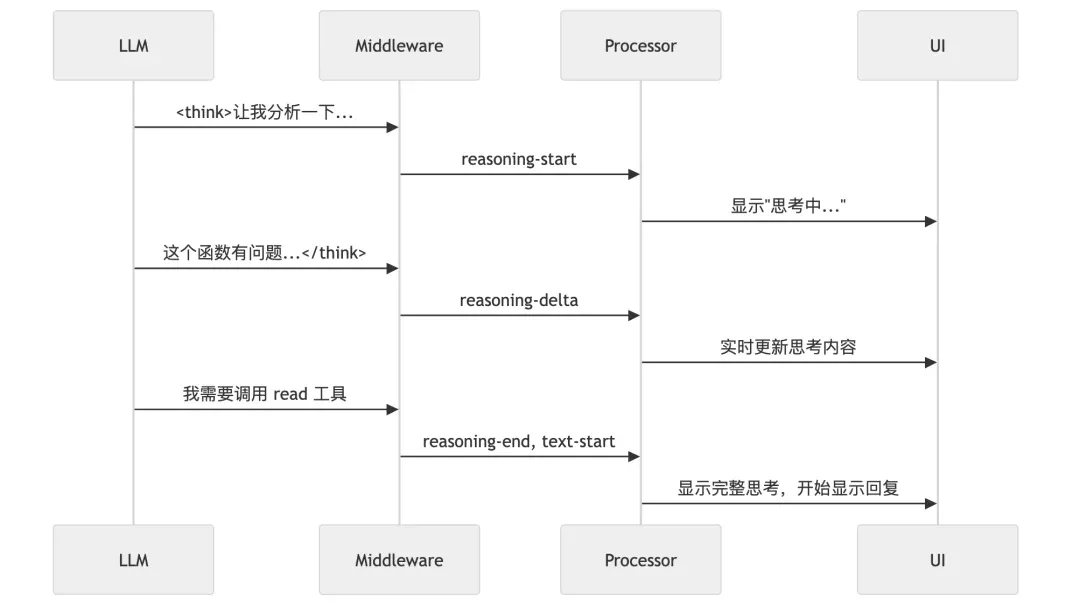
Implementation:
import { wrapLanguageModel, extractReasoningMiddleware } from "ai";

// Wrap model to extract reasoning
const wrappedModel = wrapLanguageModel(baseModel,
  extractReasoningMiddleware({
    tagName: "think"  // Extract content from <think>...</think>
  })
);

// Stream event handling
for await (const event of stream.fullStream) {
  switch (event.type) {
    case "reasoning-start":
      // Create reasoning Part
      createReasoningPart(messageID);
      break;

    case "reasoning-delta":
      // Append reasoning content
      appendToReasoningPart(messageID, event.text);
      // Real-time UI update
      publishPartUpdate(messageID, partID);
      break;

    case "reasoning-end":
      // Complete reasoning
      finalizeReasoningPart(messageID);
      break;
  }
}
What users see:
┌─────────────────────────────────────────────────────────────────┐
│ 🤔 Thinking...                                                  │
├─────────────────────────────────────────────────────────────────┤
│ Let me analyze this function.                                   │
│                                                                 │
│ The problem is on line 42: fetchData() returns Promise<string>, │
│ but the code directly assigns to a string variable without await│
│                                                                 │
│ I need to:                                                      │
│ 1. Read the full file to confirm context                        │
│ 2. Add the await keyword                                        │
│ 3. Make sure the function is async                              │
└─────────────────────────────────────────────────────────────────┘
This not only provides better UX but also adds transparency — users can see how AI thinks, better understanding and verifying its decisions.
8.2 File System Snapshots and Rollback
Another highlight of OpenCode is that any modification can be rolled back. This is achieved through Git snapshots:
// Create snapshot at step start
async function onStepStart(ctx: StepContext) {
  // Record current Git state
  const snapshot = await Snapshot.track({
    directory: ctx.directory,
    includeUntracked: true,  // Include untracked files
  });

  // Save snapshot reference
  await Session.updatePart(ctx.messageID, {
    type: "step-start",
    snapshot: snapshot.ref,
  });
}

// Calculate changes at step end
async function onStepFinish(ctx: StepContext) {
  const startSnapshot = getStepStartSnapshot(ctx.messageID);
  const currentSnapshot = await Snapshot.track({ directory: ctx.directory });

  // Calculate diff
  const patch = await Snapshot.diff(startSnapshot, currentSnapshot);

  // Save patch
  await Session.updatePart(ctx.messageID, {
    type: "patch",
    diff: patch,
    additions: countAdditions(patch),
    deletions: countDeletions(patch),
  });
}

// Rollback to any snapshot
async function revert(sessionID: string, messageID: string) {
  const snapshot = await Session.getSnapshot(messageID);

  // Restore file state
  await Snapshot.restore(snapshot.ref);

  // Create rollback message
  await Session.updatePart(messageID, {
    type: "revert",
    snapshot: snapshot.ref,
  });
}
Rollback interface:
┌─────────────────────────────────────────────────────────────────┐
│ 📜 Session History                                              │
├─────────────────────────────────────────────────────────────────┤
│                                                                 │
│ [1] 10:30 - Read src/app.ts                                    │
│ [2] 10:31 - Edit src/app.ts (+5, -3)          [🔄 Revert]      │
│ [3] 10:32 - Run tests                                          │
│ [4] 10:33 - Edit src/utils.ts (+20, -0)       [🔄 Revert]      │
│ [5] 10:35 - Create src/new-file.ts (+50, -0)  [🔄 Revert]      │
│                                                                 │
│ Select step to revert, or press Q to cancel                     │
└─────────────────────────────────────────────────────────────────┘
8.3 Smart Summary Generation
After each conversation ends, OpenCode automatically generates summaries:
async function summarize(sessionID: string, messageID: string) {
  // 1. Generate title
  const title = await generateTitle(sessionID, messageID);

  // 2. Generate body summary
  const body = await generateBody(sessionID, messageID);

  // 3. Calculate file change stats
  const diffs = await computeDiffs(sessionID);

  // 4. Save summary
  await Session.updateMessage(messageID, {
    summary: { title, body, diffs },
  });
}

async function generateTitle(sessionID: string, messageID: string) {
  // Use small model for title generation
  const result = await LLM.stream({
    model: smallModel,
    agent: "title",
    messages: getFirstUserMessage(sessionID),
    system: "Generate a concise title (max 100 chars) for this conversation.",
  });

  return result.text.slice(0, 100);
}
Summaries are used for:
- Session list display
- History search
- Reference after context compaction
8.4 Prompt Caching Optimization
Anthropic’s API supports Prompt Caching, and OpenCode fully leverages this:
// System prompt split into two parts
function buildSystemPrompt(agent: Agent, custom: string[]) {
  return [
    // [0] Static header - can be cached
    PROVIDER_HEADER,

    // [1] Dynamic body - may change each time
    [
      agent.prompt,
      ...custom,
      environmentInfo(),
    ].join("\n"),
  ];
}

// If header unchanged, Anthropic uses cache
// Can save 50-90% input tokens
Cost comparison:
Without Caching:
- Input: 50,000 tokens × $3/M = $0.15
- Output: 2,000 tokens × $15/M = $0.03
- Total: $0.18

With Caching (80% cache hit):
- Input (cached): 40,000 tokens × $0.30/M = $0.012
- Input (new): 10,000 tokens × $3/M = $0.03
- Output: 2,000 tokens × $15/M = $0.03
- Total: $0.072

Savings: 60%!
8.5 Parallel Tool Execution
When AI needs to call multiple independent tools, OpenCode supports parallel execution:
// AI returns multiple tool calls
const toolCalls = [
  { name: "read", args: { file_path: "src/a.ts" } },
  { name: "read", args: { file_path: "src/b.ts" } },
  { name: "grep", args: { pattern: "TODO", path: "src/" } },
];

// Execute all tools in parallel
const results = await Promise.all(
  toolCalls.map(async (call) => {
    const tool = ToolRegistry.get(call.name);
    return tool.execute(call.args, ctx);
  })
);

// All results returned to LLM together
This significantly improves efficiency, especially when reading multiple files or running multiple searches.
Chapter 9: Learning Design Patterns from Source Code
OpenCode’s codebase is an excellent tutorial for learning modern TypeScript design patterns. Let’s see which patterns it uses.
9.1 Namespace Pattern
OpenCode heavily uses TypeScript’s namespace for code organization:
// session/index.ts
export namespace Session {
  // Type definitions
  export const Info = z.object({...});
  export type Info = z.infer<typeof Info>;

  // Event definitions
  export const Event = {
    Created: BusEvent.define("session.created", Info),
    Updated: BusEvent.define("session.updated", Info),
    Deleted: BusEvent.define("session.deleted", z.string()),
  };

  // Methods
  export async function create(input: CreateInput): Promise<Info> {...}
  export async function get(id: string): Promise<Info | null> {...}
  export async function update(id: string, editor: Editor): Promise<Info> {...}
  export async function remove(id: string): Promise<void> {...}
}
Why Namespace?
- Namespace isolation: Avoid global pollution
- Code organization: Related functionality together
- Type and value coexistence:
Session.Infois both type and Schema - Self-documenting:
Session.create()is clearer thancreateSession()
9.2 Discriminated Union Pattern
// Use literal types as discriminators
type Part =
  | { type: "text"; content: string; }
  | { type: "tool"; state: ToolState; }
  | { type: "reasoning"; content: string; };

// Type narrowing
function renderPart(part: Part) {
  switch (part.type) {
    case "text":
      // TypeScript knows part is { type: "text"; content: string }
      return <Text>{part.content}</Text>;
    case "tool":
      // TypeScript knows part is { type: "tool"; state: ToolState }
      return <ToolCall state={part.state} />;
    case "reasoning":
      return <Thinking>{part.content}</Thinking>;
  }
}
This pattern is ubiquitous in OpenCode, making complex types manageable.
9.3 Builder Pattern
System Prompt construction uses the Builder pattern:
class SystemPromptBuilder {
  private parts: string[] = [];

  addHeader(providerID: string) {
    this.parts.push(SystemPrompt.header(providerID));
    return this;
  }

  addAgentPrompt(agent: Agent) {
    if (agent.prompt) {
      this.parts.push(agent.prompt);
    }
    return this;
  }

  addCustomInstructions(paths: string[]) {
    for (const path of paths) {
      const content = readFileSync(path, "utf-8");
      this.parts.push(content);
    }
    return this;
  }

  addEnvironment(info: EnvInfo) {
    this.parts.push(formatEnvironment(info));
    return this;
  }

  build(): string[] {
    // Return cacheable two-part structure
    return [
      this.parts[0],  // header
      this.parts.slice(1).join("\n"),  // body
    ];
  }
}
9.4 Factory Pattern
Tool creation uses the Factory pattern:
namespace Tool {
  export function define<T extends z.ZodObject<any>>(
    id: string,
    init: () => ToolDefinition<T>
  ): Tool {
    // Lazy initialization
    let definition: ToolDefinition<T> | null = null;

    return {
      id,
      get schema() {
        definition ??= init();
        return definition.parameters;
      },
      get description() {
        definition ??= init();
        return definition.description;
      },
      async execute(args: z.infer<T>, ctx: ToolContext) {
        definition ??= init();
        return definition.execute(args, ctx);
      },
    };
  }
}

// Usage
const ReadTool = Tool.define("read", () => ({
  description: "Reads a file",
  parameters: z.object({ file_path: z.string() }),
  execute: async (args, ctx) => {...},
}));
Lazy initialization (init() only called on first use) speeds up startup.
9.5 Observer Pattern (Event Bus)
OpenCode uses an event bus for loosely-coupled communication:
// Define events
const SessionCreated = BusEvent.define("session.created", Session.Info);
const MessageUpdated = BusEvent.define("message.updated", MessageV2.Info);

// Publish events
Bus.publish(SessionCreated, sessionInfo);

// Subscribe to events
Bus.subscribe(SessionCreated, (session) => {
  console.log(`New session: ${session.title}`);
});

// Use in UI
function SessionList() {
  const [sessions, setSessions] = useState<Session.Info[]>([]);

  useEffect(() => {
    // Subscribe to session changes
    const unsubscribe = Bus.subscribe(SessionCreated, (session) => {
      setSessions(prev => [...prev, session]);
    });

    return unsubscribe;
  }, []);

  return <List items={sessions} />;
}
9.6 Strategy Pattern
Provider implementation uses the Strategy pattern:
interface ProviderStrategy {
  id: string;
  getApiKey(): string | undefined;
  models(): Model[];
  languageModel(modelID: string): LanguageModel;
}

class AnthropicProvider implements ProviderStrategy {
  id = "anthropic";

  getApiKey() {
    return process.env.ANTHROPIC_API_KEY;
  }

  models() {
    return [
      { id: "claude-3-5-sonnet", context: 200000, ... },
      { id: "claude-3-opus", context: 200000, ... },
    ];
  }

  languageModel(modelID: string) {
    return anthropic(modelID);
  }
}

class OpenAIProvider implements ProviderStrategy {
  id = "openai";
  // ... different implementation
}

// Unified usage
function getProvider(id: string): ProviderStrategy {
  const providers = {
    anthropic: new AnthropicProvider(),
    openai: new OpenAIProvider(),
    // ...
  };
  return providers[id];
}
Chapter 10: Performance Optimization & Engineering Practices
10.1 Startup Performance Optimization
CLI tool startup speed is crucial. OpenCode employs multiple optimizations:
// 1. Lazy imports
async function runCommand() {
  // Only import heavy modules when needed
  const { Session } = await import("./session");
  const { Server } = await import("./server");
  // ...
}

// 2. Lazy initialization
let _config: Config | null = null;
function getConfig() {
  // Only load config on first call
  _config ??= loadConfig();
  return _config;
}

// 3. Parallel initialization
async function bootstrap() {
  // Execute independent init tasks in parallel
  await Promise.all([
    loadConfig(),
    initializeStorage(),
    discoverMCPServers(),
  ]);
}
10.2 Memory Management
Long-running Agents need careful memory management:
// 1. Stream processing, avoid large strings
async function* streamFile(path: string) {
  const stream = createReadStream(path);
  for await (const chunk of stream) {
    yield chunk.toString();
  }
}

// 2. Timely cleanup
function cleanup(sessionID: string) {
  // Clear caches
  messageCache.delete(sessionID);
  partCache.delete(sessionID);

  // Trigger GC (in Bun)
  Bun.gc(true);
}

// 3. Weak reference caches
const cache = new WeakMap<object, ComputedValue>();
10.3 Concurrency Control
// Use semaphore to limit concurrency
class Semaphore {
  private permits: number;
  private queue: (() => void)[] = [];

  constructor(permits: number) {
    this.permits = permits;
  }

  async acquire() {
    if (this.permits > 0) {
      this.permits--;
      return;
    }
    await new Promise<void>(resolve => this.queue.push(resolve));
  }

  release() {
    const next = this.queue.shift();
    if (next) {
      next();
    } else {
      this.permits++;
    }
  }
}

// Limit concurrent tool executions
const toolSemaphore = new Semaphore(5);

async function executeTool(tool: Tool, args: object, ctx: ToolContext) {
  await toolSemaphore.acquire();
  try {
    return await tool.execute(args, ctx);
  } finally {
    toolSemaphore.release();
  }
}
10.4 Error Handling Best Practices
// 1. Typed errors
class ToolExecutionError extends Error {
  constructor(
    public tool: string,
    public args: object,
    public cause: Error
  ) {
    super(`Tool ${tool} failed: ${cause.message}`);
    this.name = "ToolExecutionError";
  }
}

// 2. Error boundaries
async function safeExecute<T>(
  fn: () => Promise<T>,
  fallback: T
): Promise<T> {
  try {
    return await fn();
  } catch (error) {
    console.error("Execution failed:", error);
    return fallback;
  }
}

// 3. Retry logic
async function withRetry<T>(
  fn: () => Promise<T>,
  options: { maxAttempts: number; delay: number }
): Promise<T> {
  let lastError: Error | undefined;

  for (let attempt = 1; attempt <= options.maxAttempts; attempt++) {
    try {
      return await fn();
    } catch (error) {
      lastError = error as Error;

      if (!isRetryable(error) || attempt === options.maxAttempts) {
        throw error;
      }

      // Exponential backoff
      await sleep(options.delay * Math.pow(2, attempt - 1));
    }
  }

  throw lastError;
}
10.5 Testing Strategy
// 1. Unit tests
describe("Session", () => {
  it("should create session with correct defaults", async () => {
    const session = await Session.create({
      projectID: "test-project",
      directory: "/test",
    });

    expect(session.id).toBeDefined();
    expect(session.title).toBe("");
    expect(session.time.created).toBeLessThanOrEqual(Date.now());
  });
});

// 2. Integration tests
describe("Tool Execution", () => {
  it("should read file correctly", async () => {
    const result = await ReadTool.execute(
      { file_path: "/test/file.txt" },
      mockContext
    );

    expect(result.output).toContain("file content");
  });
});

// 3. E2E tests
describe("Full Workflow", () => {
  it("should complete code editing task", async () => {
    const session = await Session.create({...});

    await SessionPrompt.prompt({
      sessionID: session.id,
      parts: [{ type: "text", content: "Fix the bug in app.ts" }],
    });

    const messages = await Session.messages(session.id);
    const lastAssistant = messages.findLast(m => m.role === "assistant");

    expect(lastAssistant.finish).toBe("stop");
    expect(lastAssistant.parts.some(p =>
      p.type === "tool" && p.state.name === "edit"
    )).toBe(true);
  });
});
Conclusion: The Future of AI Programming
Review: What Did We Learn?
By diving deep into OpenCode’s source code, we’ve seen a complete implementation of a modern AI Agent framework:
- Session Management: Three-layer structure (Session → Message → Part) supporting complex state tracking
- Agent System: Specialized role definitions, supporting subtasks and parallel execution
- Tool System: Declarative definitions, context-aware, permission-controlled
- Provider Abstraction: Unified interface, supporting 18+ LLM providers
- Context Compression: Multi-layer strategies (pruning, summarization, filtering) solving long conversation issues
- Security Mechanisms: Fine-grained permission control, doom loop protection
Looking Forward: What’s Next for AI Programming
OpenCode represents the current state of AI coding assistants, but this is just the beginning. Possible future directions:
1. Stronger Code Understanding
- More LSP feature integration
- Type inference and refactoring support
- Understanding project architecture and design patterns
2. Smarter Task Planning
- Automatic decomposition of complex tasks
- Predicting potential problems and solutions
- Learning user coding habits
3. Better Collaboration Experience
- Multi-Agent collaboration
- Human-AI hybrid programming
- Real-time code review
4. Broader Integration
- CI/CD system integration
- More programming languages and frameworks
- Connecting more external services (databases, APIs, documentation)
Final Words
OpenCode isn’t just a tool — it’s a serious answer to “what can AI do for programming.”
Its codebase demonstrates how to wrap complex AI capabilities into an elegant development experience. Every design decision — from streaming reasoning extraction to context compression, from permission systems to rollback features — is aimed at making AI a truly useful programming companion.
If you’re a developer, I strongly recommend:
- Use it: Experience AI programming firsthand
- Read it: Source code is the best textbook
- Contribute: Open source projects need community power
AI won’t replace programmers, but programmers who use AI will replace those who don’t.
Now is the time to embrace the future of AI programming.
This article is based on OpenCode source code analysis. For any technical questions, feel free to discuss in GitHub Issues.
Appendix: Quick Reference
A. Core File Locations
| Function | File Path |
|---|---|
| CLI Entry | packages/opencode/src/index.ts |
| Session Management | packages/opencode/src/session/index.ts |
| Main Loop | packages/opencode/src/session/prompt.ts |
| Stream Processing | packages/opencode/src/session/processor.ts |
| LLM Calls | packages/opencode/src/session/llm.ts |
| Tool Registry | packages/opencode/src/tool/registry.ts |
| Provider | packages/opencode/src/provider/provider.ts |
| Permission System | packages/opencode/src/permission/ |
B. Key Type Definitions
// Session
Session.Info
Session.Event.Created
Session.Event.Updated

// Message
MessageV2.User
MessageV2.Assistant
MessageV2.Part

// Tool
Tool.Context
Tool.Result
ToolState

// Agent
Agent.Info
Agent.Mode

// Provider
Provider.Model
Provider.Options
C. Configuration Files
# Global config
~/.opencode/config.json

# Project config
.opencode/config.json

# Custom instructions
AGENTS.md
CLAUDE.md
CONTEXT.md

# Custom tools
~/.opencode/tool/*.ts
D. Environment Variables
# API Keys
ANTHROPIC_API_KEY=sk-ant-...
OPENAI_API_KEY=sk-...
GOOGLE_API_KEY=...

# Configuration
OPENCODE_MODEL=claude-3-5-sonnet
OPENCODE_PROVIDER=anthropic
OPENCODE_DEBUG=true