
Introduction: When AI Agents Grow “Eyes” and “Hands”
Hey, I’m Mr. Guo.
Yesterday, OpenAI just released the intelligent browser Atlas, undoubtedly causing quite a stir in AI and developer communities. Before this, many browsers claiming to be AI Native or Agent-concept had emerged on the market. Honestly, I’ve tried quite a few — most had mediocre experiences.
So before actually experiencing Atlas, my expectations were roughly: probably similar to Playwright combined with Model Context Protocol (MCP) automation solutions — just OpenAI’s own models and Agent framework more deeply integrated with the browser. Theoretically better stability and compatibility, essentially built-in tool calls, maybe faster?
What attracted me most was that it seemed to provide an interaction method without needing command line or IDE like Claude Code — obviously more friendly for non-technical-background users like us. After all, who doesn’t want to get work done just by talking? With this curiosity, I immediately got hands-on and tested a real, complex (for AI) project management scenario involving adding tasks, filling multiple task fields, finding existing field information to correctly fill in — to “grill” Atlas’s real capabilities.
First Impressions: IDE-Style Layout and Agent Mode’s Amazement
Opening Atlas, the interface layout isn’t particularly novel: left side is the main browser operation area, right side is a familiar Copilot sidebar. This structure appears in products like Perplexity Comet too. But Atlas’s detail handling and interaction logic gave me a strong “IDE” feeling — as if the browser was no longer just a content “viewer,” but a “workbench” for complex tasks. This made me wonder: will this IDE-style layout be the ultimate form of all productivity software? At least, it’s clear and usable.
What truly amazed me was its performance when switching to Agent mode. When you authorize Atlas to operate the browser, the entire interface enters a special state: background turns blue, a dedicated mouse pointer appears on screen that moves and clicks on its own. Text bubbles pop up beside the pointer in real-time, telling you what it’s doing: “Clicking add record button,” “Filling in task name”… This visualized execution process is very intuitive, like having a transparent assistant operating in front of you.

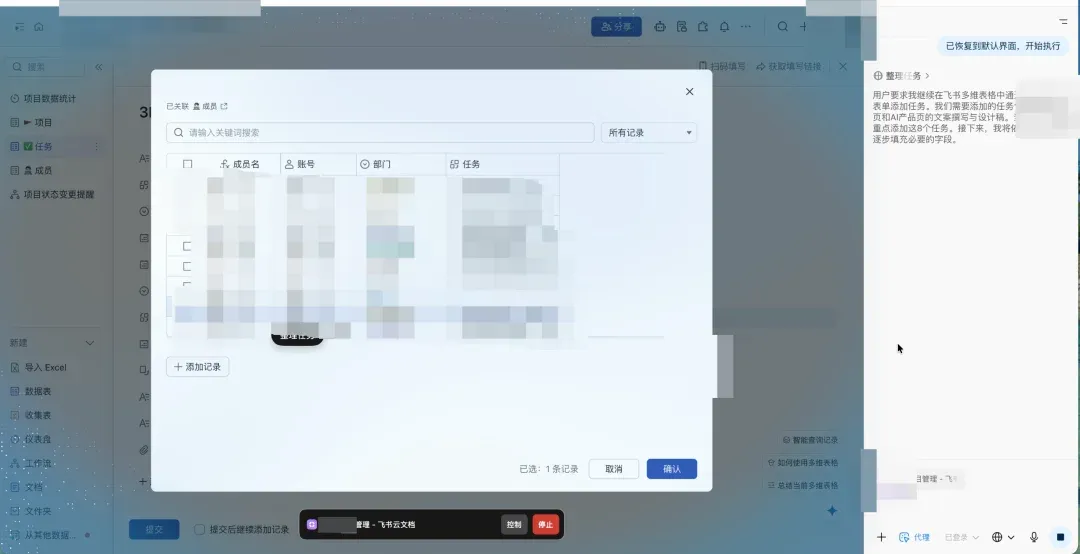
Due to real production environment involvement, I’ve redacted for confidentiality — my apologies.
Real-World Test: Making Atlas Do PM Work in a Collaboration Platform’s Multi-dimensional Tables
Talk is cheap, show me the results. I decided to give Atlas a tough one: help me handle a real project management task.
-
Task Starting Point: First, I planned a website structure framework (a SaaS platform official site) in the collaboration platform’s cloud docs using a mind map.
-
Step One: Task Breakdown. I had Atlas read this mind map and summarize the task list needed for website construction, requiring each page to be broken down into three subtasks: copywriting, design mockup, and frontend development. Atlas understood perfectly, quickly providing a clearly structured task summary.
-
Step Two: Table Creation (Core Test). I opened the corresponding multi-dimensional table, then through a single prompt, gave Atlas an extremely complex series of instructions: in the “View by Project” tab, click the “+Add Record” button to sequentially create multiple product page copywriting and design tasks. During creation, multiple fields needed precise filling:
This instruction’s complexity: it required the Agent to not only understand natural language, but precisely locate elements in the GUI (buttons, input fields, dropdown menus, specific project names), execute multi-step operations (click, input, select, confirm, submit), and handle field dependencies and multi-select logic.
- 【Task】: Fill task name (e.g., “xxx Product Page Copywriting”)
- 【Project】: Must click to select record, find and select “Project Alpha Website Construction”
- 【Status】: All tasks select “Not Started”
- 【Assignee】: All copywriting tasks assigned to “Xiao Li” and “Xiao Zhang” (requires multi-select support)
- 【Priority】: Default select P2
Results and Evaluation: Impressive Capabilities, Painful Speed
Final result? Atlas stumbled but ultimately completed all tasks perfectly!
But the process wasn’t easy.
-
Speed Is the Hard Part: I had it create roughly 10 tasks total, taking nearly 30 minutes — averaging 3 minutes per task. This speed, frankly, a human doing this might take 3 minutes total.
-
Learning and Self-Healing Ability: Especially on the first task creation, Atlas clearly encountered difficulties — errors in understanding interface elements and execution flow. But what most surprised me: it didn’t freeze or give up, but conducted research and corrections on its own (I made zero human interventions), eventually finding the correct operation path. Subsequent task creations were noticeably smoother than the first. This demonstrates its Agent has certain autonomous learning and error-correction capabilities.
-
Productization Capability Victory: Despite unsatisfactory speed, Atlas’s visualization effects in Agent mode, its complex instruction comprehension, and final task completion all left deep impressions. This further convinces me: OpenAI’s models may not be the strongest on certain individual metrics, but their ability to build products is absolutely top-tier among AI giants. Their continued dominance in C-end user volume (especially non-API users) is no coincidence.
Comparing to Comet: Seemingly Similar, Actually Worlds Apart
As an early user of Perplexity Comet browser, I was initially attracted by its elegant frontend design. At first glance, Atlas and Comet layouts look similar — both browser operation area + Copilot sidebar.
But after actually experiencing Atlas’s Agent mode, I can only say: Perplexity’s Agent productization capability is still way behind — these two products aren’t even in the same dimension. Comet is more like an information gathering and organizing assistant, while Atlas truly has the capability to “get hands dirty” on webpages. Therefore, Comet was never my default browser for a single day, while Atlas conquered me — a rather picky user — in just one day. Plus Perplexity requiring human verification every ten-some minutes is truly a devastating blow to user experience.
Deep Dive: How Does Atlas “See” and “Operate” Your Webpages?
As a product person, I couldn’t help but dig into the logic and principles behind this refined, beautiful, and actually useful product. Though this isn’t a technical article, let me briefly cover it.
To figure out how Atlas achieves all this, I specifically “grilled” it and combined with public information, roughly reconstructed its underlying principles:
1. How Does It “See” Webpage Content? (Non-Agent Mode)
Atlas doesn’t actually “visit” the webpage you’re viewing. Instead, the browser sends the page’s structured text content (DOM text snapshot) to the ChatGPT model in read-only mode through a secure interface. This is called “local webpage context sharing.” For security reasons, it cannot read your local files (file://).
2. How Does It “Operate” Webpages? (Agent Mode)
When you authorize Agent mode, Atlas browser opens a “browser operation proxy layer.” The ChatGPT model tells this proxy layer what actions to execute (click, input, etc.) through secure JSON commands (like: {"action": "click", "selector": "button.add"}), then the browser executes these operations locally on your device. The model itself doesn’t “remotely control” your computer.
3. How Does It Precisely Locate Elements? (Hybrid Recognition)
Atlas uses two recognition mechanisms simultaneously:
- Structural Recognition (DOM Semantic Layer): Prioritized, locates through HTML structure (ID, class, text content, etc.), fast and precise.
- Visual Recognition (CV Layer): Fallback when pages are Canvas, remote-rendered, or have unstable DOM — locates through screenshots using OCR and UI element detection. The system automatically fuses these methods (Hybrid Targeting), ensuring stability and flexibility.
4. How Are Virtual Mouse and Bubbles Implemented? (Frontend Rendering + Sync)
The cool effects you see aren’t the model operating — they’re locally frontend-rendered visualization layers (UI Overlay) by Atlas browser. Model issues command -> Browser executes operation + renders animation -> Browser feeds back results -> Model updates state. This process is strictly serialized synchronously through “Command-Event Loop” mechanism, ensuring action and visual effect consistency.
Future Outlook: When Agents “Take Action” For Us
This experience further convinces me: future software form will likely become “human gives instructions -> Agent executes -> human reviews” workflow. This isn’t limited to simple webpage operations — it may even penetrate into most professional software with high entry barriers.
Yes, currently Atlas took 30 minutes to finish what I could do in 3 minutes — speed is the hard part. But the significance is completely different. Model capabilities will strengthen, speed will increase, tool ecosystems will become richer — these are foreseeable trends.
More importantly, though I opened one browser for it to work 30 minutes while I only spent 1 minute giving instructions — what if I opened ten browsers simultaneously? 100? When Agent execution costs are low enough and parallel capabilities strong enough, perhaps future productivity constraints won’t be task execution efficiency, but our instruction-giving efficiency. This is undoubtedly a direction worth deep consideration for all Builders.
Found Mr. Guo’s analysis insightful? Drop a 👍 and share with more friends who need it!
Follow my channel to explore AI, going global, and digital marketing’s infinite possibilities together.
🌌 We’re witnessing another profound transformation in software interaction paradigms.
