

Preface
The internet is full of articles telling indie developers to “free-ride” Vercel—until your bill explodes and you’re left in tears!
I recently came across an analysis of a Vercel “bill shock” incident. The core conclusions were roughly fourfold: public APIs are easily hammered by crawlers, don’t keep heavy computation in Serverless, don’t proxy large files through your application, and prevent your preview deployments from being scraped.
The overall direction of this summary is correct, which is why it makes many indie developers feel like they “understand the problem.” However, after flipping through the official Vercel documentation, I found at least two points that are highly misleading:
First, many people still have a legacy Serverless mindset, thinking it’s primarily about “charging by execution time.” Today’s Vercel has folded Functions into the “Fluid Compute” category. The core billing dimensions provided by the platform are Active CPU, Provisioned Memory, and Invocations. You will certainly pay more for heavy computation, but if you only focus on the “5 seconds of execution” dimension, you will easily miss the points that actually need optimization.
Second, many people interpret the Preview Deployment issue as “fear of being indexed by search engines.” A more accurate statement is: Vercel’s Preview Deployments come with X-Robots-Tag: noindex by default. The real danger is that you have exposed an unprotected preview environment to the public internet; anyone can access it, and it will still consume your resources. noindex solves search indexing, not access control.
Therefore, I don’t want this article to be a generic “collection of money-saving tips.” I want to get to the bottom of this: many SaaS projects aren’t defeated by Vercel’s pricing; they are defeated by their own misunderstanding of the platform’s boundaries.
01
01 Understand the Billing Logic: Vercel is More Like a “Pay-per-Behavior” Platform
Many indie developers use Vercel for the first time, thinking of it as a “high-end hosting platform”: you deploy, traffic arrives, and at most, it’s a bit more expensive than a traditional VPS.
This understanding creates a major illusion.
Vercel’s official documentation and Pricing page are quite clear. Today’s Functions, under Fluid Compute, focus on three core things:
01 How many times your code is called, i.e., Invocations
02 How much CPU time your code actually consumes, i.e., Active CPU
03 How much memory your function occupies during execution, i.e., Provisioned Memory
Beyond that, you have costs for Edge Requests, Fast Data Transfer / Fast Origin Transfer, and Blob requests and data transfers.
What does this mean?
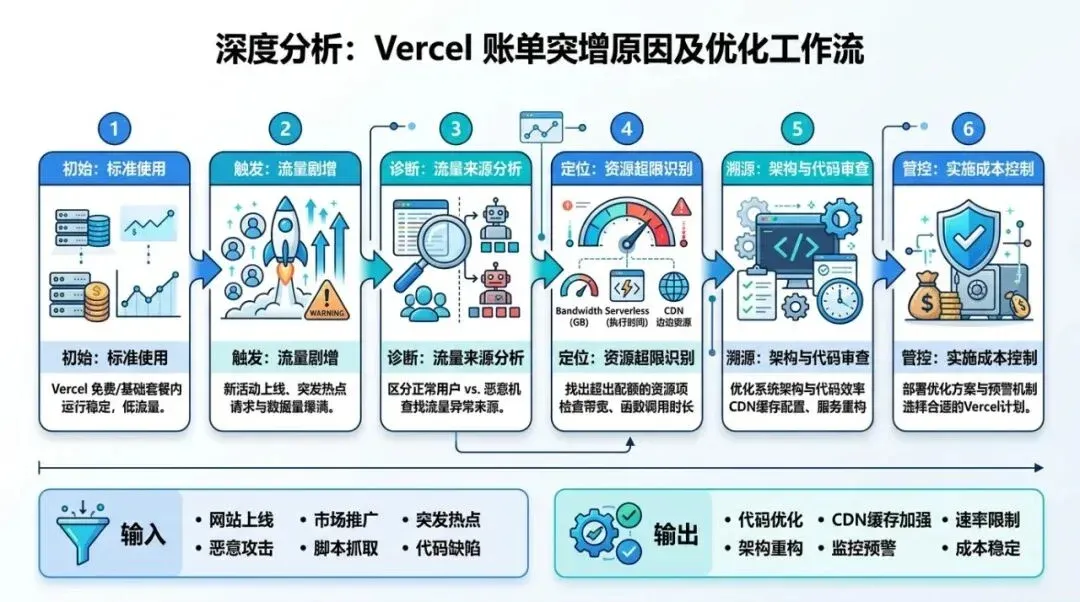
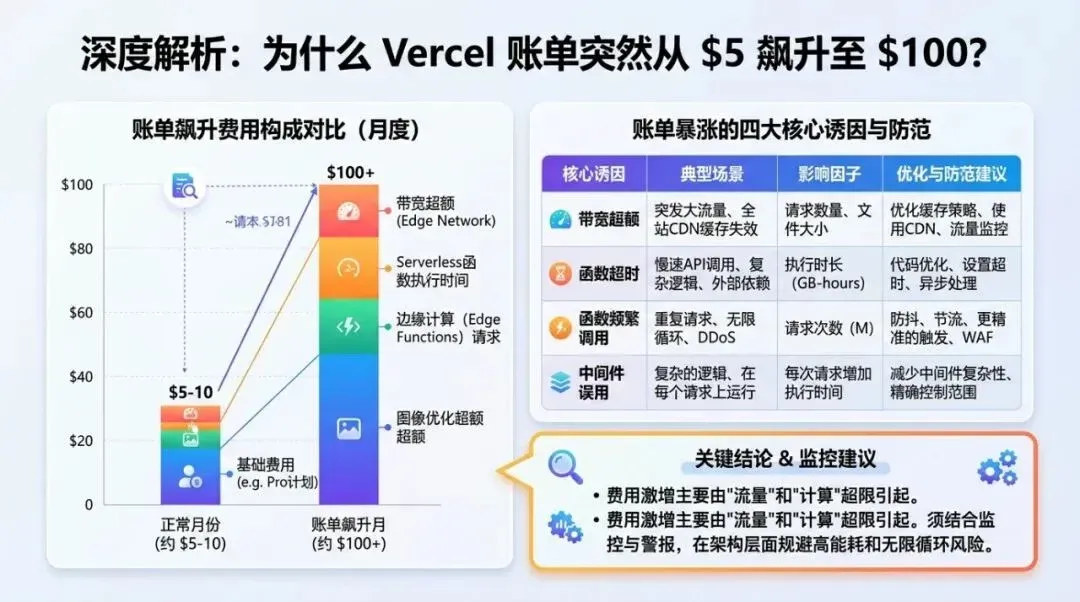
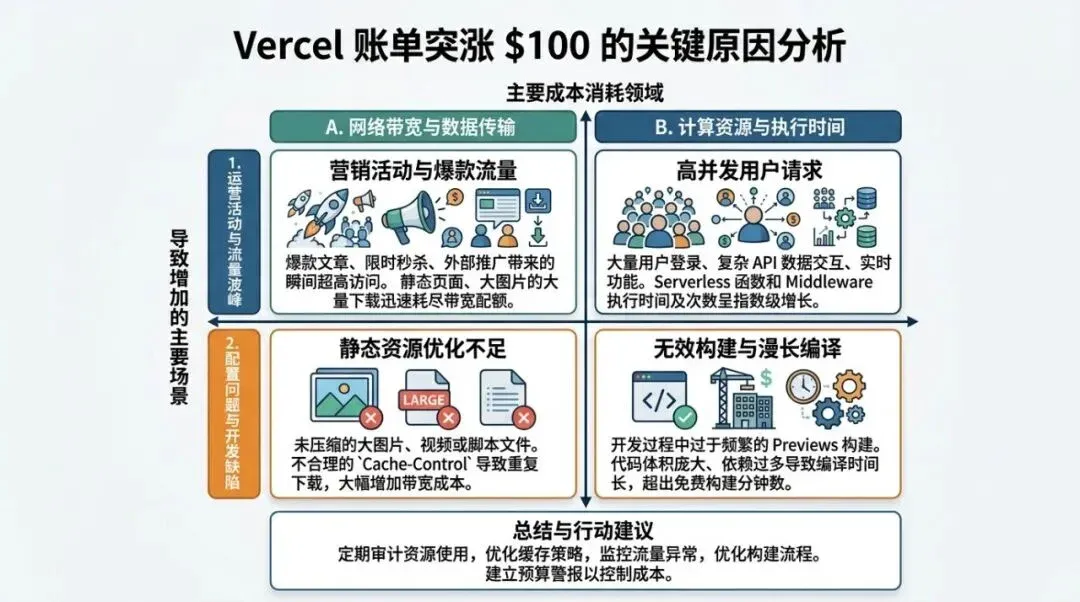
It means Vercel was never just “hosting.” It is more like a global application platform that charges based on behavior. Every cache miss, every triggered public API, every large file routed through your application server, and every time the same content is repeatedly fetched from the origin—all of this eventually turns into usage.
This is why many people have the illusion: “I haven’t even made any money yet, so why is my bill growing?” Because you think you are paying for user growth, when in reality, a large part of what you are paying for is the cost of design flaws.
More importantly, Vercel officially reminds users of two things on their Pricing page:
01 If a function response is cached, it will not run, and it will not incur Function Invocation or corresponding duration costs. 02 New teams have a customizable on-demand usage budget by default, and you can configure a hard limit to automatically pause projects once you reach 100%.
Combined, these two reminders expose the truth: the teams in real danger are usually not those with too much traffic, but those that haven’t configured caching strategies or spend guardrails.
A quick, crucial detail: Caching doesn’t make costs “zero.” According to official guidelines, while the expensive function computation is eliminated upon a cache hit, Edge Requests and similar resources may still accumulate, and static assets/file transfers are still billed according to their own metrics. Therefore, the value of caching is to suppress the most uncontrollable computation costs, not to turn the platform into a free lunch.
02
02 Pitfall 1: Naked Public APIs and Default “No-Cache”
This is the most common type of bill shock that leaves people stunned.
Many SaaS projects naturally expose certain paths:
• /api/generate
• /api/convert
• /api/download
• /api/search
• /api/rss
As long as these endpoints are publicly accessible, they won’t just be visited by real users; they will be visited by all kinds of bots, crawlers, scripts, and automated tools “scanning for fun.”
Vercel states clearly in its DDoS documentation: attack traffic blocked by the Firewall is not charged, but requests that are successfully served before automatic mitigation, as well as bot/crawler traffic not identified as DDoS, will still count toward usage.
The implication here is heavy.
It tells you that platform-level automatic protection is important, but you cannot rely entirely on “Vercel will block it for me.” If your public interface lacks rate limiting, authentication, quotas, or caching, it becomes the easiest entry point for repeated cost-draining.
There is another often-overlooked amplifier: default no-caching.
Vercel’s official Cache-Control documentation is clear; the default value is:
Cache-Control: public, max-age=0, must-revalidateIn other words, browsers and CDNs will not cache these responses for you by default.
If your API response is the same for all visitors, or at least doesn’t need to be recalculated in real-time for several minutes or hours, sticking with the default means treating every single visit as a fresh computation.
For these types of interfaces, I suggest at least three lines of defense:
Layer 1: Block obvious abnormal traffic at the Edge
When you notice abnormal access patterns, turn on Attack Challenge Mode, and if necessary, use Vercel WAF custom rules to challenge or deny. The official documentation mentions that search engine crawlers like Googlebot are automatically allowed, so normal SEO won’t be harmed by this switch.
Layer 2: Implement quota control at the Application Layer
If the interface provides high-value capabilities (e.g., generation, downloading, transcoding, summarization, search), it is best to add user-level, IP-level, or API-key-level rate limiting. Solutions like Upstash’s sliding window are perfect here. It’s not about being “elegant”; it’s about preventing your product from being used as free infrastructure before it has even grown.
Layer 3: Don’t recompute what can be cached
If the result is the same for most people, use CDN caching. The official recommendation for server responses with identical content is to use the s-maxage header:
Cache-Control: max-age=0, s-maxage=86400, stale-while-revalidate=60The meaning of this header is simple: let the edge layer handle repeated visits, and let the backend refresh asynchronously.
Vercel also introduced Request Collapsing in 2025. It can collapse concurrent misses for the same path in the same region into a single call, avoiding the “1,000 function calls in an instant for one hot page” scenario. This feature is valuable, but it still requires the route to be cacheable. If you keep everything as default “no-cache,” even the smartest feature can only block some concurrent waste, not continuous repeated origin fetches.
03
03 Pitfall 2: Keeping Heavy Computation Tasks in Functions Long-Term
The second type of bill is usually not caused by “bad traffic,” but by your own architecture.
Many indie developers directly stuff the following tasks into app/api/* or route handlers:
• AI long-text generation
• PDF parsing
• Image processing
• Audio/video transcoding
• Large-scale scraping
• Report generation
Doing this during the development phase is natural because it’s fast, the path is short, and the product can get up and running quickly.
The problem is that once you keep this form long-term, Functions start to take on computing work they aren’t optimized for. The official documentation is clear: Function usage grows with Active CPU, memory, and call volume. In other words, as long as you keep heavy lifting there, as traffic scales, costs scale with it.
My assessment is:
Vercel is great for Web entry points, rendering layers, lightweight business logic, edge routing, and collaborative experiences. It can also handle some dynamic logic. But if you already know a task is high-CPU, high-memory, long-chain, queueable, or asynchronous, keeping it in Functions is usually doing the wrong thing in the most expensive way possible.
Better destinations for these tasks usually include: • Cloud Run / Container services • Queues + Workers • Independent backend services • Dedicated transcoding/parsing nodes
In other words, Vercel should be responsible for receiving requests, authentication, queuing, and displaying status, while the heavy computation is handed off to a place more suited as a “compute layer.”
This isn’t because Vercel is bad, but because every platform has boundaries. If you force it to do things beyond its boundaries, you don’t pay an abstract price; you pay a concrete bill.
04
04 Pitfall 3: Routing Uploads and Downloads Through Your App
The third type of bill is especially common in “file-based SaaS.”
You might provide: • Image uploads • Video uploads • ZIP downloads • PDF exports • Template file distribution
Many projects are designed like this at the start:
User -> Next.js / API Route -> Storage Service
User <- Next.js / API Route <- Storage Service
The advantage of this is that the path is intuitive and permissions are easy to control. The downside is equally direct: every file must pass through your application.
Vercel Blob’s official documentation already provides the better solution. The design of “Client Uploads” allows files to be uploaded directly from the browser to Blob without passing through your server. For files larger than 4.5 MB, the official documentation explicitly recommends using client uploads.
More importantly, the warning in the pricing documentation: when using Client Uploads, uploads do not incur data transfer charges. If you use Server Uploads, where your Vercel app receives the file first and then uploads it to Blob, you will incur Fast Data Transfer costs.
The engineering principle behind this is consistent: 01 Permissions are issued by your application. 02 Files are uploaded/downloaded directly via object storage. 03 Your Web layer is only responsible for generating tokens, signed URLs, metadata, and status.
If you don’t use Vercel Blob, you can follow the same logic. The presigned URL in the AWS S3 official documentation is a classic solution: give users time-limited upload or download permissions, and the file itself goes directly to object storage without passing through your application.
I recommend a flow like this:
User -> Next.js / API Gateway -> Signed URL / Upload Token -> Blob / S3 / R2The result of this is very practical: • Your application server does not handle large file transfers. • Large file traffic and application compute traffic are separated. • The cost structure is easier to understand. • It is easier to locate problems when they occur.
Many people say, “I’ll put files in object storage,” but the flow remains the old one. The key to saving money is never just the storage location, but whether the transmission path is routed through your application.
05
05 Pitfall 4: Mistaking Preview’s noindex for a Security Measure
This is the point I wanted to highlight most while reading the documentation this time.
Many suggestions will tell you: Preview Deployments are easily caught by search engines, so you should add X-Robots-Tag: noindex in vercel.json.
The problem is that Vercel’s official knowledge base already states: Preview Deployments are not indexed by search engines by default because they automatically include X-Robots-Tag: noindex.
If you follow the advice to “add noindex to preview,” there’s no harm, but you will develop an illusion: the problem is solved.
In reality, the question you should be asking is: Is this preview URL protected?
If a preview environment is publicly exposed, it can still be accessed by people, automated tools, shared, and used to test boundaries. Even if it isn’t indexed by search engines, it can still consume your resources.
A more subtle pitfall: the official documentation specifically notes that if you bind a custom domain to a non-production branch, the default X-Robots-Tag: noindex protection is not automatically applied.
So, what you really need to add here is not “SEO tricks,” but access control.
Vercel’s direction in the Deployment Protection documentation is very clear:
• Hobby plans can use Vercel Authentication + Standard Protection.
• It protects preview deployments and deployment URLs.
• Beyond that, you can configure password protection, trusted IPs, etc.
In other words, noindex handles “whether to enter search results,” while Deployment Protection handles “who can get in.” These are two completely different things.
If you have recently encountered abnormal access, adding an Attack Challenge Mode layer will give you more peace of mind; but the truly useful long-term solution is still to minimize the public exposure surface.
06
06 A Low-Risk Architecture I Recommend
If you are currently building a typical SaaS, I recommend splitting the entire chain into four layers:
User / Bot / Crawler
    ↓
WAF / Rate Limit / Attack Challenge
    ↓
CDN Cache / Next.js Web Layer
    ↓
Queue / Worker / Independent Backend
    ↓
Blob / S3 / R2 (Object Storage)
The advantages of this structure are very clear:
First, Vercel handles what it does best
Routing, rendering, edge distribution, product collaboration, and developer experience.
Second, heavy computation is moved to more suitable places
Tasks that require long execution times enter a queue or an independent worker. You no longer bind “page entry” and “compute construction site” together.
Third, file traffic and application traffic are separated
Uploads and downloads are handed off to object storage; the application only issues tokens or presigned URLs. Your Web layer no longer acts as a porter for large files.
Fourth, cost observation is much clearer
When you look at usage, you know whether the cost is from page visits, function computation, object transfer, image optimization, Blob, or Edge Requests. The bill is no longer a fog.
Many teams don’t need a “cheaper platform”; they need a chain with a clear cost structure. Only when you understand where your money is going can you talk about optimization.
07
07 Seven Actions You Can Take Right Now
If you are already using Vercel, I suggest you do these 7 things today:
01 Run vercel usage to clearly see the most expensive resource items in the current billing cycle.
02 Configure on-demand usage budget and hard limit to ensure runaway spend isn’t discovered by luck.
03 Audit all public APIs and add rate limiting, authentication, and quotas to high-value interfaces.
04 Check which responses can actually be cached; don’t keep eating the default max-age=0, must-revalidate.
05 List heavy tasks like AI generation, transcoding, parsing, and scraping, and decide one by one whether they should be moved out of Functions.
06 Change the upload/download chain to client uploads or presigned URLs to reduce application proxying.
07 Add Deployment Protection to preview deployments and deployment URLs; don’t mistake noindex for a security measure.
If you ask me, what is the one realization an indie developer should have on Vercel?
My answer is:
The most dangerous cost on Vercel is never “suddenly getting a lot of users,” but “letting a bunch of repeated actions that shouldn’t be billed keep silently racking up costs.”
What really needs to be saved is never just the $20 monthly subscription fee. What really needs to be saved are those unnecessary consumptions that could have been cached, rate-limited, offloaded, directly uploaded, or isolated.
Once you fill in these gaps, Vercel will remain a great product; only this time, you are using the platform, rather than being educated by it.
