
Word count: ~3200 words
Estimated reading time: ~15 minutes
Last updated: August 31, 2025
Is this article for you?
👉 If you’re in marketing or operations, fed up with the “wait, rely, beg” dev process.
👉 If you have brilliant growth ideas but can’t implement them yourself.
👉 If you want to know how non-technical folks like us gain “tech superpowers” in the AI era.
Core Structure
- Cognitive Revolution: What exactly is Vibe Coding? Your new role is AI’s “commander.”
- Equipping Your “Command Center”: Mindset building and Claude Code installation guide.
- Your First Battle: Full recap of building an automated weekly report tool with Vibe Coding.
Introduction: That Heartbreaking Dev Queue
Hey, I’m Mr. Guo. Let’s first replay a scenario that I bet you’ve experienced: Monday’s growth meeting, you propose a brilliant marketing campaign with estimated sky-high ROI. Amid all the praise, the tech lead says: “Great idea, let’s add it to the backlog. If all goes well… we should get to it next quarter.” Cold water poured, your creativity instantly sinks without a trace.
This isn’t just an efficiency problem — it’s an “identity problem.” In traditional workflows dependent on development, we marketing and operations folks, no matter how good our ideas, are ultimately just passive “requirement submitters,” “tool people” waiting for resource allocation. But your performance targets don’t drop because of this; bosses usually only ask for results. But what if I told you AI is completely changing this? Welcome to the Vibe Coding era — a time where you can become a creator without relying on developers.
Chapter 1: Cognitive Revolution — Vibe Coding, A New Dialogue with Technology
First, we need to accurately understand what Vibe Coding is. It’s not another tech buzzword but a fundamental shift in how we work. Vibe Coding is the practice of using artificial intelligence (AI) to generate functional code based on natural language prompts. This approach fundamentally changes the human role: from “author” writing code line by line, to “director” or “commander” guiding and managing AI.
For us marketing and operations teams, this means we can shift focus from “how to implement technical details” to “how to clearly describe the business problem.” This perfectly fills a long-standing “value realization gap”: many requirements are too complex for no-code tools but not priority enough for dev teams. Vibe Coding is the perfect weapon to fill this gap.
Vibe Coding vs. Other Approaches
To help you accurately position this new skill, here’s a strategic framework for making smart technology choices when facing specific tasks.
| Feature | Vibe Coding | Traditional Coding | No-Code | Low-Code |
|---|---|---|---|---|
| Primary Interface | Natural language prompts | Code editor (IDE) | Visual drag-drop | Visual + some code |
| Learning Curve | Low | Very high | Very low | Medium |
| Development Speed | Very fast | Slow | Fast | Fairly fast |
| Flexibility/Customization | Medium to high | Very high | Low | Medium |
| Scalability | Limited, suits small-medium projects | High, suits enterprise apps | Limited | Medium |
| Ideal Use Cases | Rapid prototypes, internal automation, custom marketing micro-tools | Complex apps, core products, performance-critical systems | Standard sites, simple forms, workflow automation | Complex internal tools, business process apps |
This handbook will focus entirely on teaching “responsible AI-assisted development” mode: AI is your powerful “pair programmer,” but you, as “commander,” must review, test, and ultimately understand the code it generates, taking full ownership of the final product.
Chapter 2: Equipping Your “Command Center” — Mindset Building & Core Tool Installation
Step 1: Overcome Fear of Code (Mindset Building)
Before starting, we must first tear down that “wall” in our minds. Most operations folks’ fear of code stems from fear of the unknown and demands for perfection. Remember these principles:
-
Just Do Something: Don’t overthink complex problems; just start doing something. Action is the best medicine for fear.
-
Start with specific issues: Don’t think “I need to learn programming.” Think “I need to solve this stupid ‘manual weekly report’ problem.” The more specific the goal, the stronger the motivation.
-
Start with practical: In initial stages, don’t obsess over underlying principles and fundamentals. Let tools work for you first, develop interest through practice, then circle back to theory.
Step 2: Install Your AI Co-Pilot (Claude Code)
1. Install Node.js (Code’s “Runtime Environment”) Before Vibe Coding, we need to prepare a basic “runtime environment” for code — Node.js. If you’ve already installed it, ensure version 18.0 or higher. Open your computer’s terminal (Windows users search PowerShell or CMD, Mac users search Terminal), copy and paste the following command, then press Enter.
# (For Debian/Ubuntu systems)
curl -fsSL https://deb.nodesource.com/setup_22.x | sudo bash -
sudo apt-get install -y nodejs

# After installation, run these commands to check version
node --version
npm --version
2. Install China Claude Code Proxy Next we install the core tool. Note that Claude official is extremely strict about blocking Chinese users — even with VPN, you’re easily banned. Therefore, I strongly recommend using a domestic proxy service: no VPN needed, works directly, supports convenient WeChat payment. Here we install the “China Claude Code Proxy” I recommend.
Please note: The following command installs a third-party proxy version, not the official version. You can learn details and purchase service at code.yoretea.com. Use discount code GUOSHU for a discount.
npm install -g claude-code --registry=https://code.yoretea.comMr. Guo’s suggestion: I personally strongly recommend using Claude Code within VS Code or other modern IDEs (Integrated Development Environments). You can directly open the IDE’s built-in terminal to run it, making it very convenient to view and manage AI-generated project files in the same window.
There are also some excellent AI-native IDEs on the market, like Cursor or ByteDance’s TREA. These tools themselves integrate powerful AI features. My advice: if your core workflow centers on Claude Code, there’s no need to purchase these IDEs’ paid plans since Claude Code is already powerful enough. You can use these IDEs’ free versions as auxiliary tools for minor code tweaks — complementary to each other.
Chapter 3: Your First Battle — Vibe Coding an Automated Weekly Report
Now let’s use true Vibe Coding to complete the “automated boss-pleasing weekly report” task. Claude Code is a fully-automatic coding Agent — what we need to do is clearly describe task requirements and considerations to it all at once, not guide it step by step.
Core Workflow: Issue Command → AI Plans & Executes → Review & Deploy
In your project folder, open terminal, type claude-code to launch the program, then input our carefully designed, singular, complete command.
The One Prompt:
“Hello, please help me create a Google Apps Script project for automating marketing weekly reports.
Core requirements:
- Create a main file named
report.js. - Implement a main function named
automateWeeklyReportin the file. - This function should perform the following: a. Read data from the ‘DataSource’ sheet in the current Google Sheets file. b. Clear the ‘WeeklyReport’ sheet. c. Write all data read from ‘DataSource’ into ‘WeeklyReport’. d. Send an email notification to ‘manager@example.com’ with subject ‘【Auto Notification】This Week’s Marketing Report Data Updated,’ body should include the Google Sheets file link.
Considerations:
- Please add clear comments to the code explaining each major logic block’s function.
- Code style should be clean and readable.
Deliverable requirements:
- Before starting work, please first create and show your
Claude.mddevelopment plan document. - After development is complete, please generate a
USAGE.mdusage guide clearly telling users how to deploy thereport.jsfile to Google Apps Script editor and how to set up weekly auto-run triggers.”
After pressing Enter, Claude Code will start working like a real developer. It will first output its thought process and development plan (Claude.md), then generate code, and finally provide you with a detailed user manual (USAGE.md).
See the difference? You didn’t guide step by step but, like a product manager, defined requirements and delivery standards completely and all at once. Through precise commanding, you completed an automation tool’s construction. This is the essence of Vibe Coding.
Here’s a case from my actual work using a content hook on a website to capture user emails and other info. Its logic is similar to the automated report’s Google Apps Script project — both automate writing content to Google Sheet reports. Of course, the email capture part needs separate development on the website side.
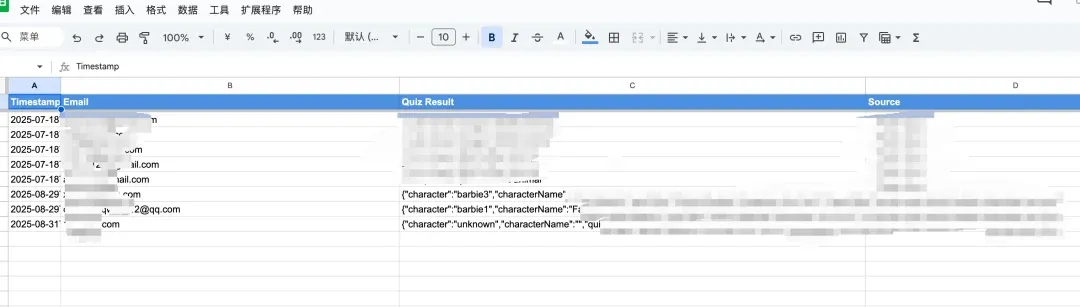
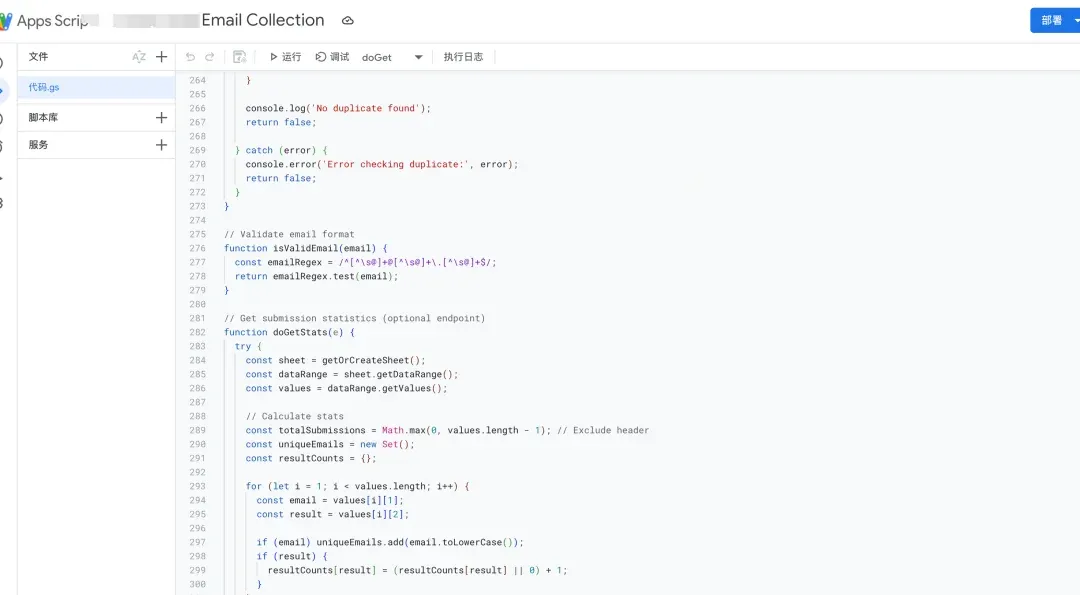
This functionality is similar to CRM. Actually what you can integrate isn’t limited to Google Sheets. If you need integration with other CRM systems, just give the corresponding API documentation to AI and it will help you complete it.
Conclusion & Series Preview
Congratulations! You’ve not only saved precious weekly time but more importantly, experienced the new working mode as AI’s “commander,” successfully taking the crucial step from “tool user” to “rule creator.” This sense of control in realizing ideas is just the beginning.
Today, we had AI run errands for you. Also, have you noticed that many conversational AIs like ChatGPT produce lots of hallucinations and factual errors when processing large tables and data? In the next “Data Liberation” installment, we’ll learn how to use AI to wield Python tools, processing and analyzing more complex data while ensuring accuracy, avoiding hallucinations, making you a super data whiz. Stay tuned!
Found this article opened a new world for you? Drop a 👍 and share with more marketing and operations friends still doing manual work!
🌌 The future is prompt-driven, and you are the one issuing prompts.
